Implementing Smart Link Authentication: Phishing-Resistant Magic Links
An examination of smart link authentication and phishing-resistant magic links to enhance passwordless email security.
Implementing Smart Link Authentication: Phishing-Resistant Magic Links
Standard magic links are frequently marketed as a passwordless solution, yet for an advanced security architect, they represent a significant vector for credential harvesting. The fundamental flaw in typical implementations is the decoupling of the authentication token from the client environment. When a user receives an email containing a link such as https://app.example.com/auth?token=xyz, the server validates the token's signature and expiration but often ignores the origin context. If an attacker sends a phishing email with a valid token or intercepts a legitimate one, they can forward that URL to their own machine. Because the server treats the token as a universal key, the attacker gains access without needing the user's credentials.
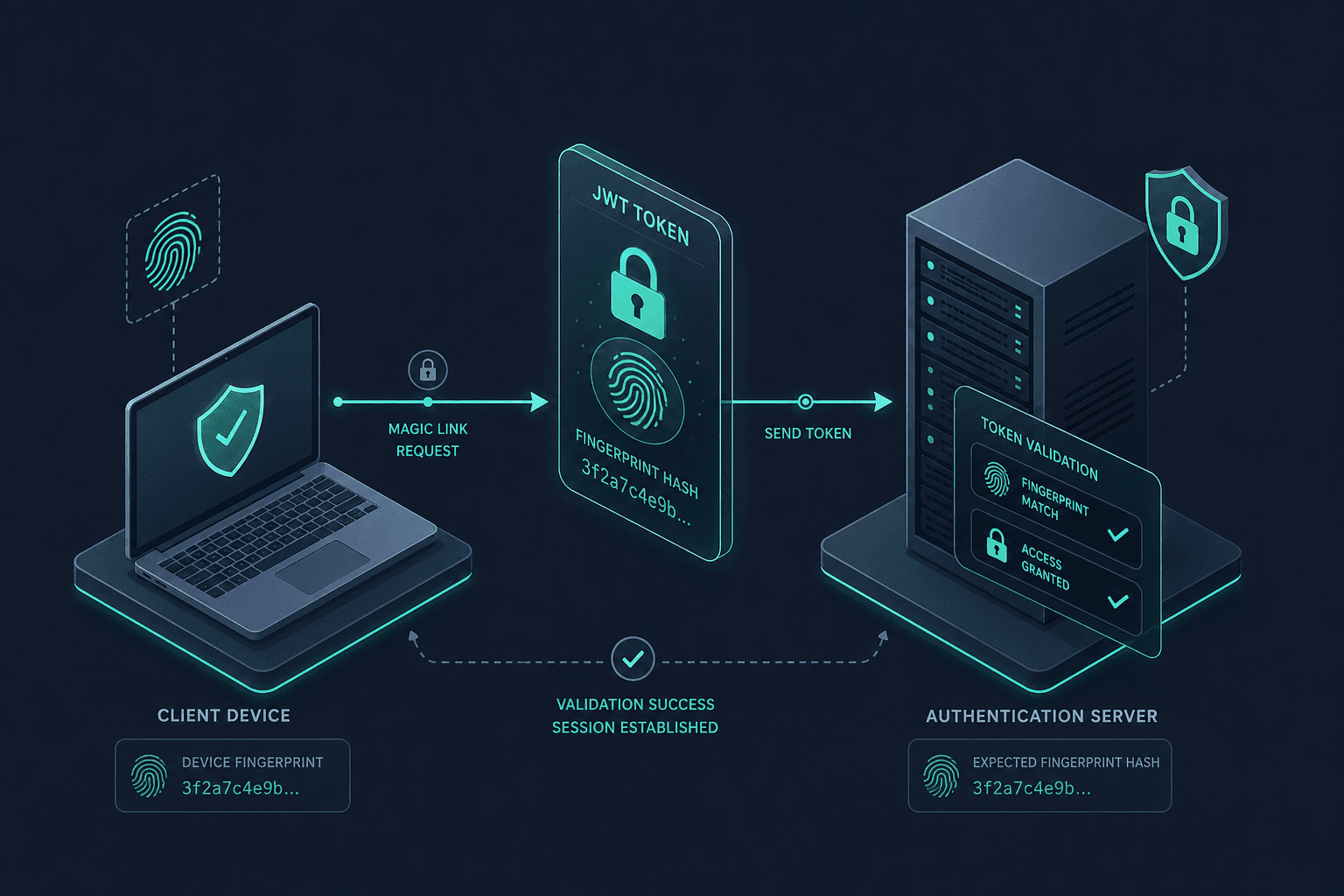
To resolve this, we must implement "Smart Link Authentication." This approach does not merely rely on a secret string; it binds the secret to the specific client context. The mechanism shifts from "Is this token valid?" to "Is this token valid for this specific device at this specific moment?" This transforms the link from a reusable key into a context-aware, one-time pad.
The Mechanism of Failure: Why Standard Links Leak
Consider the lifecycle of a standard magic link. Alice requests a login. The server generates a random string, signs it with a private key, and emails it. Alice clicks the link from her browser. The server verifies the signature and the expiration time. If both checks pass, she is logged in.
The vulnerability lies in the fact that the token contains no information about the sender. If an attacker, Bob, sends a phishing email with a pre-generated valid token, or if Bob tricks Alice into clicking a link on a malicious site that redirects to the real domain with the token appended, Bob can simply copy that URL. He pastes it into his own browser. The server sees a valid signature and a non-expired token. It grants access. The server has no record that the request originated from a different IP address, a different User-Agent string, or a different browser fingerprint than the one expected.
This is a classic "Replay Attack." The token is valid, but the context is wrong. In a Zero Trust architecture, we assume the network and the browser are hostile until proven otherwise. Therefore, the token itself must carry the proof of the client's identity.
The Solution: Client Binding and State
The core mechanism for phishing resistance is Client Binding. We generate a cryptographic hash of the client's unique attributes at the moment of login request. These attributes typically include the User-Agent string, a Device-ID (if available), and potentially the IP address or Screen-Resolution as a soft binding factor.
When Alice requests the link, the server does not just generate a random token. It generates a payload containing:
- The user ID.
- A timestamp (TTL).
- A Client Fingerprint Hash derived from the data Alice provided during the request (or the current session state).
This payload is then signed. The resulting link looks like https://app.example.com/auth?token=<signed_payload>.
When the link is clicked, the server performs a two-step validation:
- Signature Verification: Decode the payload and verify the signature using the server's private key.
- Context Verification: Compare the
Client Fingerprint Hashinside the token against theClient Fingerprintof the current incoming request.
If Alice clicks the link on her phone, but Bob tries to use the same link on his laptop, the fingerprints will differ. The server rejects the request. Even if Bob manages to spoof the User-Agent string, he cannot easily replicate the full device fingerprint (e.g., canvas fingerprinting, WebGL vendor, or a persistent local storage ID) that was hashed into the token at the time of generation.
Implementation Workflow: A Concrete Scenario
Let's walk through the flow with named actors: Alice (the legitimate user), Bob (the attacker), and AuthServer (our backend).
Step 1: The Request
Alice initiates a login on https://app.example.com/login. Her browser sends a POST request to the /api/request-magic-link endpoint.
POST /api/request-magic-link
{
  "email": "alice@example.com",
  "device_info": {
    "user_agent": "Mozilla/5.0 (Macintosh; Intel Mac OS X 10_15_7) ...",
    "screen_resolution": "1920x1080",
    "timezone": "America/New_York"
  }
}
The AuthServer receives this. It does not immediately generate a token. Instead, it creates a temporary session in Redis or the database with status PENDING. It hashes the device_info fields to create a fingerprint_hash.
Step 2: Token Generation The server constructs the JWT payload:
const payload = {
  sub: "alice_id_123",
  iat: Math.floor(Date.now() / 1000),
  exp: Math.floor(Date.now() / 1000) + (5 * 60), // 5 minute TTL
  fingerprint: "sha256(ua+resolution+tz)", // The bound hash
  jti: "unique-link-id-456" // Unique token ID for one-time use
};
The server signs this payload and emails the link to Alice. The link contains jti and exp within the token itself.
Step 3: The Attack Attempt
Bob intercepts the email or sends a phishing link with the same jti. He clicks the link from his computer. His browser sends a request to /api/validate-link.
The server extracts the fingerprint from the token (which was generated on Alice's Mac). It calculates the fingerprint of Bob's request (Windows PC, different User-Agent).
The comparison fails: Token_Fingerprint != Request_Fingerprint.
The server returns 403 Forbidden with a message "Link mismatch." Bob is blocked.
Step 4: The Legitimate Login
Alice clicks the link on her Mac. Her browser sends the request.
The server calculates the fingerprint of the incoming request.
It matches the fingerprint inside the token.
The server checks the jti in a database. It ensures this jti has not been used before (atomic check).
If valid, the server updates the jti status to USED and issues a session cookie.
The Critical Role of Atomicity and TTL
Binding the client is necessary, but it is not sufficient on its own. We must also address the "Use-once" constraint. If Alice clicks the link, but the server takes too long to process the request, or if the network is slow, the token might remain valid. If Bob somehow gets the token (e.g., via a keylogger on Alice's machine) and clicks it before Alice does, he wins.
To mitigate this, the server must implement Atomic State Transitions. The database update that marks the token as USED must be atomic.
UPDATE magic_links
SET status = 'USED', used_at = NOW()
WHERE jti = :jti AND status = 'PENDING'
LIMIT 1;
The LIMIT 1 ensures that even if two requests arrive simultaneously (Alice and Bob), only one succeeds. The second request will find the status is no longer PENDING and will be rejected.
Furthermore, the TTL (Time To Live) must be extremely short. A 5-minute window is standard, but for high-security applications, 60 seconds is preferable. This reduces the "attack surface" window where a phished link remains valid. The email should also instruct the user that the link expires quickly, reinforcing the urgency.
Conclusion
Implementing smart link authentication introduces complexity. We are no longer relying solely on the secrecy of the token; we are relying on the integrity of the client context. This introduces a tradeoff: legitimate users might face friction if their device fingerprint changes dynamically (e.g., switching from Wi-Fi to mobile data, or using a different browser profile).
To handle this, the fingerprint logic should be flexible. Instead of hashing the entire User-Agent string, which changes frequently with browser updates, hash only the stable components (e.g., a persistent Device-ID stored in localStorage or a hardware-agnostic identifier). If the fingerprint check fails, the system can optionally prompt for a secondary factor (like an OTP) rather than hard-blocking, though this re-introduces friction.
Ultimately, the goal is to move from "Something you have" (the email link) to "Something you have and something you are" (the specific device context). By binding the token to the client and enforcing atomic one-time use, we transform the magic link from a vulnerable key into a robust, phishing-resistant credential.
Wrapping Up
The transition from standard magic links to phishing-resistant smart links represents a critical evolution in passwordless security. By enforcing client binding through cryptographic fingerprinting and ensuring atomic state transitions, organizations can effectively neutralize replay attacks and man-in-the-middle phishing attempts. While this approach introduces implementation complexity and potential user friction, the security benefits of treating the magic link as a context-aware, one-time pad far outweigh the costs in high-security environments.
Common Pitfalls
Implementing client-bound magic links introduces specific risks that must be managed carefully.
- Fingerprint Drift: Device fingerprints are not static. Browser updates, OS patches, or even dynamic IP changes can alter the
User-AgentorScreen-Resolutionbetween the time the link is generated and when it is clicked. Relying on volatile attributes leads to false negatives. - False Positives on Device Changes: Users often switch devices or browsers (e.g., from desktop to mobile). If the binding is too strict, legitimate users are locked out. A rigid implementation may force a fallback to weaker authentication methods, negating the security gain.
- Storage Security: The
jti(JWT ID) and associated fingerprint data must be stored securely. If the database storing these tokens is compromised, an attacker could theoretically reconstruct valid sessions or bypass the one-time use check if the atomicity logic is flawed.
Practical Takeaways
To successfully deploy this architecture, keep these mental models in mind:
- Context is King: Treat the token as a temporary key that only works for a specific lock (the device). If the lock changes, the key is useless.
- Fail Secure, Not Hard: When fingerprint mismatches occur, design the system to degrade gracefully (e.g., prompt for a secondary factor) rather than failing with a generic error that leaves the user stuck.
- Atomicity is Non-Negotiable: Never rely on application-level checks for "one-time use." Always enforce this at the database level using transactions or specific SQL clauses like
LIMIT 1.
FAQ
Q: How do I handle users who change browsers?
A: Do not rely solely on volatile attributes like User-Agent. Implement a persistent Device-ID stored in localStorage or a secure cookie that survives browser changes, or allow a configurable "fingerprint tolerance" window that allows slight variations in the hash.
Q: What is the ideal TTL for these links? A: For high-security environments, a TTL of 60 seconds is recommended to minimize the window of opportunity for attackers. For general consumer apps, 5 minutes is acceptable, but ensure the UI reflects this urgency.
Q: Where should the jti be stored?
A: Store the jti in a high-performance store like Redis with an expiration time matching the link's TTL. This allows for fast atomic reads and writes. Ensure the store is isolated from the public-facing application logic to prevent direct manipulation.
Related posts
Building an Identity Service Mesh: Integrating IAM with Istio
An examination of integrating Identity and Access Management with service mesh technologies like Istio using SPIFFE for secure service-to-service communication.
Implementing WebAuthn in Keycloak: Passkey Authentication Setup
A walkthrough for configuring WebAuthn and passkeys within Keycloak to enable passwordless authentication using FIDO2 standards.
Identity-First Security: Shifting to Identity Perimeter
An examination of shifting security strategy from network perimeter to identity perimeter using zero trust principles and perimeter-less security.