
Inference on Apple Silicon with MLX
A practical guide to running local machine learning inference on Apple Silicon using the MLX framework and unified memory architecture.
Running large language models (LLMs) locally on a MacBook used to require either massive external GPU enclosures or suffering from excruciatingly slow inference speeds due to memory management inefficiencies. The introduction of MLX on Apple Silicon fundamentally changes this landscape for local inference. Unlike traditional deep learning frameworks that treat the CPU and GPU as separate entities requiring explicit data movement, MLX is designed from the ground up to leverage Apple’s unified memory architecture. This guide explains the mechanism behind MLX’s efficiency and provides a practical workflow for local inference.
The Unified Memory Bottleneck
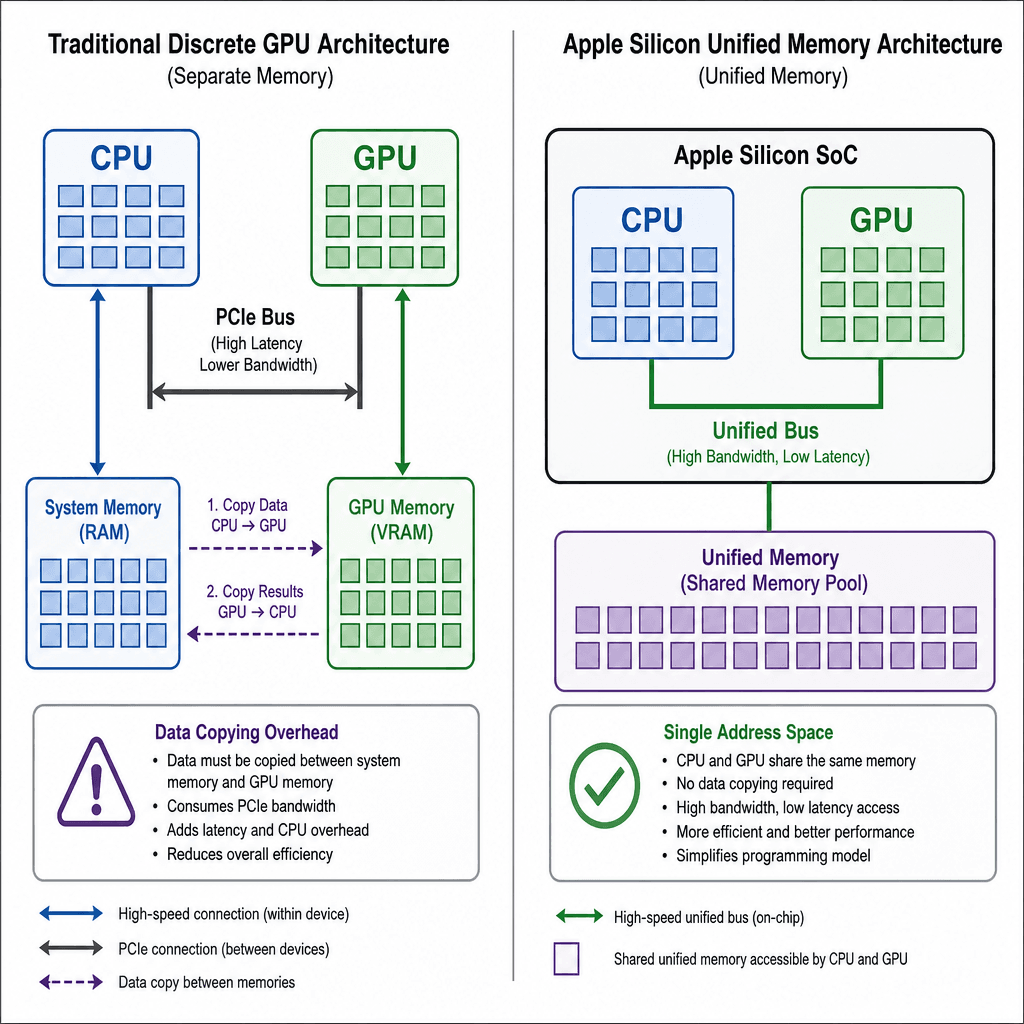
To understand why MLX is necessary, one must first understand the bottleneck in standard frameworks like PyTorch or TensorFlow on Apple Silicon. Apple’s M-series chips use a unified memory bus, meaning the CPU, GPU, and Neural Engine all access the same physical RAM pool without explicit copying overhead in hardware. However, most general-purpose frameworks are designed for discrete GPUs (like NVIDIA’s CUDA ecosystem), where memory is partitioned.
In PyTorch, even when running on MPS (Metal Performance Shaders), tensors often require explicit placement. If a model layer expects data on the GPU but it resides in CPU memory, the framework must issue a command to copy that data across the PCIe or internal bus. For large models, this "memory wall" becomes the primary constraint, not compute power. Data transfer latency can exceed compute time, leading to underutilized GPU cores.
MLX eliminates this by treating memory as a single, flat address space. There is no concept of "moving" data to the GPU; instead, the framework schedules operations on the most efficient accelerator based on the data’s current location and the operation’s requirements. This reduces memory footprint and increases throughput by removing serialization points for data transfer.
Core Mechanism: Lazy Evaluation and JIT Compilation
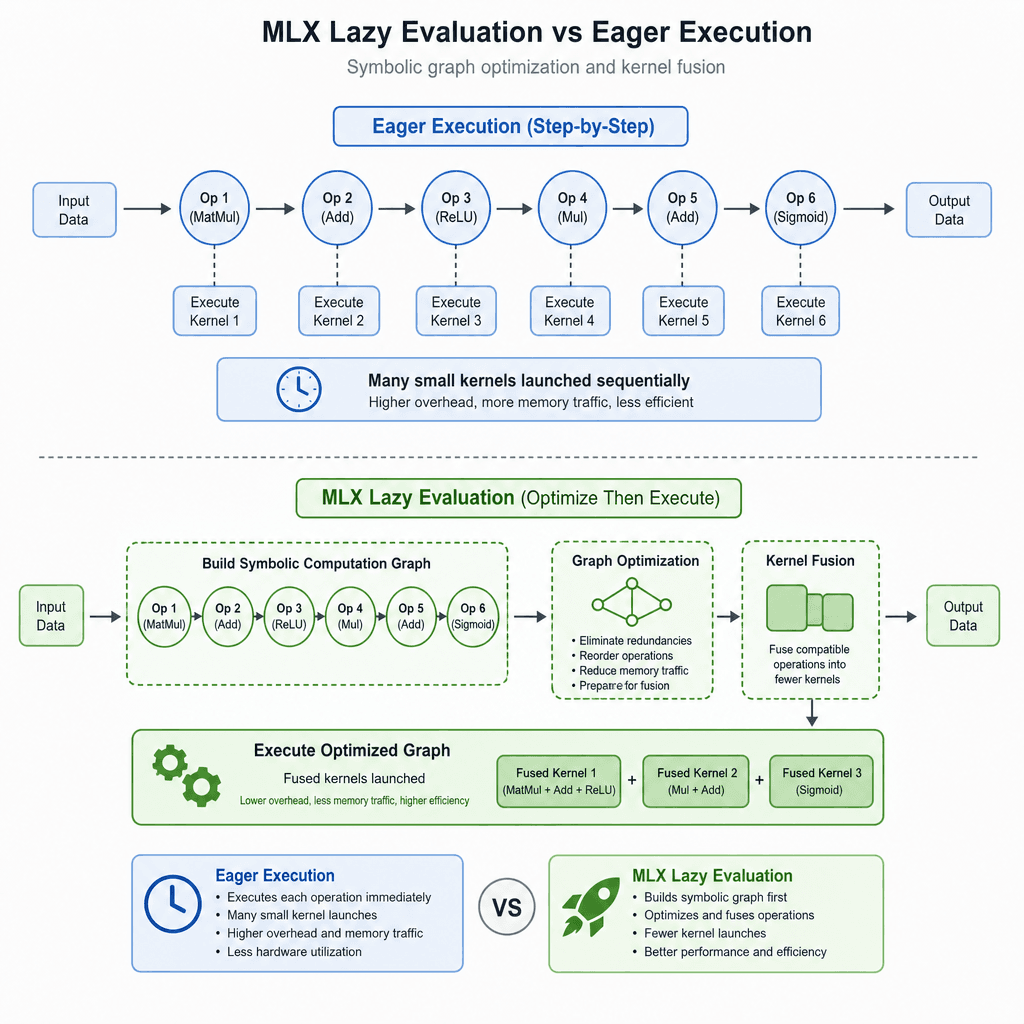
MLX achieves its performance through two key mechanisms: lazy evaluation and Just-In-Time (JIT) compilation.
Lazy Evaluation
When you define a model in MLX, you are not immediately executing operations. Instead, you are building a symbolic computation graph. This graph describes what to compute, not when. This allows MLX to optimize the execution order before any actual math occurs. For example, if multiple operations read from the same memory block, MLX can fuse them into a single kernel launch, reducing the number of times data is read from RAM.
JIT Compilation
When inference begins, MLX compiles this graph into optimized machine code specific to the Apple Silicon chip in use. This process, known as JIT compilation, fuses multiple small operations into larger, more efficient kernels. This is critical for Apple Silicon, where memory bandwidth is the limiting factor, not raw FLOPS. By fusing operations, MLX minimizes the amount of data written back to memory between steps, keeping data in the fast SRAM caches of the GPU/Neural Engine for longer.
This approach contrasts sharply with eager execution (used by PyTorch and TensorFlow), where each operation is executed immediately, often resulting in numerous small kernel launches and repeated memory reads/writes.
Practical Inference Workflow

For developers looking to run LLMs locally, the most accessible entry point is the mlx-lm library, which provides high-level utilities for loading and running models from Hugging Face. Below is a practical scenario using a quantized LLaMA model.
Installation and Setup
First, install MLX and the LM utilities:
pip install mlx-lmRunning Inference
You can run inference directly from the command line without writing Python code. This is useful for quick testing. Using a pre-quantized model repository (indicated by the -4bit suffix) causes MLX to load the model in INT4 quantization, significantly reducing memory usage while maintaining reasonable quality.
mlx_lm.generate --model mlx-community/Llama-2-7b-chat-hf-4bit \
  --prompt "Explain quantum computing in simple terms." \
  --max-tokens 100 \
  --temp 0.7
Python API for Custom Workflows
For more complex applications, such as integrating inference into a macOS app, use the Python API. The following example demonstrates loading a model and generating text. Note that the model and tokenizer objects reside in unified memory; no explicit .to('mps') calls are needed.
import mlx.core as mx
from mlx_lm import load, generate

# Load model and tokenizer. MLX automatically handles memory placement.
model, tokenizer = load("mlx-community/Llama-2-7b-chat-hf-4bit")

# Prepare prompt
prompt = "What is the capital of France?"
inputs = tokenizer.encode(prompt)

# Generate response
output = generate(model, inputs, temp=0.7)

# Decode and print
print(tokenizer.decode(output))
Memory Management Considerations
Apple Silicon’s unified memory is shared. If you have 16GB of RAM, the OS, your browser, and the model all compete for this pool. Quantization is not just an optimization; it is a necessity for larger models on consumer hardware. A 7B parameter model in FP16 requires ~14GB of memory just for weights, leaving little room for context or OS overhead. Quantizing to INT4 reduces this to ~4GB, allowing the model to fit comfortably alongside other applications.
MLX’s lazy evaluation helps here by allowing you to manage memory explicitly if needed. You can delete intermediate tensors or clear the cache to free up memory during long-running sessions.
Conclusion
MLX represents a paradigm shift for local AI on Apple Silicon. By leveraging unified memory and lazy evaluation, it removes the friction of data movement that plagues traditional frameworks. For developers, this means faster inference, lower power consumption, and the ability to run larger models on consumer-grade hardware. As the ecosystem matures, MLX is poised to become the standard for local inference on Mac, enabling a new generation of privacy-preserving, offline AI applications.
While MLX currently leads in ease of use for Apple Silicon, it is worth noting that it is still evolving. Ecosystem support for certain specialized architectures may lag behind PyTorch. However, for LLM inference and general machine learning workloads, its mechanism-level optimizations provide a compelling advantage that is difficult to ignore.
Related posts
OWASP Top 10 for LLM Applications, Applied
A practical examination of the OWASP Top 10 for LLM Applications, covering security checklists, mitigations, and appsec review processes for developers.
Model Merging: SLERP, TIES, and DARE
An examination of model merging techniques including SLERP, TIES, and DARE for ML engineers and researchers.
Axolotl Configs Explained Line by Line
A detailed breakdown of Axolotl YAML configuration files for fine-tuning models with DeepSpeed and custom dataset formats.
