OIDC Session Management and Front-Channel Logout
A technical examination of OIDC session management, focusing on front-channel logout mechanisms, check_session_iframe, and session state validation for identity engineers.
In Single Sign-On (SSO) architectures, the most persistent failure mode is the "zombie session": a user logs out of the Identity Provider (IdP), but the Relying Party (RP) still grants access because it lacks visibility into the IdP’s session termination. Unlike SAML, where the RP can validate an assertion directly against the IdP’s backend, OpenID Connect (OIDC) is primarily an authentication protocol that issues tokens. The RP stores these tokens locally (in memory, localStorage, or cookies). There is no shared session cookie between the IdP domain and the RP domain due to browser Same-Origin Policy (SOP). Therefore, OIDC requires a client-side synchronization protocol to maintain session consistency. This mechanism relies on three pillars: the sid claim, the check_session_iframe, and the cryptographic validation of session_state.
The Origin of Trust and the sid Claim
To understand session management, we must first define what constitutes a "session" in OIDC. In traditional web applications, a session is an object on the server keyed by a cookie. In OIDC, the session is an abstract concept defined by the user-agent (browser) and the IdP.
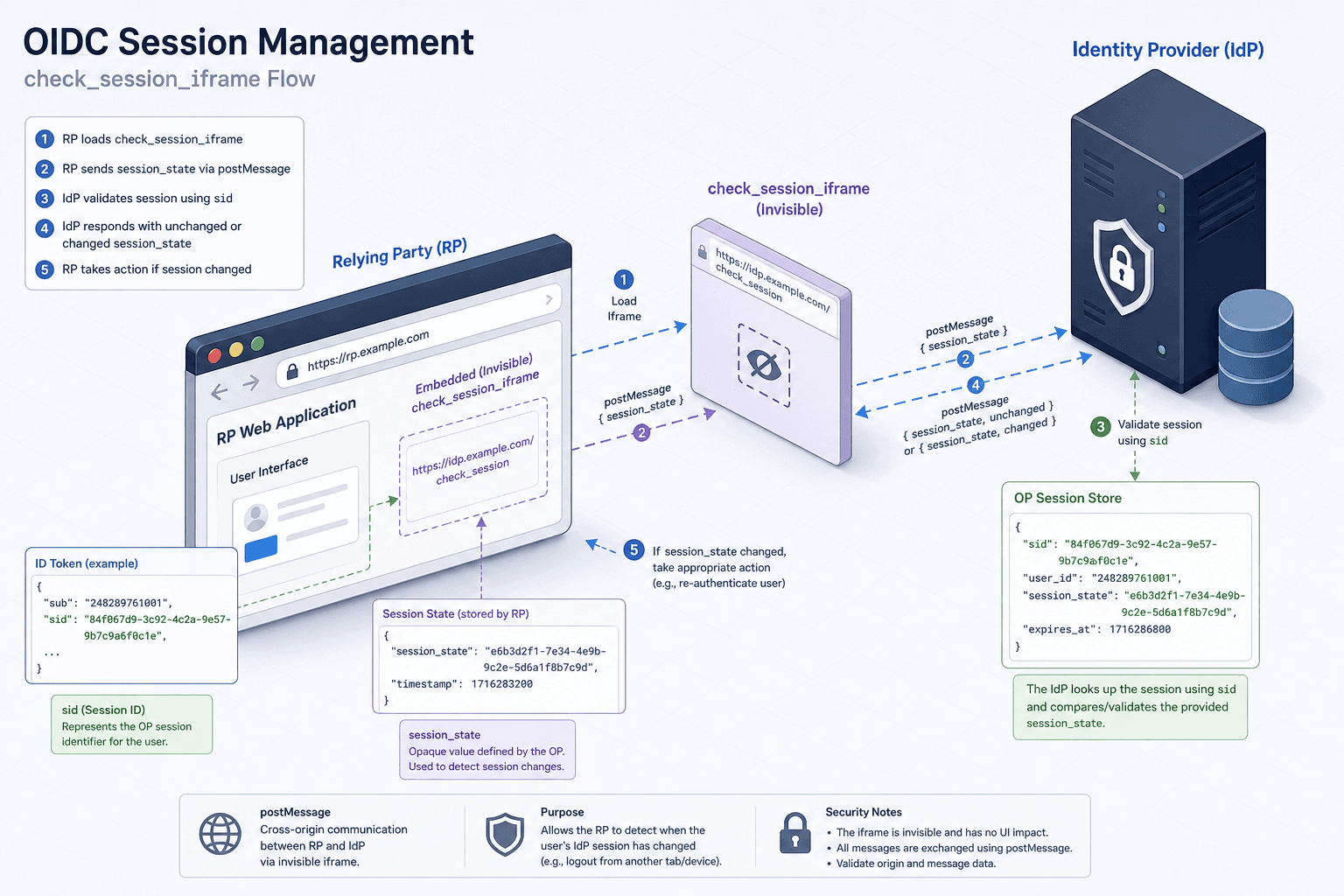
When a user authenticates, the IdP creates a session and returns an ID Token to the RP. Crucially, if the openid scope is requested, the ID Token contains a sid (Session ID) claim. This sid is a unique identifier for the user’s session within the IdP.
The RP stores this sid locally. It serves as the anchor for all subsequent synchronization. If the sid changes, the session has changed. If the sid is absent, the RP may need to treat the session as anonymous or re-authenticate, depending on configuration. The sid is not a secret; it is a public identifier for the session lifecycle.
The check_session_iframe Mechanism
How does the RP know if the IdP has terminated the session associated with that sid? The answer lies in the check_session_iframe mechanism, defined in the OIDC Session Management 1.0 specification.
This mechanism uses an invisible HTML iframe embedded in the RP’s page. The iframe’s src attribute points to a well-known URL on the IdP. The Discovery Document (.well-known/openid-configuration) contains a field named check_session_iframe which points to the actual endpoint URL (e.g., /session/check-iframe).
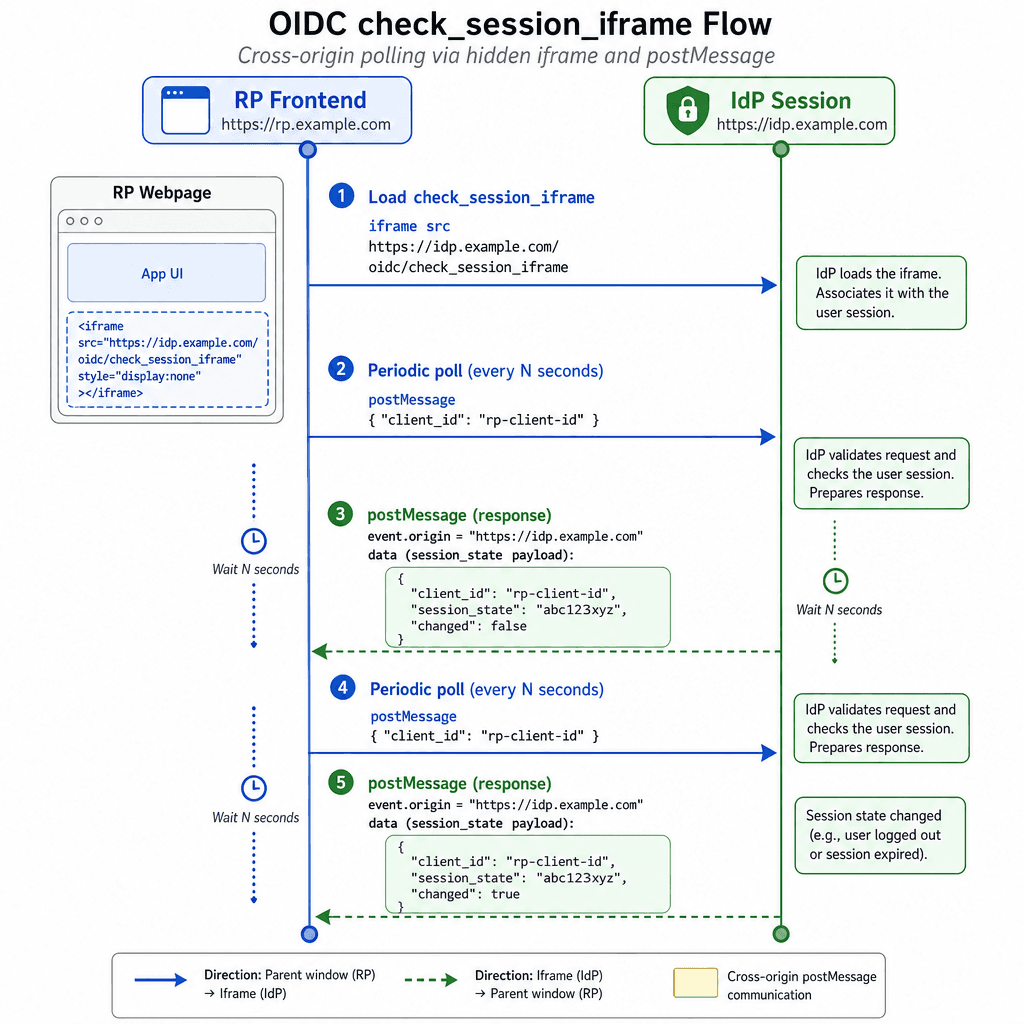
Here is the technical flow:
- Embedding: The RP’s frontend JavaScript dynamically creates an iframe pointing to the IdP’s
check_session_iframeendpoint. - Cross-Origin Communication: Because the iframe is loaded from the IdP’s domain, it has access to the IdP’s session state. However, the RP cannot read the iframe’s content directly due to SOP. Instead, the communication happens via the
postMessageAPI. - Polling State: The RP’s JavaScript periodically sends a message to the iframe using
iframe.contentWindow.postMessage(), containing the client ID and thesession_statevalue it has stored. - State Change Detection: The iframe computes the current session state and replies to the RP via
window.parent.postMessage()with a status of"unchanged","changed", or"error". A"changed"(or"error") response tells the RP that the session state has diverged from the IdP’s reality.
This is a client-side heartbeat. It does not involve the RP’s backend server until a state change is detected. This reduces server load but introduces latency; the user might remain logged in for a few seconds after logout until the next iframe poll completes.
Validating session_state
The session_state parameter is the value used to detect changes. It is returned to the RP during the initial authentication redirect response, and it is this stored value that the RP later sends to the check_session_iframe for comparison.
The session_state is calculated by the IdP as follows:
session_state = base64url(HASH(client_id + ' ' + origin_url + ' ' + OP_browser_state + ' ' + salt)) + '.' + saltWhere:
origin_urlis the RP’s origin.OP_browser_stateis a value reflecting the user’s login state at the IdP, known only to the IdP.saltis a random string generated by the IdP.
The RP stores this value upon login. On every page load or interaction, the RP sends the stored session_state (along with its client_id) to the check_session_iframe. Only the IdP can recompute the expected value, because only the IdP knows the current OP_browser_state. The iframe compares the value it recomputes against the one the RP sent and replies with "unchanged" or "changed".
This validation ensures that the state change is genuine and not something the RP can be tricked into believing on its own. An attacker cannot forge a valid session_state without knowledge of the IdP’s current browser state.
Front-Channel Logout
The check_session_iframe mechanism is passive; it detects changes. For active logout, OIDC defines Front-Channel Logout 1.0.
When a user clicks "Logout" on the IdP’s UI, the IdP initiates a push notification to all registered RPs. This is done by embedding hidden iframes for each RP's frontchannel_logout_uri on the IdP's own logout page.
- IdP Action: The IdP iterates over the
frontchannel_logout_urivalues registered for each RP. - Navigation: The IdP renders an iframe on its logout page for each RP, with its
srcset to the RP'sfrontchannel_logout_uri. The URL includes theissandsidquery parameters. - RP Reaction: Loading this URL causes the RP's logout endpoint to execute, which:
- Invalidates its local session (deletes tokens, clears storage).
- Returns a response to the iframe without redirecting the top-level page, since it is loaded inside an iframe on the IdP's domain.
This is a "fire-and-forget" mechanism. The IdP does not wait for an acknowledgment from the RP. If the browser is closed before the IdP's logout page finishes loading the RP's iframe, the notification is lost, and the RP will not know about the logout until the next check_session_iframe poll or a new authentication attempt.
Limitations and Tradeoffs
Front-channel logout is efficient but has limitations. It relies on the user-agent being active. If the user closes the browser, the logout notification is lost. Additionally, the check_session_iframe adds overhead to every page load, as the browser must load and communicate with the iframe.
For high-security environments, this latency is unacceptable. In such cases, back-channel logout (using the backchannel_logout_uri and logout_token) is preferred, where the IdP makes a direct HTTP POST to the RP’s backend. However, front-channel remains the default for most consumer-facing applications due to its simplicity and lack of backend configuration requirements.
Conclusion
OIDC session management is a complex dance of client-side state synchronization. By leveraging the sid claim, the check_session_iframe, and cryptographic session_state validation, OIDC enables RPs to maintain consistent sessions across distributed origins. Understanding these mechanisms is critical for identity engineers to build secure, responsive SSO experiences that correctly handle logout and session expiration.
Related posts
Workload Identity Federation Across Clouds
Learn how to implement workload identity federation for secure, keyless access across cloud providers using OIDC.
SAML 2.0 in One Diagram
A visual walkthrough of the SAML 2.0 Single Sign-On flow, covering bindings, profiles, and how it compares to OIDC.
Angular OAuth2 Logout: revokeTokenAndLogout & Backchannel
Implement secure logout in Angular using revokeTokenAndLogout, session checks, and backchannel protocols to ensure complete session termination.