Angular OAuth2 Logout: revokeTokenAndLogout & Backchannel
Implement secure logout in Angular using revokeTokenAndLogout, session checks, and backchannel protocols to ensure complete session termination.
Logout: revokeTokenAndLogout, Session Checks, and Backchannel
In Angular applications using OAuth 2.0 and OpenID Connect (OIDC), logout is often mistakenly treated as a local state operation. Developers call localStorage.removeItem('access_token') and redirect the user. This is insecure. The session still exists on the Authorization Server (AS). The Resource Server (RS) may still accept the Access Token (AT) until it expires. If a Refresh Token (RT) is still stored or cached, an attacker can reuse it.
This article is Part 6 of the "angular-oauth2-oidc in Production" series. Secure logout requires a coordinated protocol execution. You must tell the AS to invalidate the tokens, notify the browser to clear local state, and ensure the user is redirected away from protected resources. The angular-oauth2-oidc library provides revokeTokenAndLogout to automate this, but its correctness depends on precise configuration of session checks and backchannel endpoints.
The Mechanism of revokeTokenAndLogout
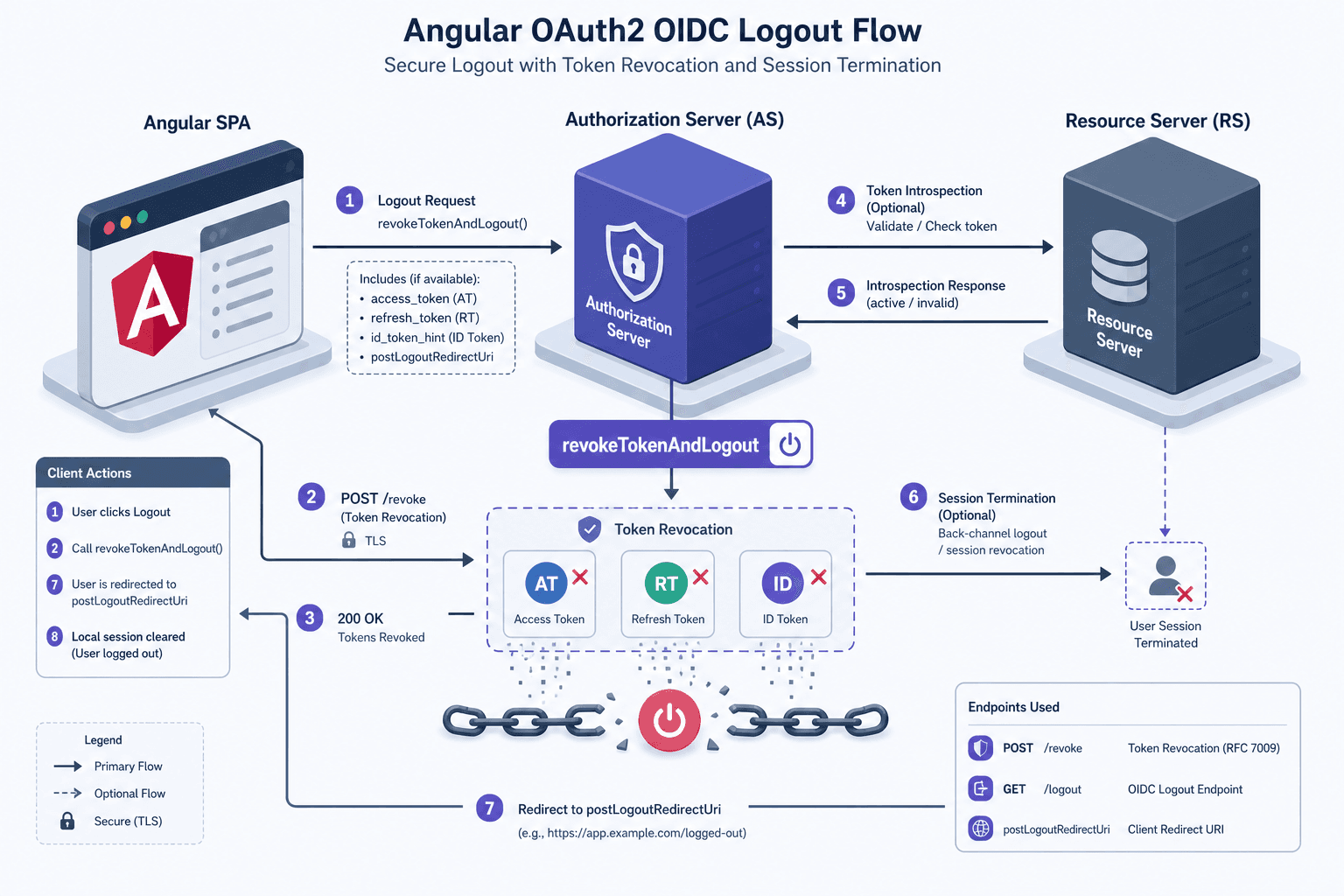
When you invoke revokeTokenAndLogout(), the library does not simply delete cookies. It performs a server-side revocation. According to RFC 7009, clients can request the revocation of tokens by sending a POST request to the /revoke endpoint. For details on token revocation, see the RFC 7009 specification and the angular-oauth2-oidc documentation.
The mechanism works as follows:
- Token Identification: The library extracts the Access Token and Refresh Token from the internal storage.
- Revocation Request: It sends a POST request to the AS’s
/revokeendpoint with parameterstokenandtoken_type_hint. - AS Validation: The AS processes the revocation request. Per RFC 7009, the AS should return
200 OKfor successful revocation requests, even if the token was already invalid, to prevent token enumeration attacks. The client treats200 OKas success and proceeds to local cleanup. - Local Cleanup: Upon receiving a 200 OK from the AS, the library clears the internal state (tokens, nonce, etc.).
- Redirect: The browser is redirected to the
postLogoutRedirectUri.
Without this step, the AS remains unaware that the user has left. The AT remains valid until its short-lived expiration, and the RT remains valid for longer periods. This creates a window of vulnerability where a stolen token can still be used.
// Example: Configuring token revocation and logout
this.oauthService.configure({
  // ... other config
  revokeTokensOnLogout: true,
  postLogoutRedirectUri: window.location.origin
});

// In your logout handler:
logout() {
  this.oauthService.revokeTokenAndLogout();
}
Note: Not all providers support /revoke. If your AS does not implement RFC 7009, revokeTokenAndLogout will fail silently or throw an error. In such cases, you must manually clear local storage and rely on session termination at the AS level via end_session_endpoint.
Silent Session Check: sessionChecksEnabled
Before a user even initiates logout, the application must know if the session is still active. This is where sessionChecksEnabled comes in.
By default, angular-oauth2-oidc can monitor the session state by loading an iframe from the AS’s check_session_iframe URL. This iframe communicates with the parent window via postMessage. If the session on the AS changes (e.g., the user logs out from another tab), the AS sends a message to the iframe, which propagates it to the Angular app.
Mechanism Level Detail:
- Iframe Injection: The library injects an invisible
<iframe>pointing to thecheck_session_iframeURL. - Heartbeat: The iframe periodically sends a
messageevent withtype: 'check_session'. - AS Response: The AS responds with the current session state (based on the
sidclaim in the ID Token). - State Comparison: The library compares the received state with the stored state. If they differ, it triggers an
eventsManagerevent.
The Failure Mode:
Modern browsers increasingly block third-party cookies and iframe tracking due to privacy concerns (e.g., Safari’s ITP, Chrome’s Privacy Sandbox). If the check_session_iframe fails to load or communicate, the library cannot detect silent logouts. This leads to:
- False Negatives: The user logs out from the AS, but the Angular app thinks the session is active.
- False Positives: The iframe fails due to network issues, triggering unnecessary logout events.
To mitigate this, you must set sessionCheckIntervall appropriately. A value of 5 seconds is common. However, if the AS does not support check_session_iframe, this feature is useless.
this.oauthService.configure({
  // ... other config
  sessionChecksEnabled: true,
  sessionCheckIntervall: 5000 // milliseconds
});
Backchannel Logout: The Secure Alternative
Frontchannel logout (using iframes) is fragile. OIDC Backchannel Logout 1.0 (OIDC Back-Channel Logout) solves this by moving the session notification from the browser to the server.
How It Works:
- Registration: During client registration, the client registers a
backchannel_logout_uriwith the AS. - Logout Event: When the user logs out from the AS (or session expires), the AS sends an HTTP POST request directly to the
backchannel_logout_uriwith alogout_token(JWT). - Validation: The Angular app (or a backend proxy) validates the
logout_token, extracts thesidandsub, and identifies the user session. - Termination: The app invalidates the local session and redirects the user.
Why It Matters for Angular:
True OIDC Backchannel Logout requires a backend component (even if lightweight) to receive the AS's POST request and relay it to the SPA, as the SPA cannot directly accept such requests from the AS due to security and network constraints. In a single-page application (SPA), there is no server to receive the POST request directly from the AS. Therefore, backchannel logout in SPAs typically requires a lightweight backend service (e.g., an Azure Function, AWS Lambda, or a simple Node.js proxy) to receive the logout_token and forward the logout signal to the Angular app via WebSocket, Server-Sent Events (SSE), or polling.
If your architecture lacks a backend, you cannot use true backchannel logout. You must rely on the frontchannel check_session_iframe or manual logout triggers. Note that sessionChecksEnabled is a browser-based feature using iframes, while Backchannel Logout is a distinct OIDC extension requiring backend infrastructure; they are not direct configuration swaps but different architectural choices.
Implementation Workflow
Here is a complete configuration example for angular-oauth2-oidc that prioritizes security:
import { AuthConfig } from 'angular-oauth2-oidc';

export const authConfig: AuthConfig = {
  issuer: 'https://your-auth-server.com',
  clientId: 'your-client-id',
  redirectUri: window.location.origin + '/callback',
  postLogoutRedirectUri: window.location.origin,

  // Enable revocation
  revokeTokensOnLogout: true,

  // Enable silent session check
  sessionChecksEnabled: true,
  sessionCheckIntervall: 5000,

  // Optional: If using backchannel logout via a backend proxy
  // logoutUrl: 'https://your-backend-proxy/logout',
};
Sequence of Events on Logout:
- User clicks "Logout".
- Angular calls
oauthService.logout()oroauthService.revokeTokenAndLogout(). - If
revokeTokensOnLogoutis configured:- POST to
/revokewith AT and RT. - On success, clear local storage.
- POST to
- If
sessionChecksEnabledis true:- The iframe check continues running in the background.
- If the AS sends a logout signal via iframe, the app triggers a logout event.
- Redirect to
postLogoutRedirectUri.
Conclusion
Secure logout in Angular is not about clearing localStorage. It is about coordinating with the Authorization Server to invalidate tokens and detect session changes. Use revokeTokenAndLogout to ensure tokens are invalidated server-side. Use sessionChecksEnabled to monitor for silent logouts via iframes. If possible, migrate to Backchannel Logout for a more robust, browser-independent solution. Always test your logout flow across different browsers and cookie policies to ensure consistent behavior.
Related posts
Angular OAuth2/OIDC: Guards, Interceptors & Claims
Learn how to implement route guards, HTTP interceptors, and identity claims in Angular for secure OAuth2/OIDC authentication.
Angular OAuth2/OIDC Token Storage: localStorage, sessionStorage, and In-Memory
Compare localStorage, sessionStorage, and in-memory storage for Angular OAuth2 OIDC tokens to mitigate XSS risks and secure authentication.
OAuth 2.0 Refresh Tokens in Angular: Silent Refresh with useRefreshTokens
Learn how to implement automatic silent refresh in Angular using userefreshtoken and setupautomaticsilentrefresh for secure session management.