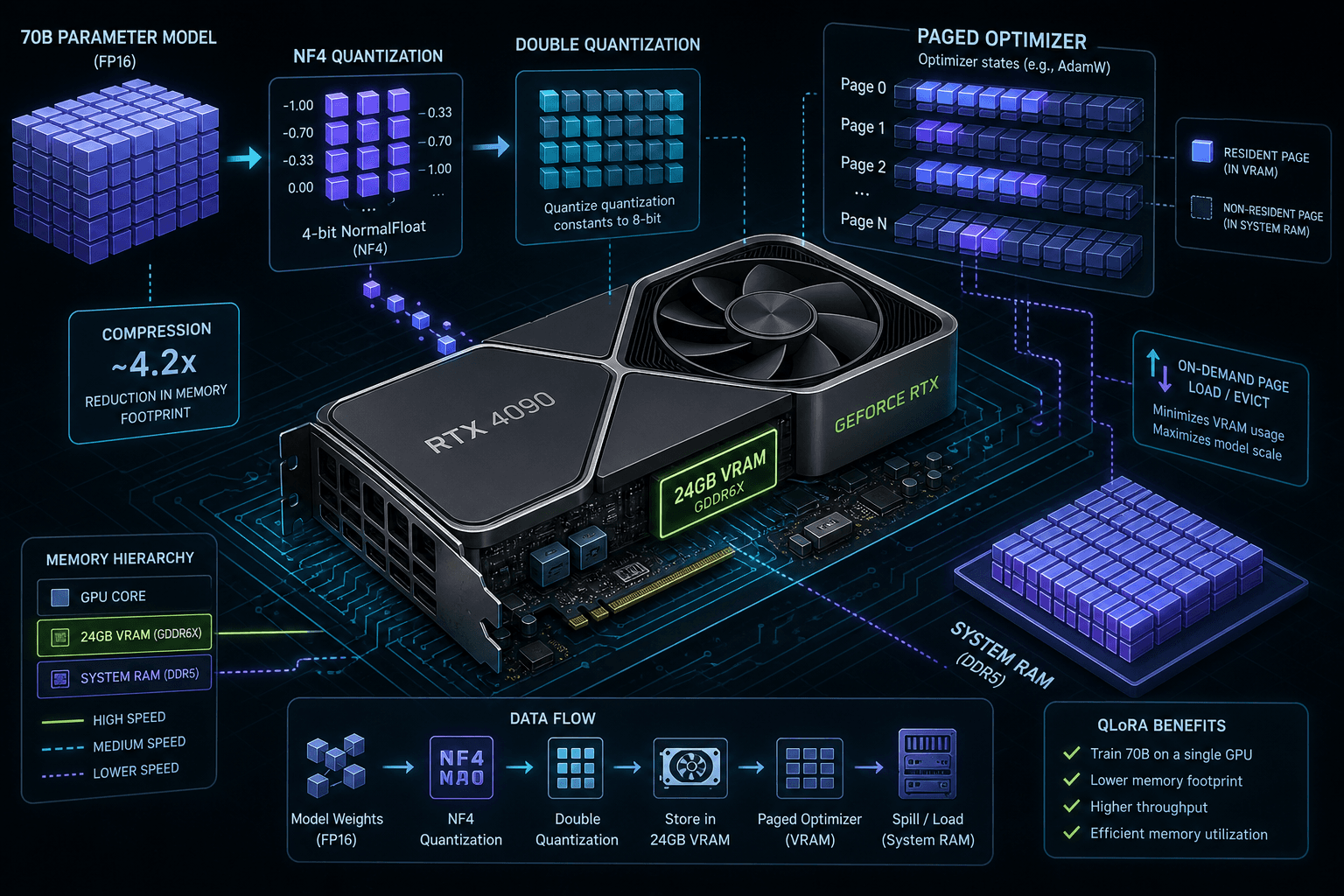
QLoRA: Fine-Tuning a 70B on One GPU
A technical walkthrough on fine-tuning 70B parameter LLMs using QLoRA, NF4 quantization, and paged optimizers on a single GPU.
Fine-tuning a 70-billion parameter language model traditionally requires a cluster of high-end GPUs, such as eight A100s or H100s. For individual researchers and smaller teams, this hardware barrier is prohibitive. However, the introduction of QLoRA (Quantized Low-Rank Adaptation) has shifted this paradigm, enabling the fine-tuning of 70B models on a single 48GB GPU, like the NVIDIA RTX A6000.
This capability does not come from magic; it comes from aggressive memory management at the tensor level. To understand how this works, we must dissect the memory footprint of a large language model (LLM) and examine the three core mechanisms QLoRA employs: 4-bit NormalFloat (NF4) quantization, double quantization, and paged optimizers.
The Memory Bottleneck: Why 70B Doesn't Fit
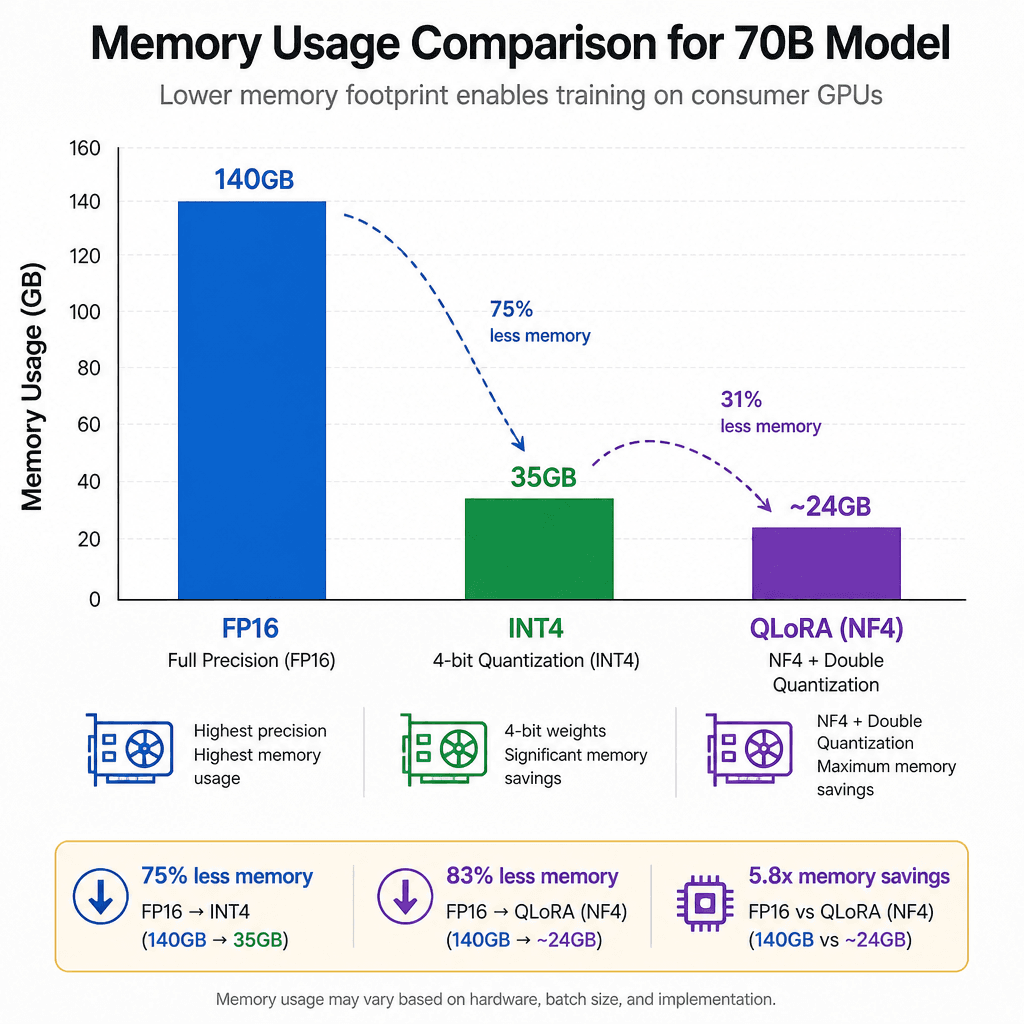
Before applying quantization, it is crucial to understand the baseline memory requirements. A 70B parameter model, when loaded in half-precision floating point (FP16 or BF16), requires approximately 140 GB of memory just for the weights ( bytes). This alone exceeds the capacity of any single consumer GPU.
Even if we quantize the weights to 4-bit integers (INT4), reducing the weight storage to roughly 35 GB, we still face a significant hurdle: the optimizer states. During training, optimizers like AdamW maintain first and second moment estimates for every trainable parameter. If we were to train the entire model, these states would require additional memory proportional to the parameter count.
QLoRA avoids this by freezing the pre-trained model weights and only training a small number of low-rank adapters (LoRA). However, even with LoRA, the base model's weights must reside in VRAM during the forward and backward passes. The challenge is fitting the quantized base model, the activation gradients, and the LoRA adapter updates into a constrained 48GB VRAM buffer on a single gpu without triggering an Out-Of-Memory (OOM) error. Since the 35GB weight footprint leaves limited headroom within the 48GB limit, QLoRA relies on additional memory-saving techniques such as double quantization and paged optimizers to manage this constraint.
NF4 Quantization: Beyond Standard INT4
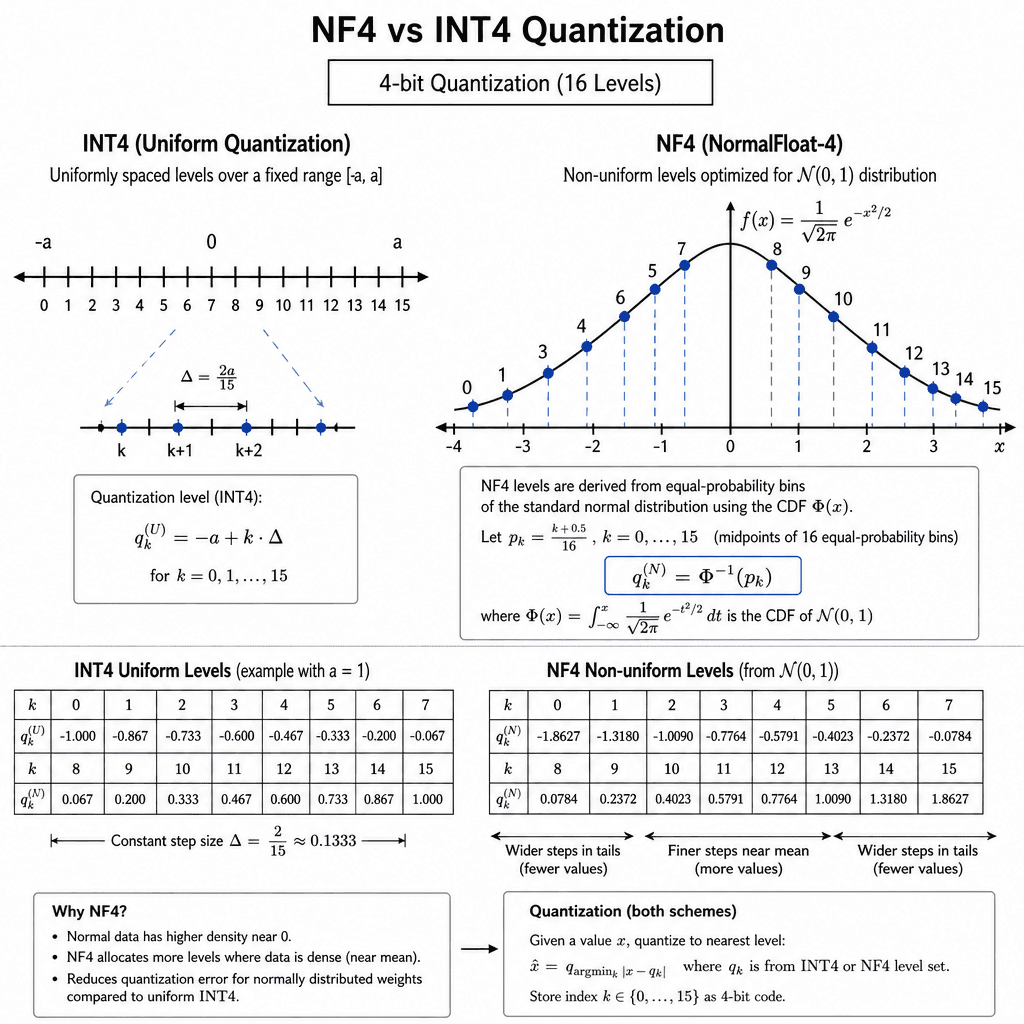
Standard INT4 quantization maps floating-point values to one of 16 discrete integer levels. This approach is lossy and can introduce significant accuracy degradation, particularly for models where weights follow a near-normal distribution.
QLoRA introduces NF4 (4-bit NormalFloat), a data type specifically designed for the weight distributions of LLMs. Instead of uniform intervals, NF4 uses a pre-computed lookup table based on the normal distribution. This table contains 16 optimal quantization levels derived from the cumulative distribution function of a normal distribution.
When quantizing, each weight is mapped to the closest value in the NF4 table. This mechanism preserves the statistical properties of the original weights more accurately than INT4, resulting in minimal performance degradation during fine-tuning. The quantization process is performed once before training begins, meaning the computational overhead during the training loop is negligible. This makes 4-bit-training feasible without immediate accuracy collapse.
Double Quantization: Squeezing the Constants
Even with NF4, the quantized model occupies about 35 GB of memory, which still leaves little headroom within a 48GB VRAM budget. The remaining memory overhead comes from the block-wise scaling factors (mean and variance) used to dequantize the weights back to FP16 for computation.
Normally, these scaling factors are stored in FP32. For a 70B model, this adds significant memory pressure. Double quantization addresses this by quantizing the scaling factors themselves. Instead of storing them in FP32, QLoRA quantizes them into INT8 or even lower bit-widths, storing only the quantization constants in VRAM.
This technique reduces the memory footprint of the quantization constants by roughly 75%, allowing the entire quantized model (weights + constants) to fit comfortably within the 48GB VRAM limit. The dequantization process happens on-the-fly during the forward pass, converting the NF4 weights back to FP16 for matrix multiplication. This on-the-fly dequantization is computationally intensive but necessary to maintain precision during training.
Paged Optimizers: Managing Fragmentation
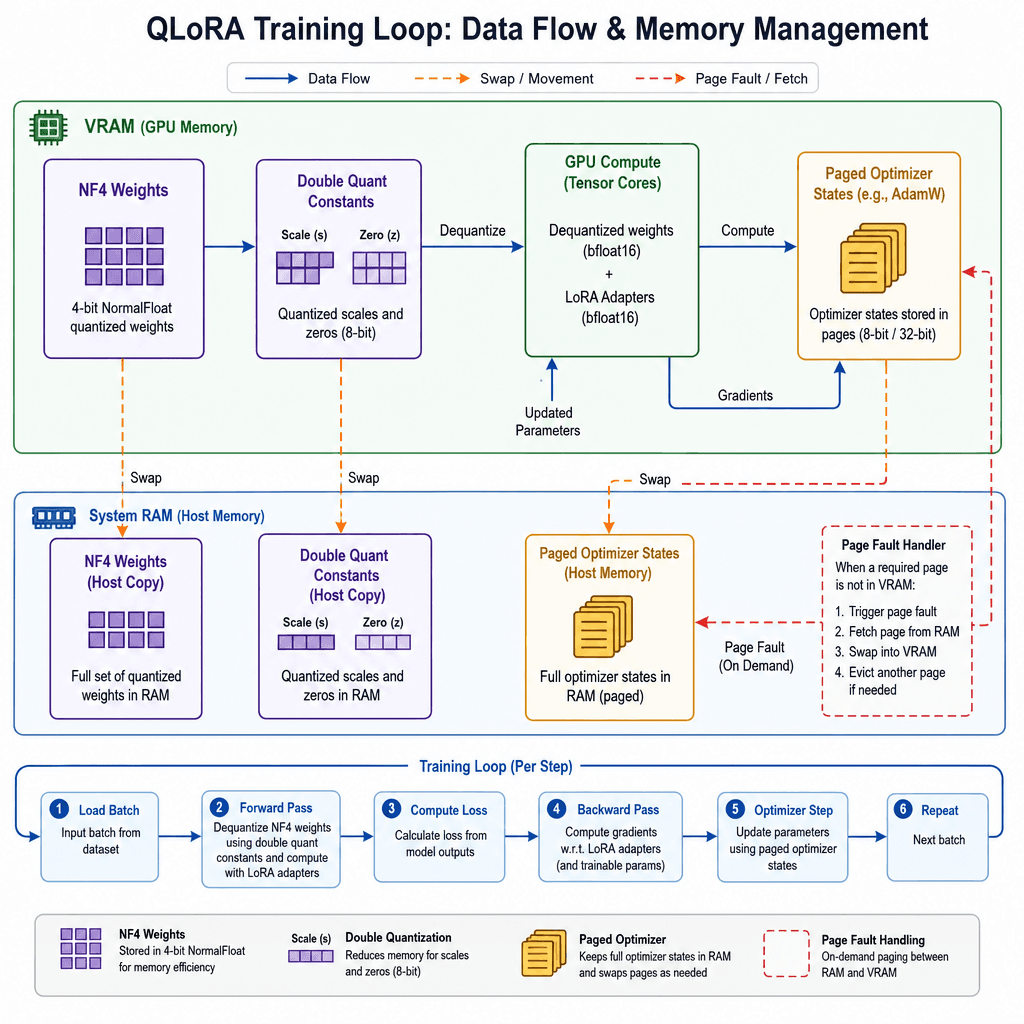
With the model weights and constants fitted into VRAM, we still need to store the optimizer states for the LoRA adapters. AdamW maintains two states per parameter: the first moment (mean) and the second moment (variance). For LoRA adapters, which constitute a small fraction of the total parameters, this memory is manageable. However, memory fragmentation in PyTorch can still lead to OOM errors.
QLoRA integrates with bitsandbytes's paged optimizers, which leverage NVIDIA's unified memory feature to handle memory fragmentation. Instead of allocating contiguous blocks of memory for optimizer states, paged optimizers allocate memory in small, manageable pages. If VRAM runs out on a single gpu, the system can swap unused pages to system RAM (CPU memory) transparently.
This mechanism allows the optimizer states to effectively utilize both VRAM and system RAM, preventing crashes due to fragmentation. It is a critical component that makes the training process stable on consumer hardware, where memory management is less predictable than in data-center environments. This approach enables memory efficient training by leveraging host memory as an extension of device memory.
Practical Implementation
Implementing QLoRA requires the transformers library from Hugging Face and the bitsandbytes library. The key is configuring the BitsAndBytesConfig to enable NF4 quantization and double quantization. This setup facilitates 4-bit training workflows on limited hardware.
from transformers import AutoModelForCausalLM, AutoTokenizer, BitsAndBytesConfig
import torch

# Define the quantization configuration
bnb_config = BitsAndBytesConfig(
    load_in_4bit=True,
    bnb_4bit_quant_type="nf4",  # Use NF4 instead of int4
    bnb_4bit_use_double_quant=True,  # Enable double quantization
    bnb_4bit_compute_dtype=torch.bfloat16  # Compute dtype for forward pass
)

# Load the model with quantization
model = AutoModelForCausalLM.from_pretrained(
    "meta-llama/Llama-2-70b-hf",
    quantization_config=bnb_config,
    device_map="auto"  # Automatically distribute layers across available GPUs
)
The device_map="auto" argument ensures that the model layers are distributed across available GPUs, maximizing VRAM utilization. When combined with LoRA, you freeze the base model and inject trainable adapter modules. This configuration is essential for single gpu deployments where resources are tightly constrained.
from peft import LoraConfig, get_peft_model

# Configure LoRA
lora_config = LoraConfig(
    r=16,  # Rank of the update matrices
    lora_alpha=32,  # Scaling factor
    target_modules=["q_proj", "k_proj", "v_proj", "o_proj"],  # Attention layers
    lora_dropout=0.05,
    bias="none",
    task_type="CAUSAL_LM"
)

# Apply LoRA to the quantized model
model = get_peft_model(model, lora_config)
Conclusion
QLoRA involves a clear trade-off between memory consumption and computational cost. The on-the-fly dequantization and double quantization introduce computational overhead, making training slower compared to full FP16 fine-tuning. Additionally, the reliance on system RAM for paged optimizers can introduce latency if the CPU-GPU bandwidth becomes a bottleneck.
By understanding the mechanisms of NF4, double quantization, and paged optimizers, engineers can effectively manage memory constraints. This approach proves that algorithmic optimizations can overcome hardware limitations, allowing fine-tuning of large models on affordable hardware. To apply these techniques to your specific use case, audit your current rotation policy or try the linked snippet locally.
Related posts
LoRA Explained: Rank by Rank Guide for ML Engineers
A technical breakdown of Low Rank Adaptation (LoRA) for ML engineers, explaining how rank and alpha parameters affect fine-tuning efficiency and model performance.
vLLM Architecture: PagedAttention and the Scheduler
An examination of vLLM's PagedAttention mechanism and scheduler, explaining how block management enables efficient LLM inference.
