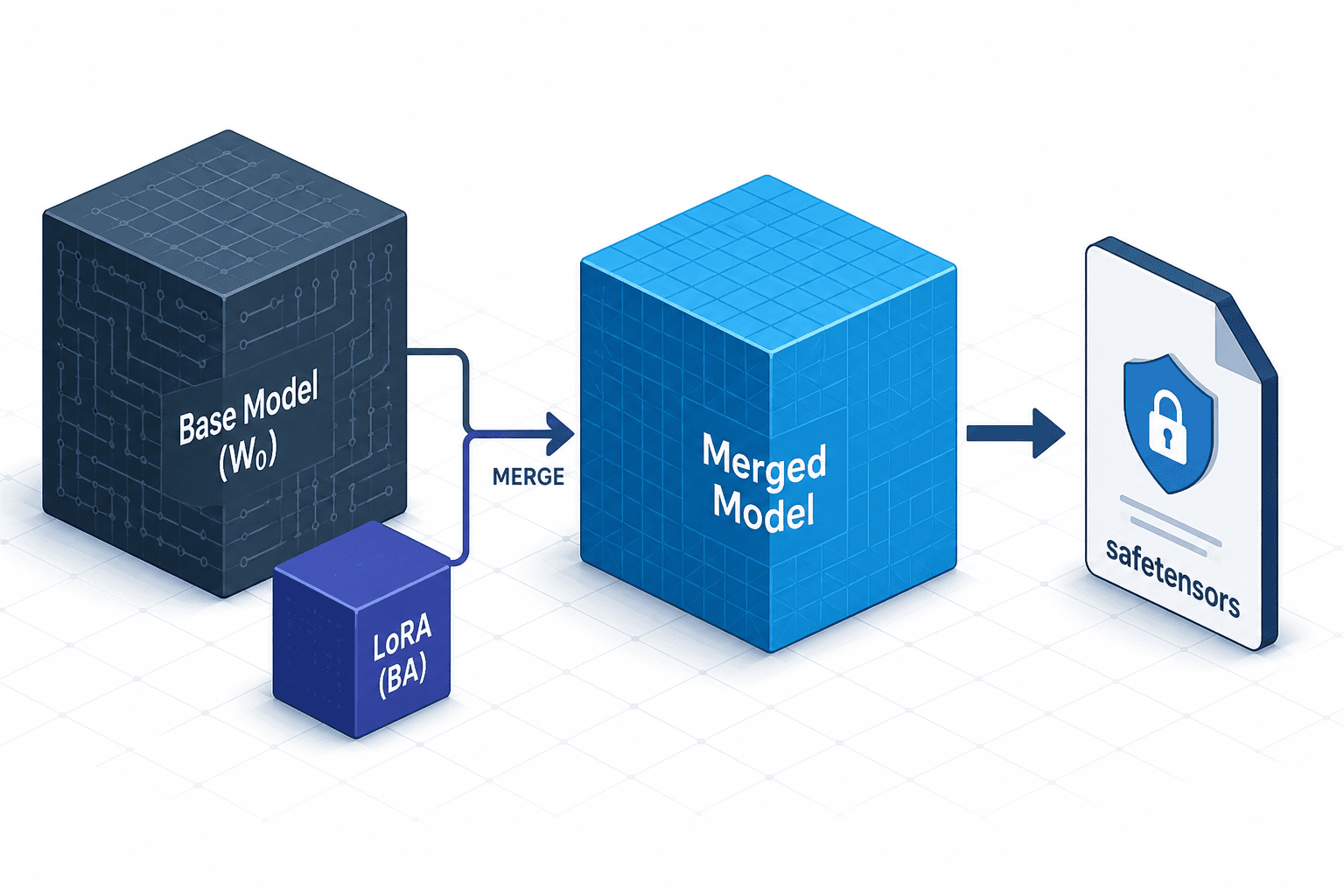
Merging, Exporting, and Serving Your Adapter
A technical walkthrough on merging LoRA adapters, exporting to safetensors, and serving models with specific dtypes for ML and platform engineers.
When you fine-tune a Large Language Model (LLM) using Low-Rank Adaptation (LoRA), you are not modifying the original base model weights. Instead, you inject trainable low-rank matrices into the attention layers and feed-forward networks. At inference time, the output is computed as , where and are the LoRA matrices and is the frozen pre-trained weight.
This post is Part 8 of the Fine-Tuning LLMs Hands-On series. While this separation allows for efficient training and easy swapping of adapters, it introduces overhead during production serving. Each request requires a matrix addition operation. For high-throughput systems, this small per-token cost accumulates. Merging the adapter into the base weights eliminates this runtime computation, resulting in a single, monolithic weight matrix. This guide details the mechanism of merging, the safe export of these weights, and the critical role of data types (dtypes) in serving.
The Mechanism of Merging
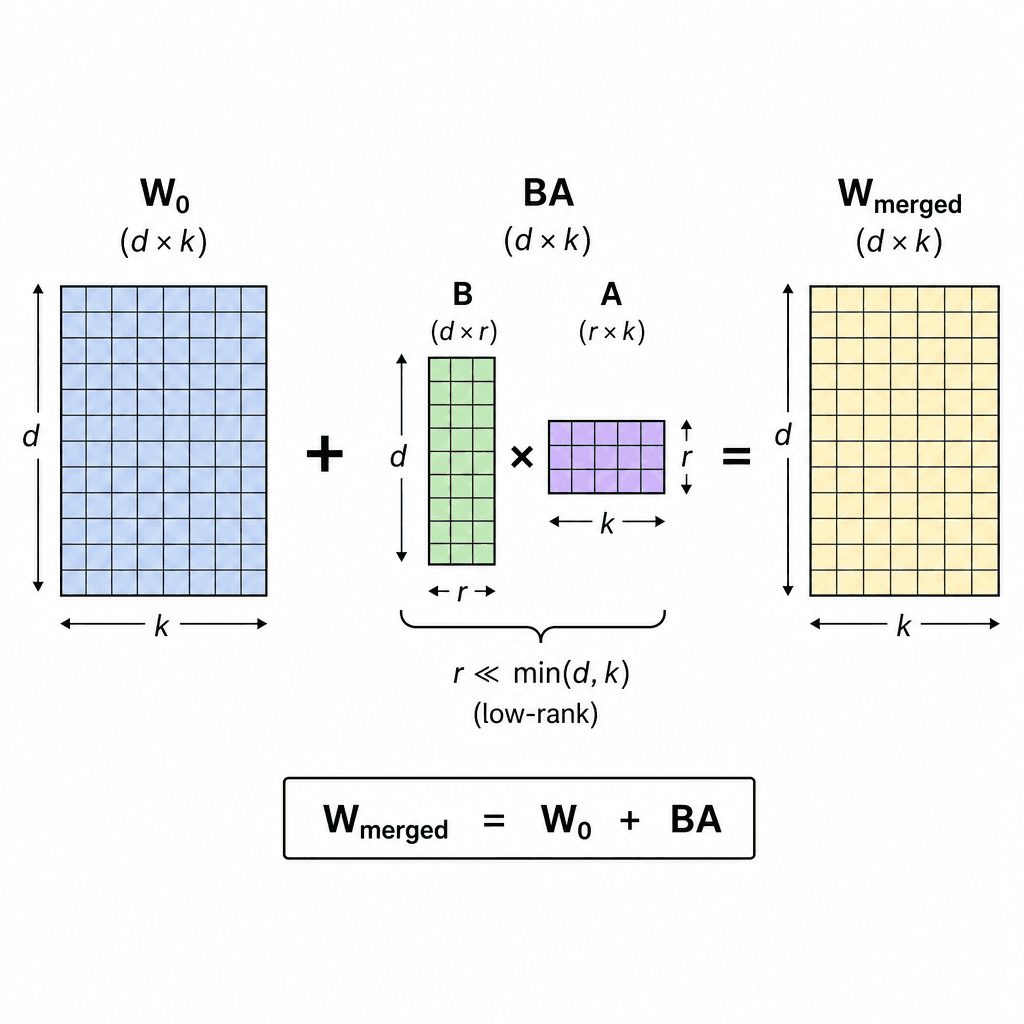
LoRA works by freezing the pre-trained weight matrix and approximating updates as a product of two low-rank matrices: , where and , with rank . The forward pass becomes:
Algebraic Fusion
Merging is the algebraic operation of computing . This algebraic fusion allows the model to behave exactly like a standard fully fine-tuned model without the overhead of loading separate adapter weights. Once merged, the model no longer needs to load and separately or perform the addition at runtime.
This process is irreversible in the sense that you cannot extract the original separate LoRA weights from the merged weights alone. However, if the original base model and the LoRA adapter files (usually .safetensors or .bin) are preserved, the unmerged state can be reconstructed. Therefore, it is crucial to keep backups of both components before merging to allow for validation or reversion.
Exporting to Safetensors
After merging, you must serialize the weights. The industry standard for LLM inference is safetensors. Unlike older formats like PyTorch's .bin or .pt, which can execute arbitrary Python code during deserialization (a significant security risk in multi-tenant environments), safetensors stores only raw binary data with metadata headers. This makes loading orders of magnitude faster because no object instantiation occurs. For more details on the security implications of traditional serialization, see the Hugging Face Safetensors documentation.
Assuming you have merged the weights using peft (Parameter-Efficient Fine-Tuning) or transformers, the export involves saving the merged state dict.
from peft import PeftModel
from transformers import AutoModelForCausalLM

# Load base model and merge adapter
base_model = AutoModelForCausalLM.from_pretrained("base-model-name")
lora_model = PeftModel.from_pretrained(base_model, "path-to-lora-adapter")
merged_model = lora_model.merge_and_unload()

# Save to local directory
output_dir = "./merged-model-export"
merged_model.save_pretrained(output_dir)
The save_pretrained method automatically writes model.safetensors and config.json. If you are using a custom training loop, ensure you call model.save_pretrained() on the merged model instance.
If you need to convert existing .bin files to .safetensors without loading the full model into memory, use the conversion utilities provided by the safetensors Python package:
import torch
from safetensors.torch import save_file

state_dict = torch.load("./old-model.bin", map_location="cpu")
save_file(state_dict, "./new-model.safetensors")
Serving Configuration and Dtype Selection
When serving the merged model, the data type (dtype) of the weights dictates memory footprint, bandwidth usage, and computational speed. The serving engine (e.g., vLLM, Hugging Face TGI, or TensorRT-LLM) must know how to interpret these bytes.
Float16 vs. Bfloat16
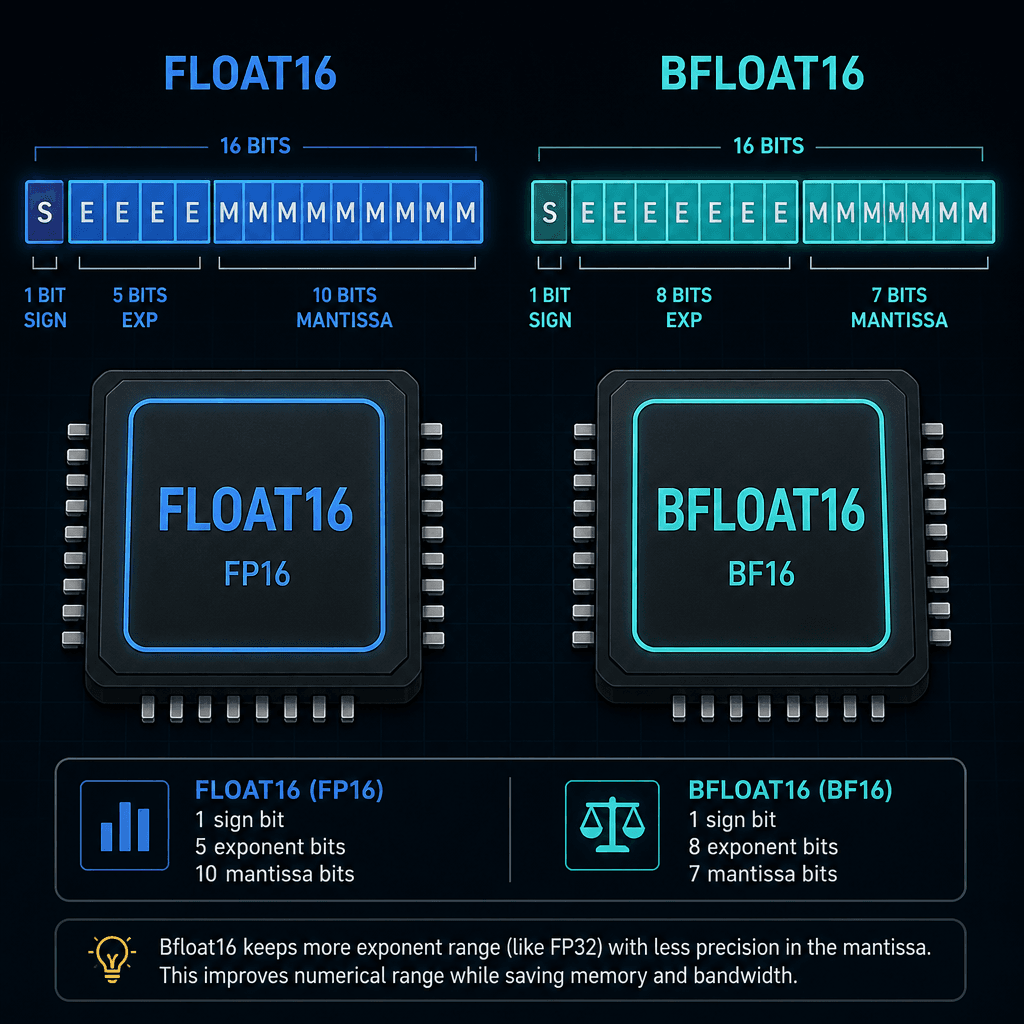
Most modern LLMs are trained in bfloat16 (brain float 16) or float16.
- Float16: 16 bits (1 sign, 5 exponent, 10 mantissa). Range is limited, leading to overflow issues for large activation values.
- Bfloat16: 16 bits (1 sign, 8 exponent, 7 mantissa). Retains the dynamic range of 32-bit float but with half the precision. This is generally preferred for LLM inference because it avoids underflow/overflow during accumulation.
For a deeper dive into the architectural advantages of bfloat16, refer to the NVIDIA Bfloat16 whitepaper or the Hugging Face documentation on data types.
When loading the model for serving, specify the dtype explicitly. If the model was saved in float16, loading it as float32 doubles memory usage with no quality gain.
# Example using transformers for local validation or lightweight serving
model = AutoModelForCausalLM.from_pretrained(
    "./merged-model-export",
    torch_dtype=torch.float16,  # or torch.bfloat16 if supported by GPU
    device_map="auto"
)
Quantization for Throughput
For production deployments where GPU memory is the bottleneck, quantization is essential. Merging allows you to quantize the entire weight matrix uniformly.
- Int8 Quantization: Reduces memory by 2x compared to float16. Often supported natively by modern GPUs via tensor cores.
- Int4 Quantization (GPTQ/AWQ): Reduces memory by 4x. Requires specific quantization-aware training or post-training quantization (PTQ). For details on these methods, see the GPTQ paper or the AWQ paper.
If you intend to use quantized formats, you must apply quantization after merging LoRA but before final export. Merging after quantization is generally not supported by standard quantization libraries because the quantized weights are no longer in a linear floating-point space suitable for direct addition. The recommended workflow is to merge the LoRA adapter into the base model first, and then apply quantization to the merged weights.
# Example: Converting to GPTQ int4 using auto-gptq
# Note: This is a destructive operation. Backup first.
from auto_gptq import AutoGPTQForCausalLM, BaseQuantizeConfig

quantize_config = BaseQuantizeConfig(bits=4, group_size=128)
model = AutoGPTQForCausalLM.from_pretrained("./merged-model-export", quantize_config=quantize_config)
model.quantize(dataset)
Validation and Deployment
Before deploying to production, verify that the merged model produces identical outputs to the unmerged LoRA setup within numerical tolerance.
import torch

# Generate with unmerged LoRA
with torch.no_grad():
    output_lora = lora_model.generate(input_ids, max_length=50)

# Generate with merged model
with torch.no_grad():
    output_merged = merged_model.generate(input_ids, max_length=50)

# Compare token IDs
assert torch.equal(output_lora, output_merged)
Note that small differences may arise due to floating-point non-associativity, but token-level equivalence is usually preserved. For more information on numerical stability in LLM inference, see this explanation of floating-point arithmetic in deep learning.
Once validated, deploy the merged-model-export directory to your serving infrastructure. Configure your serving engine to load the model in float16 or bfloat16 (or int4 if quantized). Ensure that the serving environment's CUDA/cuDNN versions are compatible with the dtype specified in the model config.
Conclusion
Merging LoRA adapters transforms a modular, efficient training artifact into a monolithic, high-performance inference engine. By understanding the mechanics of weight fusion, leveraging safe serialization formats, and carefully selecting dtypes, you ensure that your fine-tuned models deliver low-latency responses in production environments.
Related posts
Unsloth: Fine-Tuning 2x Faster on One GPU
Learn how Unsloth accelerates fine-tuning by 2x using Triton kernels and LoRA, enabling efficient model training on a single GPU.
Axolotl Configs Explained Line by Line
A detailed breakdown of Axolotl YAML configuration files for fine-tuning models with DeepSpeed and custom dataset formats.
Hyperparameters That Actually Matter
A practical examination of key hyperparameters like learning rate, batch size, and epochs for ML engineers fine-tuning LLMs.
