X.509 Certificate Fields, Explained
A clear breakdown of essential X.509 certificate fields including SAN, Common Name, Key Usage, and Extended Key Usage for developers and platform engineers.
When a browser connects to a secure website, it does not merely check if a lock icon appears. It executes a complex validation algorithm against an X.509 certificate structure defined by RFC 5280. For developers and platform engineers, treating certificates as opaque binary blobs leads to fragile PKI (Public Key Infrastructure) management. To manage TLS effectively, you must understand the specific fields that dictate validation logic: how identity is resolved, how keys are constrained, and how trust is chained.
The Structure of Trust
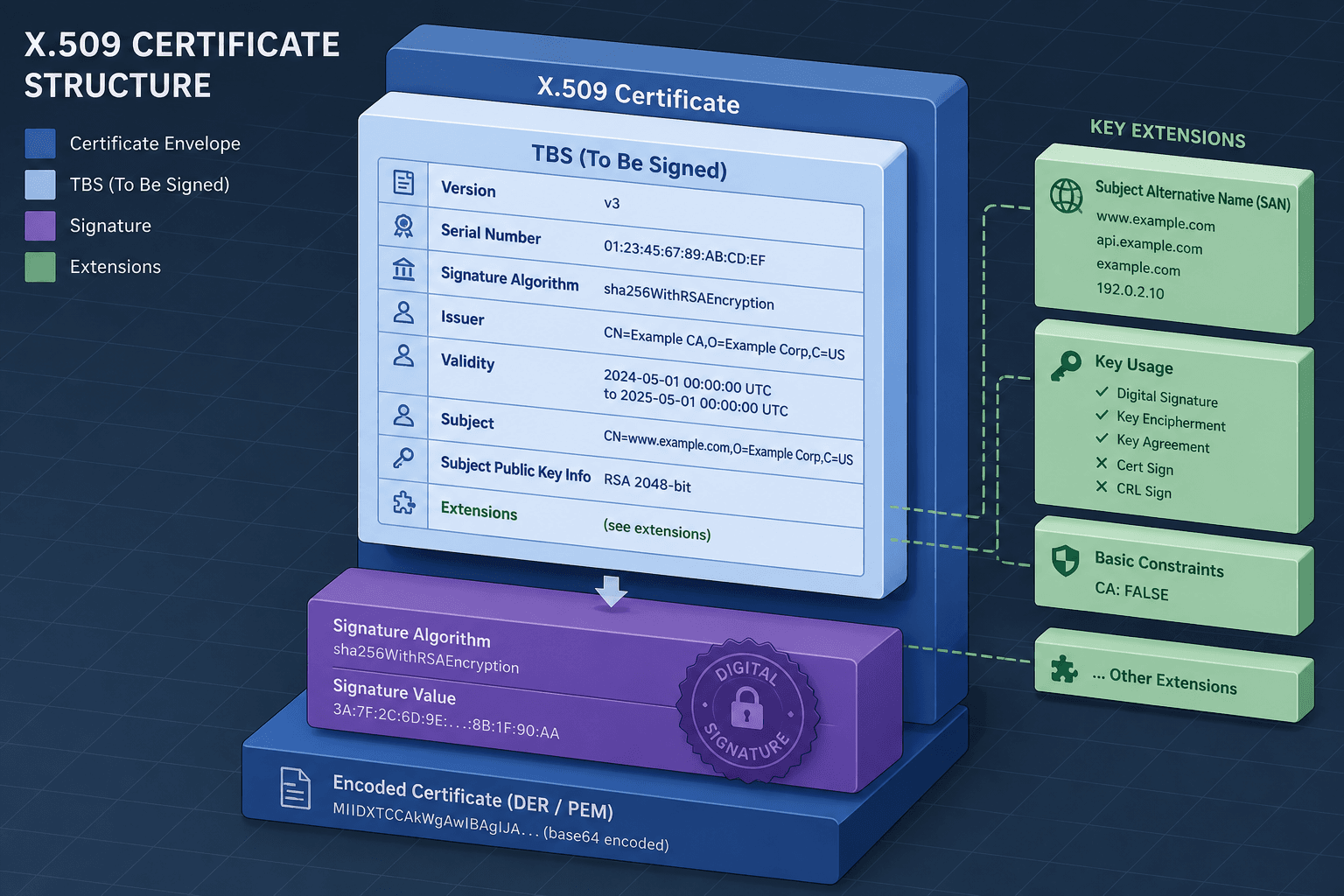
An X.509 certificate is a digital document that binds a public key to an identity. The core of this document is the TBS (To Be Signed) certificate section. This is the data structure that the Certificate Authority (CA) signs using its private key. The signature guarantees that the CA attests to the contents of the TBS section.
The TBS section contains six critical components:
- Version: Indicates the certificate profile (v3 is standard).
- Subject: The entity the certificate identifies (e.g., a server).
- Issuer: The CA that issued the certificate.
- Validity Period: Not Before and Not After timestamps.
- Subject Public Key Info: The public key itself and the algorithm identifier for which the key is used.
- Extensions: Optional fields that modify validation rules, such as SAN or Key Usage.
The cryptographic mechanism here is simple: if any bit in the TBS section changes, the signature verification fails. This integrity check is the foundation of all TLS security.
Identity Resolution: Common Name vs. Subject Alternative Name
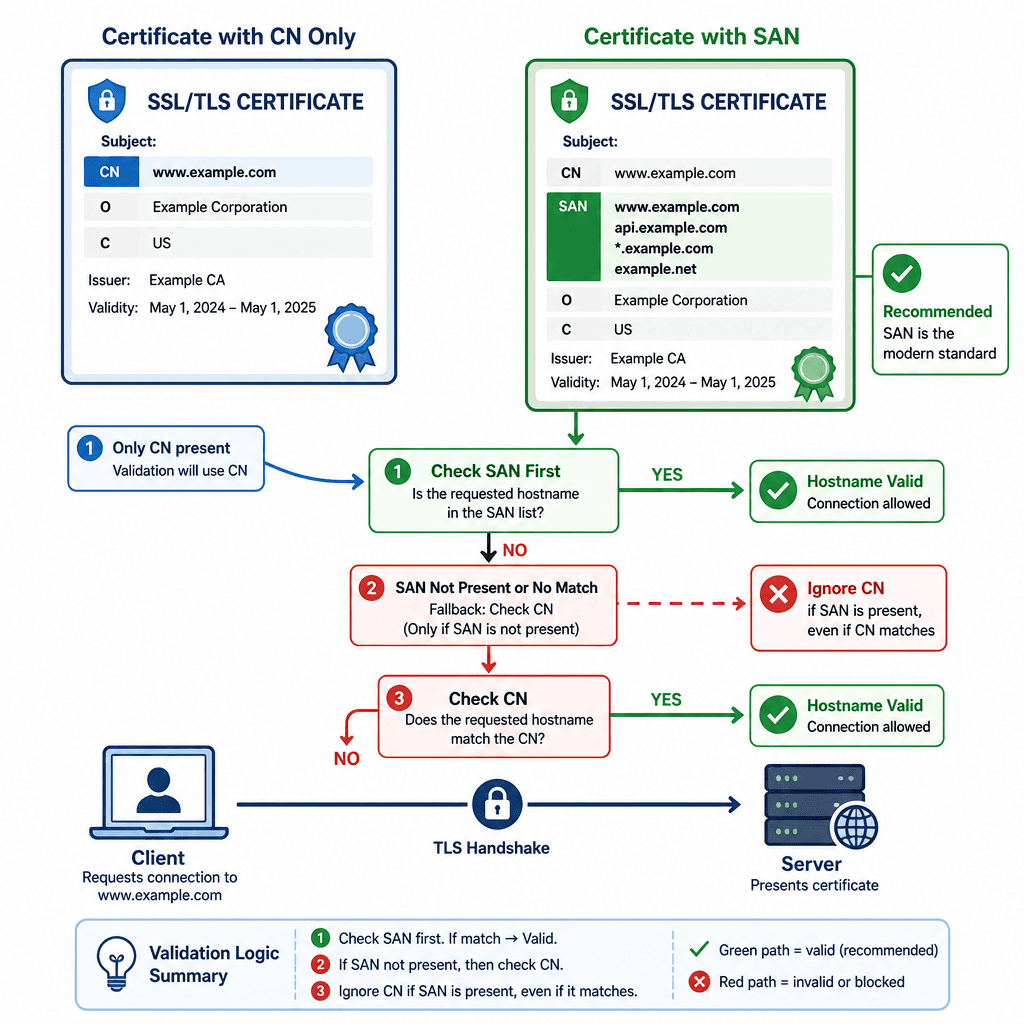
The most common source of TLS configuration errors is the relationship between the Common Name (CN) and the Subject Alternative Name (SAN).
Historically, the CN field in the Subject distinguished name was the sole identifier for a server. If a certificate had CN=example.com, browsers accepted connections to https://example.com. However, this single-field limitation caused significant interoperability issues, particularly for servers hosting multiple domains.
RFC 6125 deprecated the use of CN for server authentication in favor of the SAN extension. The mechanism is strict: if a SAN extension is present in the certificate, the CN field is ignored for hostname validation.
Consider this concrete scenario: A platform engineer generates a certificate for an API gateway. They set:
Subject:CN=api.example.comSAN:DNS:api.example.com,DNS:gateway.example.com
When a client connects to api.example.com, the validation algorithm checks the SAN list first. It finds api.example.com and proceeds.
Now, consider a second certificate:
Subject:CN=api.example.comSAN:DNS:gateway.example.com(Missingapi.example.com)
When a client connects to api.example.com, the validator checks the SAN list. It does not find api.example.com. Because the SAN extension is present, the validator does not fall back to the CN field. The connection is rejected with a hostname mismatch error, even though the CN matches.
This behavior ensures that certificates explicitly declare every hostname they represent. Relying on CN is a legacy pattern that breaks in modern environments. Always use SAN for all hostnames, IPs, and URIs that will connect to the certificate.
Intent and Constraints: Key Usage and Extended Key Usage
A public key is a mathematical object; it does not inherently know what it is allowed to do. One RSA key pair could theoretically be used for encrypting email, signing code, or establishing TLS sessions. X.509 certificates use extensions to constrain this intent.
Key Usage (KU)
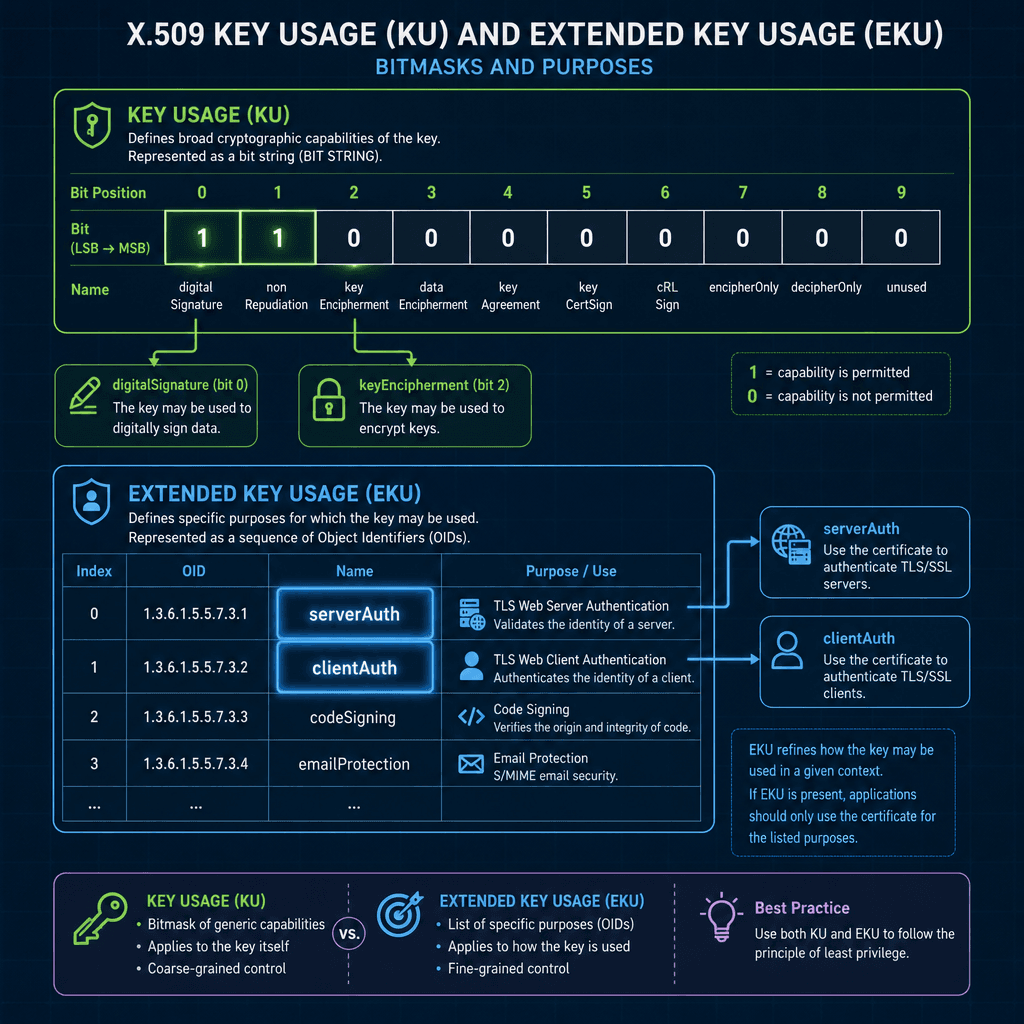
The Key Usage extension is a bitmask that defines the purpose of the key contained in the certificate. If this extension is present, the key MUST ONLY be used for the purposes indicated.
Common flags include:
digitalSignature: Allows the key to sign data (e.g., TLS handshake signatures).keyEncipherment: Allows the key to encrypt other keys (used in RSA key exchange).keyAgreement: Allows the key to participate in key agreement protocols (e.g., Diffie-Hellman).contentCommitment: Ensures non-repudiation.
If a certificate has Key Usage = digitalSignature only, and a client attempts to use it for key encipherment, the validation will fail. This prevents a signing key from being misused for encryption, which could leak private data.
Extended Key Usage (EKU)
While Key Usage defines broad cryptographic capabilities, Extended Key Usage specifies the application-specific purpose. This is critical for distinguishing between client authentication and server authentication.
Common EKU OIDs (Object Identifiers) include:
serverAuth(OID 1.3.6.1.5.5.7.3.1): The certificate is valid for TLS server authentication.clientAuth(OID 1.3.6.1.5.5.7.3.2): The certificate is valid for TLS client authentication (mTLS).codeSigning(OID 1.3.6.1.5.5.7.3.3): The certificate is valid for signing software.
If a certificate has EKU = clientAuth only, it cannot be used by a web server to prove its identity to a browser. The browser’s TLS stack checks the EKU extension and rejects the certificate if serverAuth is not present. This separation ensures that a client certificate issued for internal service-to-service communication cannot be repurposed to impersonate a public web server.
The Chain of Validation
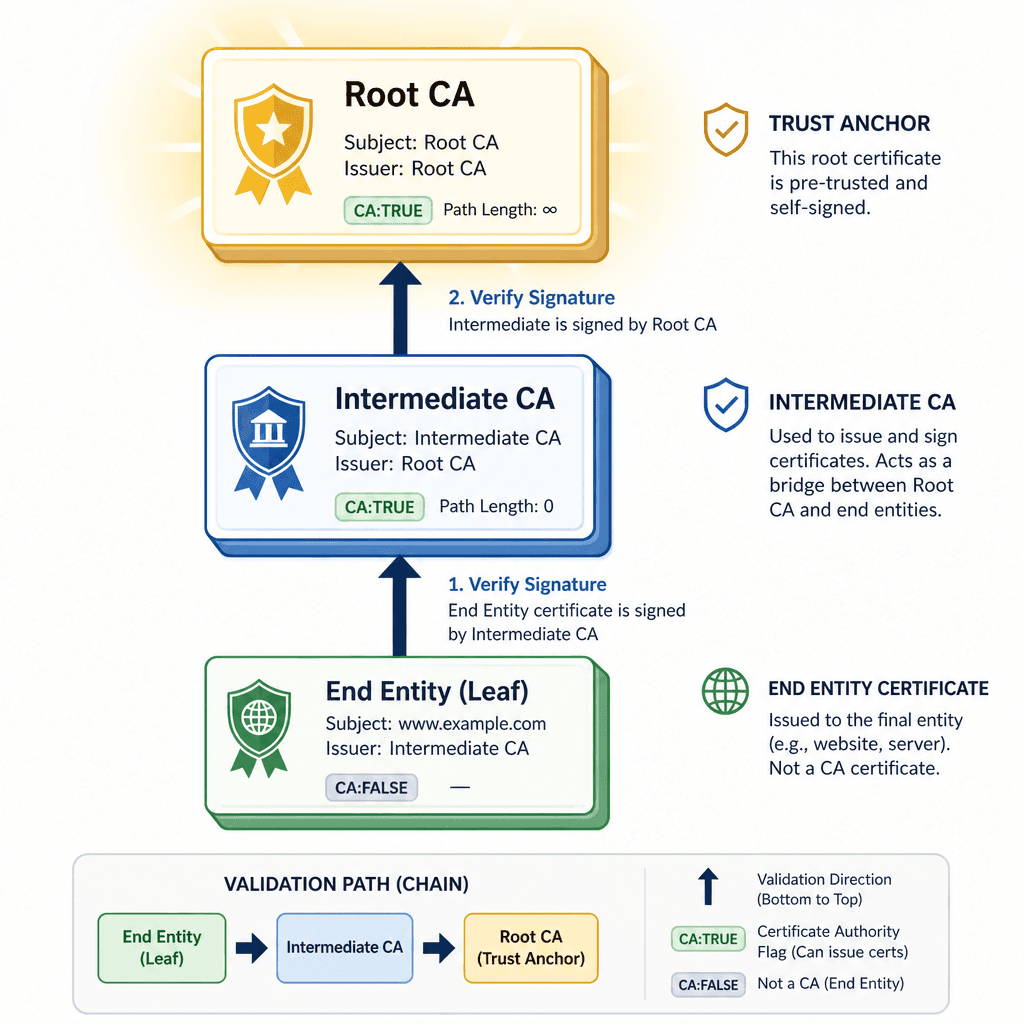
Understanding individual fields is insufficient without understanding how they interact in a chain. A typical TLS connection involves a chain of certificates:
- Root CA: Self-signed, trusted by the operating system or browser.
- Intermediate CA: Signed by the Root CA, issues end-entity certificates.
- End Entity (Leaf): Signed by the Intermediate CA, contains the domain identity.
The validation mechanism walks this chain from leaf to root. For each certificate in the chain, the validator checks:
- Signature: Is the issuer’s signature valid?
- Validity Period: Is the current time within the Not Before/Not After window?
- Basic Constraints: Does the issuer have the
CA:TRUEflag? This prevents an end-entity certificate from issuing other certificates. - Name Constraints: Does the issuer have permission to issue certificates for the requested domain?
If any link in this chain fails these checks, the entire trust relationship collapses. For example, if an Intermediate CA’s certificate has expired, all certificates it signed are invalid, regardless of their own validity periods.
Practical Implications for Engineers
For platform engineers managing PKI, these mechanisms translate to specific operational practices:
- Always use SANs: Never rely on CN for hostname validation. Generate certificates with explicit SAN entries for all aliases.
- Minimize Key Usage: Only include the necessary bits in Key Usage and EKU. A certificate for a web server should have
digitalSignatureandkeyEncipherment(orkeyAgreementfor ECC), andserverAuthin EKU. Avoid includingclientAuthunless necessary. - Monitor Expiry: The validity period is a hard constraint. Automate renewal before the Not After timestamp expires.
- Validate Chains Locally: Use tools like
openssl s_client -verify_return_errorto ensure your certificate chain is complete and valid before deploying to production.
By understanding these fields as active components of the validation algorithm rather than passive metadata, you can design more secure and reliable PKI systems. The certificate is not just a key carrier; it is a policy document that defines exactly who you are, what you can do, and who trusts you.
Conclusion
X.509 certificates are structured policy documents where specific fields dictate validation logic. Misunderstanding the hierarchy and mechanism of Subject Alternative Names (SAN) versus Common Name (CN) is the primary cause of modern TLS failures. By understanding identity resolution, intent constraints, and chain validation, engineers can prevent configuration errors and build secure infrastructures.
Common Pitfalls
Even with theoretical knowledge, implementation errors frequently occur. Below are common pitfalls observed in production environments:
- Relying on CN when SAN is present: As defined by RFC 6125, if a SAN extension exists, the Common Name is ignored for hostname validation. Certificates generated with only a CN will fail validation in modern clients if the SAN is missing or incorrect.
- Missing EKU for serverAuth: Some legacy CAs issue certificates without Extended Key Usage extensions. Modern browsers and clients often require explicit
serverAuthEKU to accept a certificate for TLS handshakes. Omitting this results in handshake failures. - Incomplete certificate chains: Deploying only the leaf certificate without the intermediate CA certificates forces the client to attempt chain building. If the intermediate is not publicly trusted or not provided, the connection fails. Always bundle the full chain.
Practical Takeaways
To ensure consistent TLS security, adhere to these operational rules:
- Always use SAN: Define all hostnames, IPs, and URIs in the SAN extension.
- Minimize Key Usage: Restrict Key Usage and EKU to the minimum required privileges (e.g.,
digitalSignature,serverAuth). - Monitor Expiry: Automate certificate renewal before the
Not Aftertimestamp. - Validate Chains Locally: Test certificate bundles locally using OpenSSL before deployment.
FAQ
What happens if SAN is missing? In modern browsers and clients, if a SAN extension is present but does not contain the requested hostname, validation fails. If no SAN extension is present at all, the client may fall back to checking the Common Name (CN), but this behavior is deprecated and increasingly unsupported.
What is the difference between KU and EKU?
Key Usage (KU) defines broad cryptographic capabilities, such as whether a key can sign data or encrypt other keys. Extended Key Usage (EKU) specifies the application-level purpose, such as serverAuth for web servers or clientAuth for mutual TLS clients.
How to check certificate validity locally?
You can use OpenSSL to verify a certificate chain and its validity. A common command is openssl s_client -connect <host>:<port> -verify_return_error, which attempts to connect and verifies the certificate chain, returning an error code if validation fails.
Related posts
Enabling TLS and mTLS in Spring Boot
A practical guide to configuring TLS and mutual TLS (mTLS) in Spring Boot using SSL bundles and server.ssl properties for secure communication.
X.509 and mTLS for Service Identity
A technical guide to implementing X.509 certificates and mutual TLS for secure service identity in backend systems.
Understanding X.509 Certificates: From Basics to mTLS Implementation
An examination of X.509 certificates, covering core concepts, certificate management, and the implementation of mutual TLS (mTLS) within PKI infrastructure.
