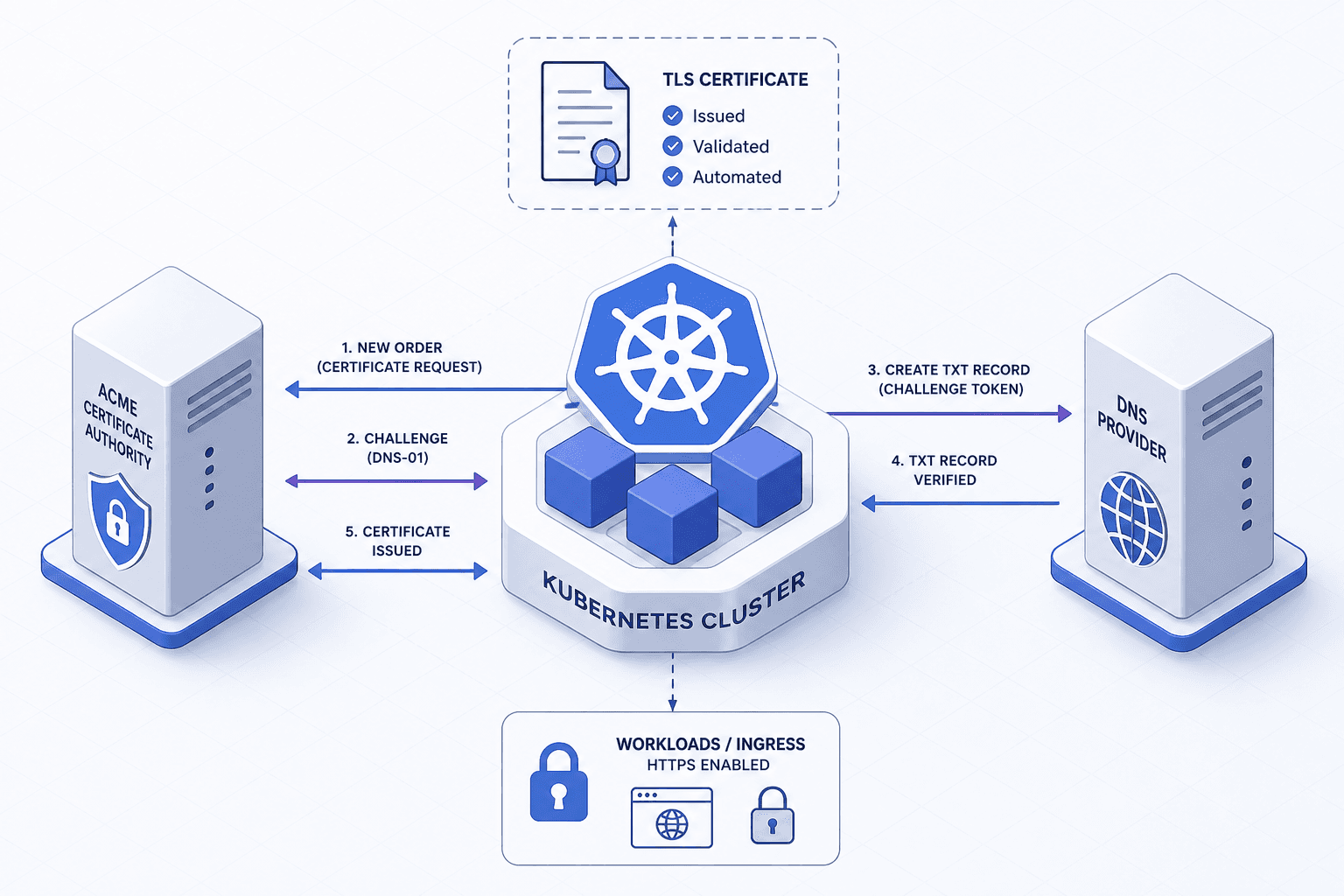
Certificate Lifecycle Automation With ACME
Explore ACME protocol for certificate lifecycle automation, covering cert-manager, challenge types, private PKI, and expiry alerting for platform engineers.
For platform engineers, Transport Layer Security (TLS) certificates are a necessary evil. They are short-lived, fragile, and expensive to manage manually. The Automatic Certificate Management Environment (ACME) protocol solves this by turning certificate issuance into a programmatic API call. When combined with tools like cert-manager and private PKI, ACME allows teams to treat certificates as ephemeral infrastructure rather than static assets.
This article explores the mechanism of ACME, its implementation in Kubernetes via cert-manager, and strategies for integrating private PKI systems.
The ACME Protocol Mechanism
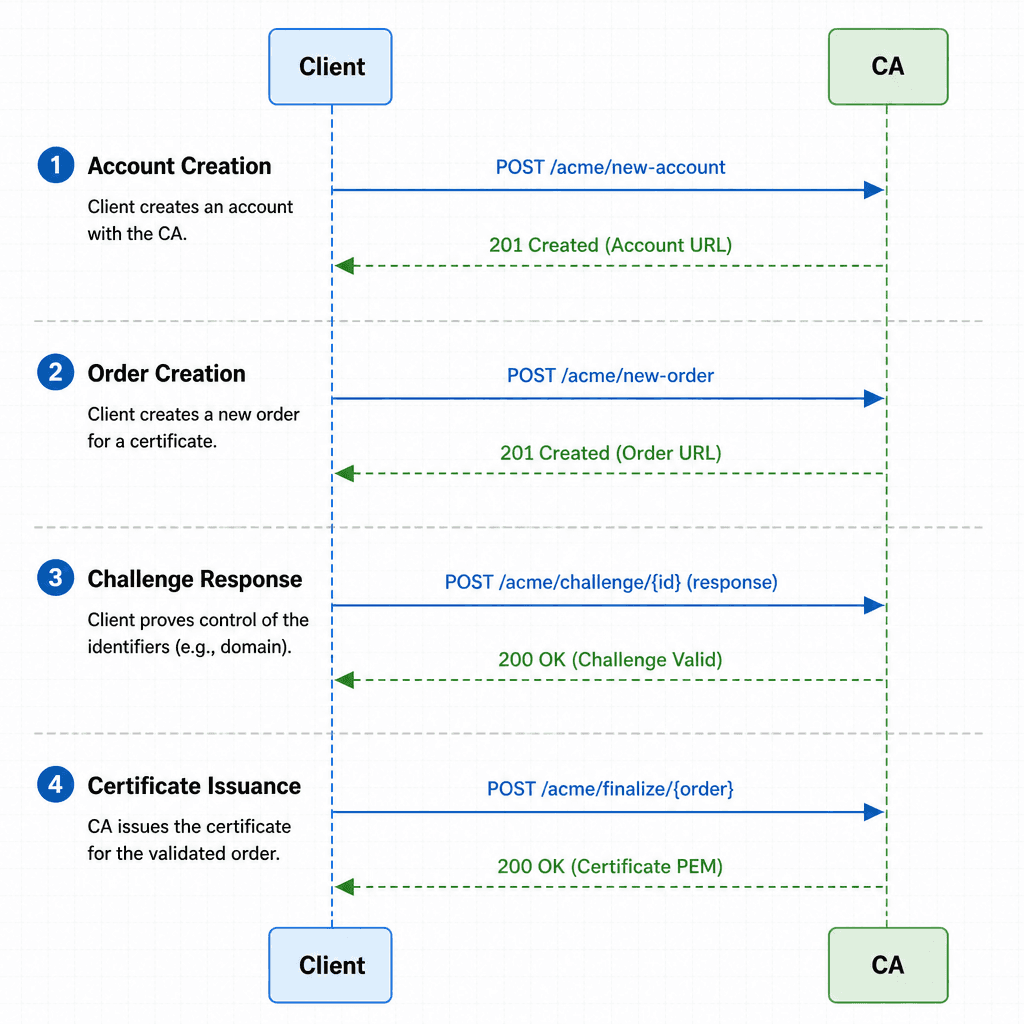
ACME, standardized in RFC 8555, is a protocol for automating the validation of domain control and the issuance of digital certificates. It is stateless and extensible, allowing clients (like cert-manager) to interact with any ACME-compliant Certificate Authority (CA), such as Let's Encrypt or an internal Vault PKI.
The core interaction follows a specific sequence:
- Account Creation: The client creates a key pair and registers with the CA. The CA associates the public key with an account URL.
- Order Creation: The client requests a certificate for one or more domains. The CA responds with a list of challenges it requires to prove ownership of those domains.
- Challenge Response: The client proves control over the domain by completing one of the provided challenge types.
- Certificate Issuance: Once the CA validates the challenge, it issues the certificate.
Challenge Types
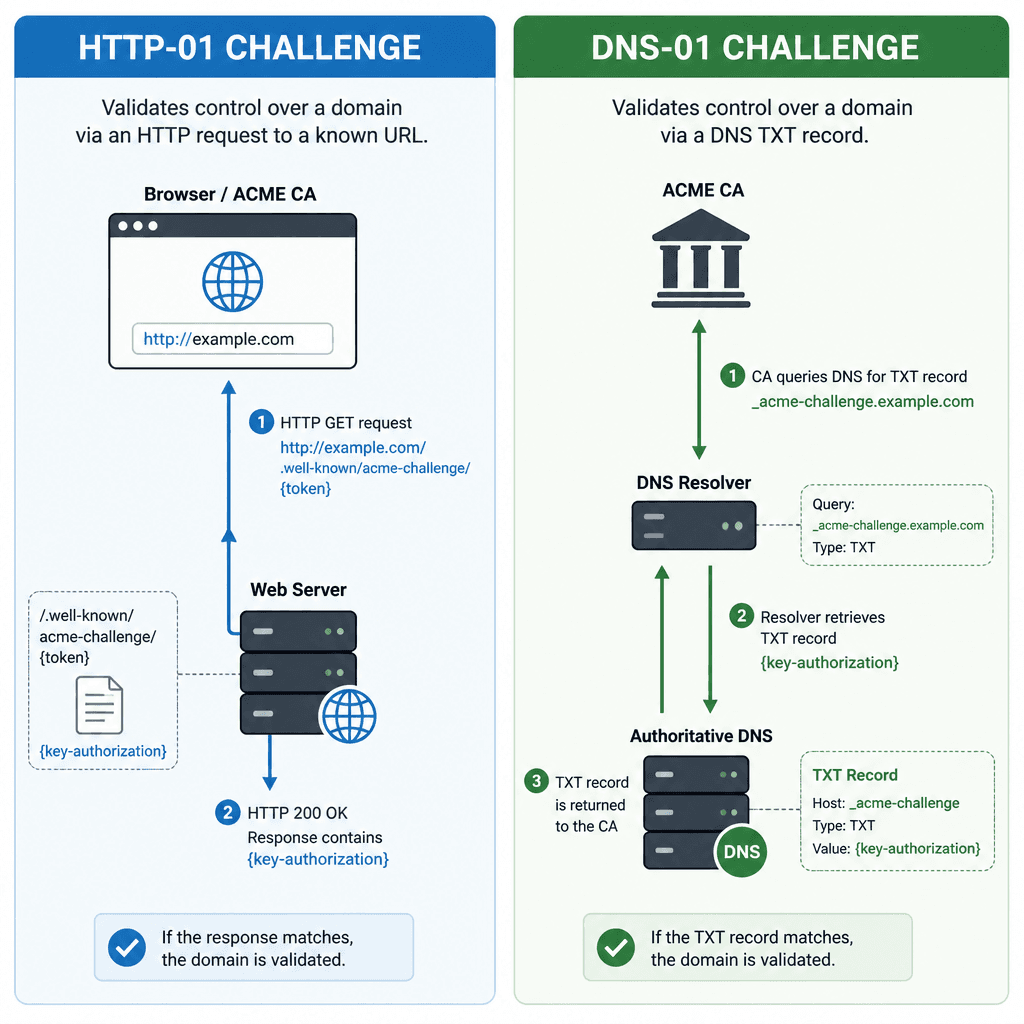
The choice of challenge type dictates how the client proves ownership. The two most common are:
- HTTP-01: The CA sends an HTTP request to
http://<domain>/.well-known/acme-challenge/<token>. The client must respond with a specific token. This requires the domain to be publicly accessible on port 80. - DNS-01: The CA sends a DNS TXT record query for
_acme-challenge.<domain>. The client must create or update this TXT record with the expected token. This works for private/internal domains and supports wildcard certificates (*.example.com).
For platform engineers managing internal services, DNS-01 is often the only viable option because internal domains are not publicly reachable. However, it requires the automation tool to have write access to the DNS provider's API.
Implementing ACME with cert-manager
cert-manager is a Kubernetes-native certificate management controller. It watches for Certificate resources and uses configured Issuers or ClusterIssuers to fulfill them via ACME. For a deeper dive into advanced configurations, refer to the official cert-manager documentation on ACME.
Configuration Example
To automate certificate renewal, you define a ClusterIssuer that specifies the ACME server and the challenge type. Below is a configuration for a DNS-01 challenge using a generic DNS provider (e.g., Cloudflare, Route53).
apiVersion: cert-manager.io/v1
kind: ClusterIssuer
metadata:
  name: letsencrypt-prod
spec:
  acme:
    server: https://acme-v02.api.letsencrypt.org/directory
    email: platform-team@example.com
    privateKeySecretRef:
      name: letsencrypt-prod-key
    solvers:
    - dns01:
        cloudflare:
          email: platform-team@example.com
          apiTokenSecretRef:
            name: cloudflare-api-token-secret
            key: api-token
In this example:
- The
serverfield points to the Let's Encrypt ACME directory. - The
dns01solver instructscert-managerto use DNS-01 challenges. - The
cloudflareblock provides credentials to interact with Cloudflare's API.
When a Certificate resource is created, cert-manager automatically handles the ACME order, challenge, and renewal process. It stores the resulting certificate and private key in a Kubernetes Secret.
Integrating Private PKI
While public CAs like Let's Encrypt are ideal for external-facing services, internal services often require certificates issued by an internal CA. ACME can be used with private PKI systems like HashiCorp Vault or Step CA.
How It Works
Private PKI systems that support ACME expose an ACME-compatible endpoint. For example, Vault's PKI secrets engine can be configured to act as an ACME CA. The process is identical to using a public CA:
- The
ClusterIssuerpoints to the Vault ACME endpoint. - Credentials are configured to allow
cert-managerto authenticate with Vault. cert-managerrequests certificates, and Vault issues them using its internal CA chain.
Security Trade-offs
Using a private PKI with ACME offers several advantages:
- Control: You control the certificate lifetime, key size, and chain of trust.
- Internal Trust: Internal services can trust the internal CA without needing to install public CA certificates.
- Privacy: Certificate issuance details are not exposed to public CAs.
However, it introduces operational complexity. You must maintain the health of the internal CA, manage key storage securely, and ensure that all internal clients trust the internal CA chain. If the internal CA goes down, certificate renewal fails, potentially causing service outages.
Expiry Alerting and Operational Concerns
Automation does not eliminate the need for monitoring. While cert-manager handles renewal, it is crucial to monitor the health of the ACME integration.
Alerting on Expiry
Set up alerts for certificates that are close to expiration. A common practice is to alert when a certificate has less than 30 days remaining. This provides a buffer in case renewal fails.
# Example: Check certificate expiry using openssl
openssl x509 -in cert.pem -noout -enddate
In Kubernetes, you can use Prometheus metrics exposed by cert-manager to alert on certificate age. The metric certmanager_certificate_expiration_timestamp_seconds indicates the expiry time of each certificate.
Key Rotation and Revocation
It is a common misconception that ACME automatically handles key rotation if the private key is lost or compromised. ACME is a protocol for certificate issuance and validation; it does not manage client-side key storage. If a private key is lost, the certificate is useless, and key rotation is a client-side operational task. ACME allows requesting new certificates with new key pairs, but the client is responsible for generating and managing those keys.
Regarding revocation, cert-manager does not automatically revoke certificates based on runtime compromise detection. However, it can be configured to revoke certificates upon resource deletion or via specific issuer configurations. This means revocation is not purely manual, but it requires explicit policy setup rather than automatic runtime response.
Common Pitfalls
When implementing ACME at scale, watch out for these common pitfalls:
- DNS Propagation Delays: For DNS-01 challenges, changes to DNS records can take time to propagate globally. If your automation is too aggressive, you may hit rate limits or face transient failures during renewal.
- CA Rate Limiting: Public CAs like Let's Encrypt enforce strict rate limits (e.g., 50 certificates per registered domain per week). Ensure your automation respects these limits to avoid being blocked.
- Internal CA Single Point of Failure: In private PKI setups, if your internal CA (e.g., Vault) becomes unavailable, all certificate renewals fail. Implement high availability for your internal CA infrastructure to prevent service outages.
Practical Takeaways
- ACME automates issuance: It removes the manual burden of certificate ordering and validation.
- cert-manager handles K8s integration: It provides a native way to manage certificates in Kubernetes clusters.
- Private PKI offers control but adds complexity: While it provides better internal trust and privacy, it requires careful maintenance of the internal CA infrastructure.
- Monitoring is essential: Automation is not "set and forget." Continuous monitoring of certificate expiry and ACME integration health is critical.
FAQ
Can ACME be used with internal CAs?
Yes. Many private PKI solutions, such as HashiCorp Vault and Step CA, support the ACME protocol, allowing cert-manager to issue certificates from internal authorities just as it would from public ones.
What happens if the ACME server is down? If the ACME server (whether public or private) is unavailable, certificate renewal will fail. Existing certificates remain valid until they expire. If they expire before the server is restored, services relying on them may fail TLS handshakes. This highlights the importance of monitoring and redundancy.
How does cert-manager handle key rotation?
cert-manager generates and manages the private keys required for ACME challenges and certificate issuance. If a key is compromised, you must manually rotate the key by deleting the associated secret and triggering a new certificate request, or by configuring policies that automatically delete secrets upon certificate expiration.
Conclusion
ACME transforms certificate management from a manual, error-prone process into an automated, reliable workflow. By using cert-manager and ACME, platform engineers can ensure that all services, whether public or internal, have valid TLS certificates without manual intervention. Integrating private PKI extends these benefits to internal services, providing greater control and security. However, automation requires robust monitoring and alerting to handle failures and maintain trust.
Call to Action
Ready to improve your certificate management? Audit your current certificate rotation policy today to identify any manual processes or single points of failure. You can also try the provided cert-manager snippet locally in a development cluster to see ACME automation in action.
Related posts
Certificate Rotation and Truststore Operations on Kubernetes
Explore certificate rotation and truststore operations in Kubernetes, covering cert-manager, CA rotation, and expiry monitoring for platform engineers.
GitOps Security: Secrets, Access, and Drift
A guide to securing GitOps workflows using SOPS, Sealed Secrets, and External Secrets Operator while managing access and detecting drift.
Generating SBOMs for Kubernetes Workloads
A guide to generating Software Bill of Materials (SBOMs) for Kubernetes workloads using tools like Syft and Trivy to improve vulnerability management.
