Autoscaling LLM Workloads Without Cold-Start Pain
Strategies for autoscaling LLM workloads effectively, managing cold starts, HPA, queue depth, and scale-to-zero patterns.
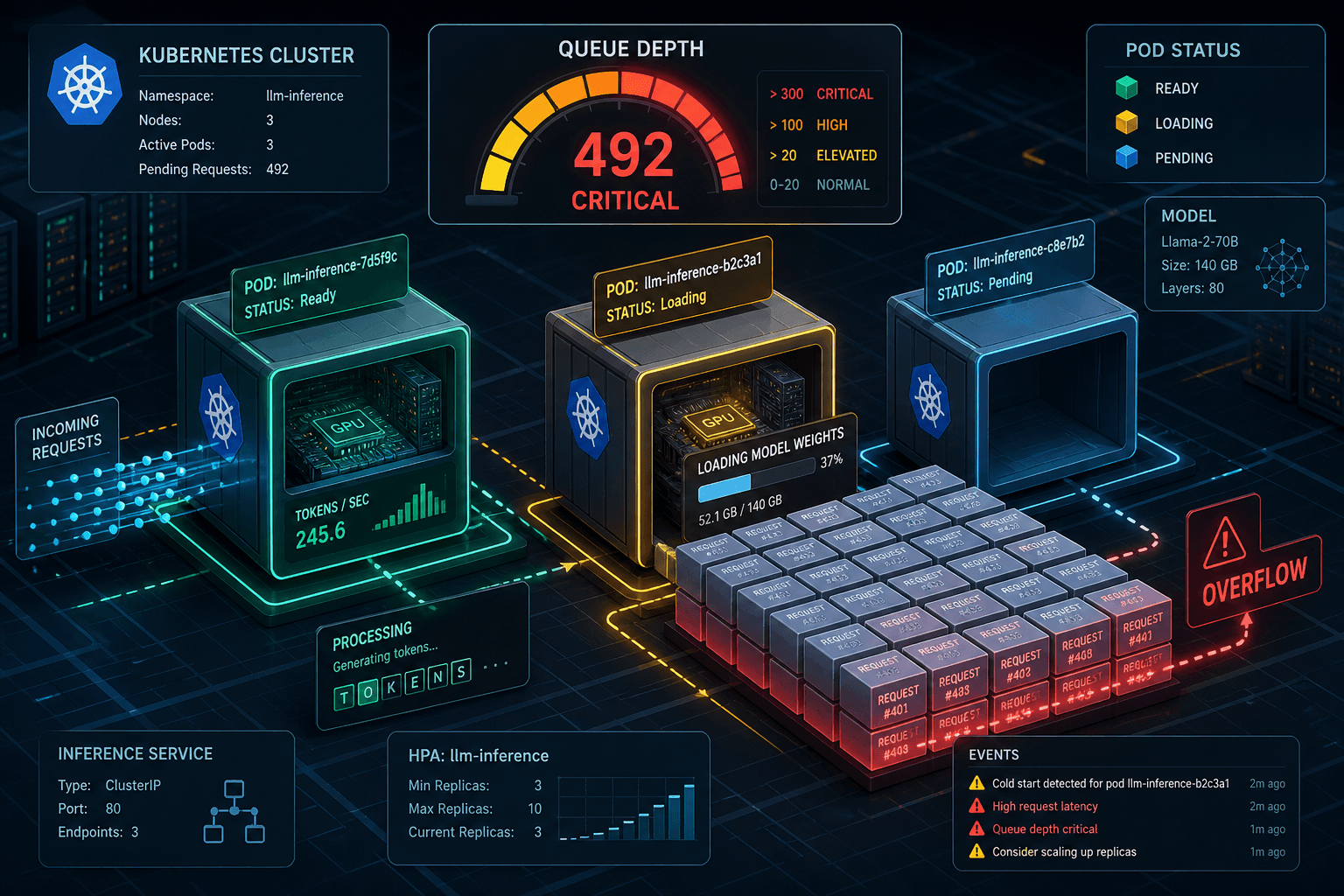
In standard web application architecture, autoscaling is a reactive safety net. If CPU usage spikes, Kubernetes spins up new pods. The assumption is that a new pod can handle a request within milliseconds. For Large Language Model (LLM) inference, this assumption is catastrophically false. Loading a 7B-parameter model into GPU memory can take 10–30 seconds. During this window, the pod is "running" but functionally dead. If you rely on standard Horizontal Pod Autoscaler (HPA) based on CPU or latency, you will face cascading failures: requests pile up in the queue, latency spikes, HPA triggers, but the new pods are still loading models when the old ones crash under load.
The core problem is not scaling speed; it is initialization latency. To solve this, we must shift from reactive scaling based on resource utilization to proactive scaling based on queue depth and predictive pre-warming.
The Anatomy of the LLM Cold Start
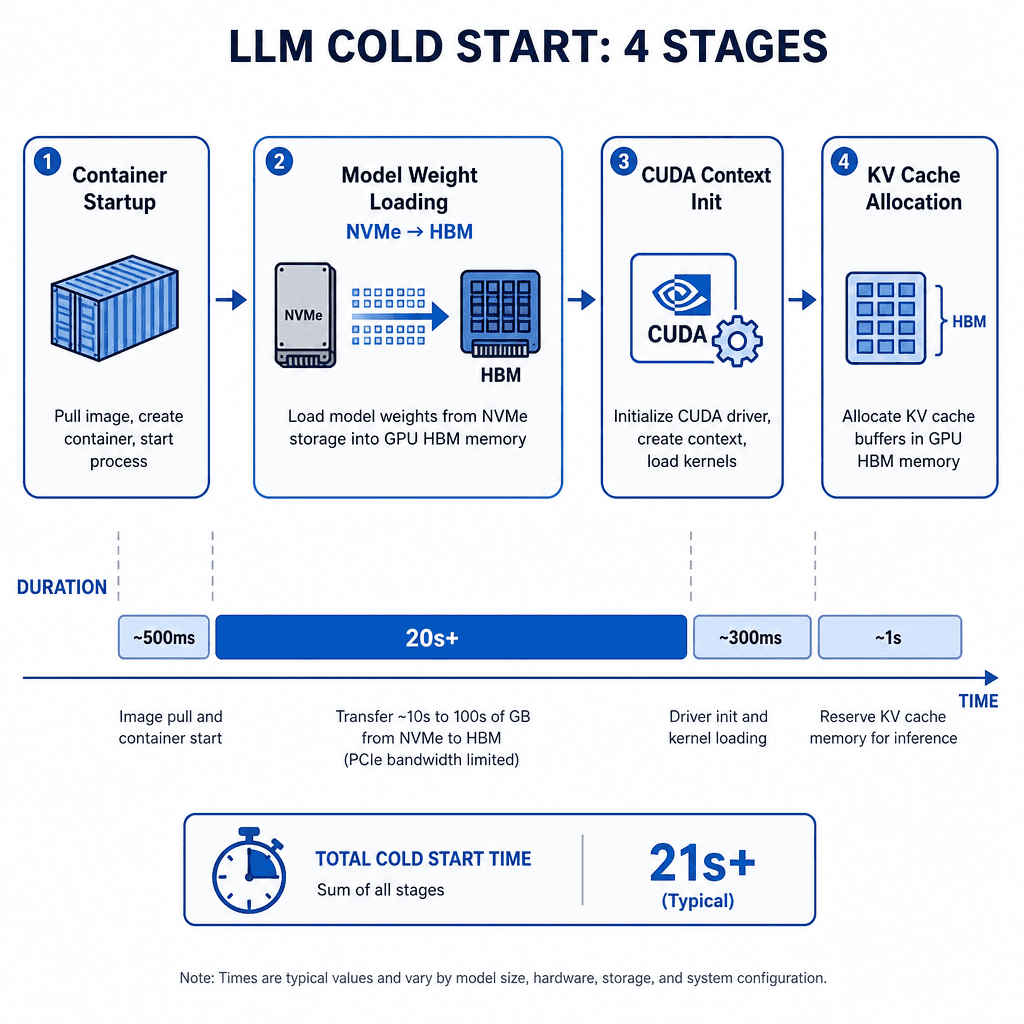
To understand why standard autoscaling fails, we must look at the mechanism of a GPU cold start. When a Kubernetes pod starts an LLM inference container (e.g., running vLLM, TGI, or TensorRT-LLM), the following sequence occurs:
- Container Startup: The OS initializes the container runtime (~500ms).
- Model Weight Loading: The model weights, often stored in various formats (e.g., GGUF, Safetensors) on NVMe storage, are read into system RAM and then transferred to GPU High Bandwidth Memory (HBM). For a 70B parameter model in FP16, this is ~140GB of data. Even with NVMe Gen4 speeds (7GB/s), this transfer takes ~20 seconds.
- GPU Context Initialization: CUDA contexts are created, and kernels are compiled or cached.
- KV Cache Allocation: The Key-Value cache, which stores attention states for ongoing generations, is pre-allocated. If not pre-allocated, every request incurs a dynamic allocation penalty.
During steps 2–4, the pod is registered in the Kubernetes Service mesh, but it cannot process requests. If a load balancer routes traffic to this pod, the request times out. Standard HPA monitors metrics after the pod is healthy, but by then, the queue has already grown.
Why Standard HPA Fails
Kubernetes HPA typically scales based on CPU utilization or custom metrics like HTTP requests per second. In an LLM context, this creates a dangerous feedback loop:
- Latency Spike: A sudden influx of requests hits existing pods. Latency increases.
- HPA Trigger: HPA detects high latency or CPU saturation and decides to scale up.
- Scale-Up Delay: Kubernetes schedules new pods. This involves node selection, image pulling (if not cached), and container startup.
- Cold Start Overlap: New pods begin loading models. They do not accept traffic until they report
Ready. - Queue Overflow: In the time it takes new pods to become ready (30s+), the existing pods are overwhelmed. The queue depth grows exponentially.
- Thundering Herd: When the new pods finally become ready, they may all start accepting traffic simultaneously, causing another latency spike, triggering further scaling.
This oscillation is inefficient and painful. The system is always reacting to the past, never anticipating the future.
Queue Depth: The Leading Indicator
The solution is to use Queue Depth as the primary scaling metric. Queue depth is the number of requests currently waiting for a GPU slot. Unlike CPU or latency, queue depth is a leading indicator of impending failure.
Implementing Queue Depth Monitoring
Most inference engines do not expose queue depth natively in Prometheus. You must instrument your serving layer. Here’s how:
- Sidecar Proxy: Deploy a lightweight proxy (e.g., Envoy, Nginx, or a custom Go/Rust sidecar) in front of the inference pods. This proxy tracks the number of pending requests.
- Custom Metrics API: Expose the queue depth as a custom metric via the Kubernetes Custom Metrics API.
- KEDA Integration: Use KEDA (Kubernetes Event-Driven Autoscaler) instead of standard HPA. KEDA can scale pods based on the value of a queue depth metric.
apiVersion: keda.sh/v1alpha1
kind: ScaledObject
metadata:
  name: llm-scaler
spec:
  scaleTargetRef:
    name: llm-deployment
  triggers:
  - type: prometheus
    metadata:
      serverAddress: http://prometheus:9090
      metricName: http_requests_pending
      query: sum(http_requests_pending{pod=~"llm-.*"})
      threshold: "5" # Scale up if queue depth > 5
In this configuration, KEDA monitors the sum of pending requests across all pods. If the queue depth exceeds 5, KEDA scales up the deployment. Crucially, KEDA can be configured to scale down slowly, preventing flapping.
Predictive Scaling and Pre-Warming
Queue depth monitoring is reactive. For predictable traffic patterns (e.g., business hours, batch processing windows), we can go proactive.
Pre-Warming Strategy
Instead of waiting for the queue to fill, we can pre-warm pods. This involves maintaining a "warm pool" of pods that have loaded models but are idle.
- Always-On Replica: Keep one replica of the model always running, regardless of load. This acts as a buffer for sudden spikes.
- Scheduled Scaling: Use CronJobs or a custom controller to scale up pods before expected traffic peaks. For example, if traffic typically spikes at 9 AM, start scaling at 8:50 AM.
- Predictive Autoscaling: Use historical traffic data to train a simple model that predicts queue depth. Feed this prediction into KEDA.
# Pseudocode for a predictive scaler
def predict_queue_depth(hour):
    # Load historical average queue depth for this hour
    historical_avg = get_historical_data(hour)
    # Add a safety margin (e.g., 20%)
    predicted = historical_avg * 1.2
    return int(predicted)

# Update KEDA target value based on prediction
update_keda_target(predict_queue_depth(current_hour))
This approach ensures that pods are ready to accept traffic before requests arrive, eliminating cold-start latency for the user.
Scale-to-Zero: When It Makes Sense
Scale-to-zero (scaling replicas to 0 when idle) is a cost-saving feature that is often misapplied to LLMs.
The Cost of Scale-to-Zero
Every time a pod scales from 0 to 1, you incur the full cold start penalty. For interactive chat applications, this is unacceptable. Users will experience timeouts or slow first-token latency.
Hybrid Approach
For low-traffic or batch inference workloads, scale-to-zero can be viable if combined with pre-warming:
- Warm Pool: Keep one replica always on (cost of one GPU).
- Scale-to-Zero for Extra Capacity: Scale additional replicas to zero when idle. When traffic increases, scale up. The warm pool handles the initial spike, giving time for the new replicas to load.
- Batch Inference: For batch jobs (e.g., summarization, embedding generation), scale-to-zero is ideal. Jobs are queued, and pods are spun up only when a batch arrives. Once processing is complete, pods scale to zero.
# KEDA with minReplicas=1 to prevent full scale-to-zero
apiVersion: keda.sh/v1alpha1
kind: ScaledObject
metadata:
  name: llm-scaler
spec:
  minReplicaCount: 1  # Always keep one pod warm
  maxReplicaCount: 10
  scaleTargetRef:
    name: llm-deployment
  triggers:
  - type: prometheus
    metadata:
      metricName: http_requests_pending
      threshold: "5"
This hybrid approach balances cost and performance. You pay for one GPU always, but you avoid cold-start latency for bursty traffic.
Common Pitfalls
Even with KEDA and pre-warming, several pitfalls can undermine your autoscaling strategy.
- Ignoring GPU Memory Fragmentation: As requests come and go, GPU memory can become fragmented. If you don't monitor fragmentation, you might have enough total free memory but no contiguous block large enough for a new model or KV cache, leading to allocation failures even when "scaled out."
- Over-provisioning Warm Pools: Maintaining too many warm replicas incurs significant idle GPU costs. Without strict limits on
maxReplicaCountand careful tuning ofminReplicaCount, your cloud bill can spiral out of control. - Neglecting Network Bandwidth during Scale-Up: When multiple pods scale up simultaneously, they all attempt to pull large model weights from the container registry or shared storage. This can saturate the network, slowing down the weight loading process for all pods and exacerbating the cold start problem. Use local caching or efficient distribution strategies (like Ray) to mitigate this.
Practical Takeaways
To implement effective autoscaling for LLM workloads, remember these key strategies:
- Monitor Queue Depth: Use queue depth as your primary leading indicator, not CPU or latency.
- Use KEDA: Leverage KEDA for fine-grained control over scaling triggers and cooldown periods.
- Implement Pre-Warming: Maintain a warm pool of at least one replica to handle initial spikes without delay.
- Anticipate Traffic: Use historical data to predict demand and scale proactively before the queue builds up.
- Balance Cost and Performance: Choose between scale-to-zero and always-on replicas based on your specific workload type (interactive vs. batch).
FAQ
Can I use standard HPA for LLM workloads? Standard HPA is generally unsuitable because it reacts too slowly. By the time HPA detects high CPU or latency and scales up, the cold start has already caused timeouts. KEDA, which can act on queue depth, is a much better fit.
How much does pre-warming cost? Pre-warming costs the price of keeping at least one GPU instance running 24/7. For many production systems, this cost is negligible compared to the revenue loss or user churn caused by cold-start timeouts.
What is the minimum warm pool size? The minimum warm pool size is typically one replica. This single pod handles initial bursts and provides a buffer while additional pods are spinning up. For extremely high-concurrency scenarios, you might increase this, but one is the baseline for avoiding cold starts.
How do I handle sudden, unpredictable traffic spikes?
For unpredictable spikes, relying solely on queue depth with KEDA is your best defense. Ensure your cooldownPeriod is set appropriately so that KEDA doesn't flap up and down. Additionally, ensure your underlying infrastructure has enough node capacity to schedule new pods quickly.
Conclusion
Autoscaling LLM workloads requires a fundamental shift in mindset. We cannot treat GPUs like CPUs. The cold start penalty is real, measurable, and devastating to user experience if ignored. By monitoring queue depth, using KEDA for fine-grained control, and implementing pre-warming strategies, we can build systems that scale efficiently without the pain of cold starts. The key is to anticipate demand, not just react to it.
Related posts
Shadow Traffic for LLM Deployments
Explore how shadow traffic and traffic mirroring enable safe comparison of candidate LLM models in production without impacting user experience.
Semantic Caching That Actually Saves Money
Learn how semantic caching reduces LLM costs by storing similar prompts, managing similarity thresholds, and handling invalidation for platform engineers.
Should You Fine-Tune? A Decision Framework
A decision framework for ML engineers and managers to determine when to fine-tune large language models versus using prompting techniques.
