Chunking Complex PDFs: Tables, Columns & Scans
Strategies for chunking complex PDFs with tables, columns, and scanned images for accurate data ingestion.
Chunking PDFs That Fight Back: Tables, Columns, and Scans
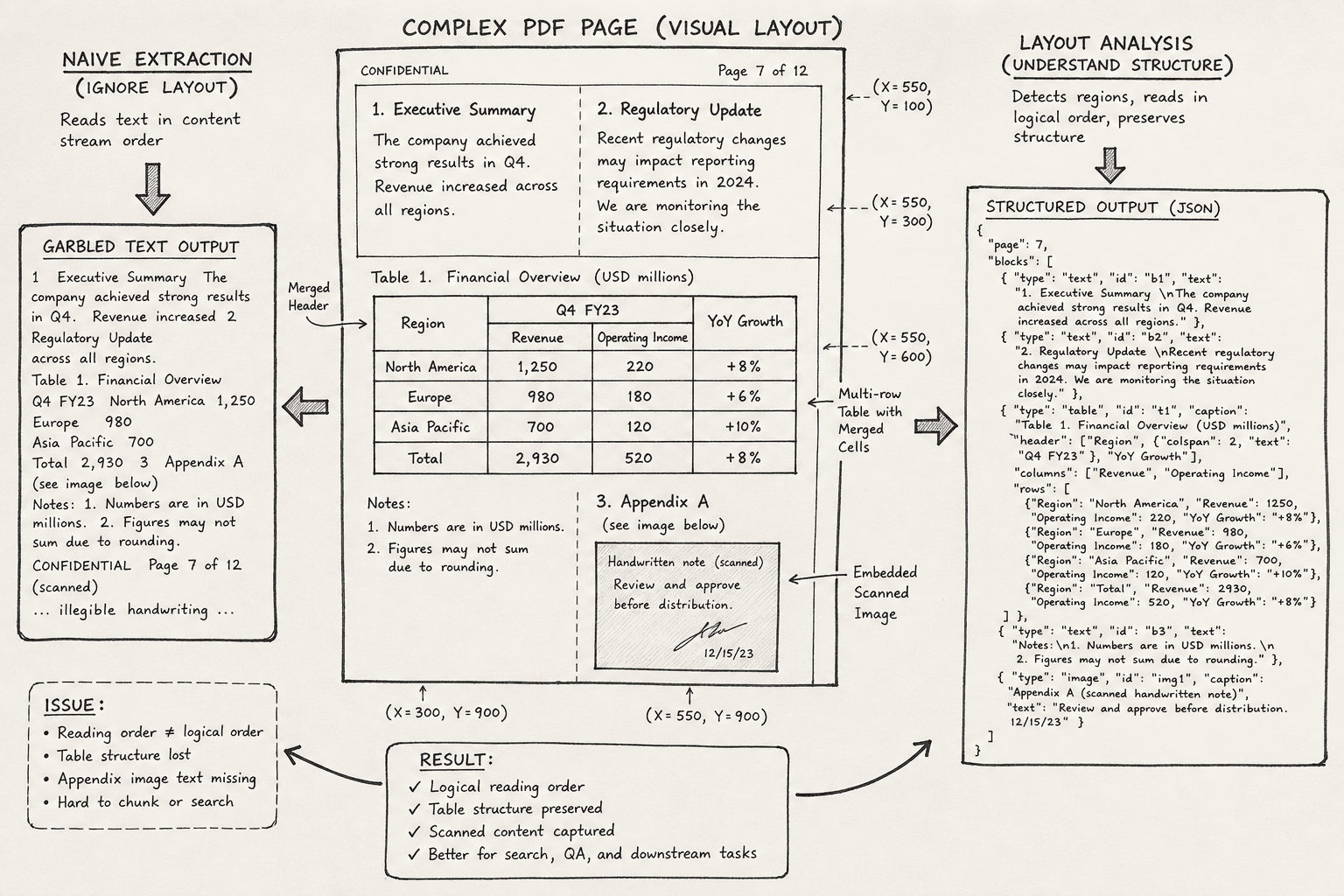
Most data engineers assume that "parsing a PDF" is a solved problem. They grab a library, extract the text, and feed it into a vector database. This works for a single-column memo. It fails catastrophically for a financial report with two columns, a merged table, and a scanned appendix.
The root cause is a fundamental mismatch in data representation. PDFs do not store semantic structure like <paragraph>, <table>, or <heading>. They store a canvas with absolute X/Y coordinates and drawing commands. When you chunk a PDF, you are not chunking content; you are chunking a visual layout that has no inherent reading order.
To ingest complex PDFs accurately, you must reconstruct the logical document flow before you split it into chunks. This requires a three-stage pipeline: Layout Analysis, Structural Reconstruction, and Semantic Chunking.
The Coordinate Trap
Consider a standard PDF generated from a Word document with two columns. The PDF specification defines text positions using a content stream. A line of text in the left column might be at (Y=700, X=50), while the corresponding line in the right column is at (Y=700, X=300).
If you use a naive text extraction tool that simply concatenates all text found at Y=700 from left to right, you get garbage:
"Left Column Sentence A Right Column Sentence A Left Column Sentence B Right Column Sentence B"This breaks semantic meaning. The model cannot distinguish that these are two separate parallel narratives. The problem is that the PDF format prioritizes rendering fidelity over logical flow. The Content-Stream operator Tj places text at specific coordinates, but it does not define precedence (ISO 32000-1:2008, Section 9.4.3). This process is known as layout analysis, where you determine the logical reading order from visual cues rather than relying on the raw stream order.
Column Reordering Mechanism
Before chunking, you must perform Layout Analysis to determine the reading order. The most robust mechanism for multi-column documents is vertical whitespace detection.
Step 1: Detect Column Boundaries
You analyze the document page by page. For each page, you project all text bounding boxes onto the X-axis. You look for large vertical gaps where no text exists. These gaps indicate column separators.
Using pdfplumber, you can extract character-level bounding boxes:
import pdfplumber

with pdfplumber.open("report.pdf") as pdf:
    page = pdf.pages[0]
    # Extract all characters with their bounding boxes
    chars = page.chars

    # Group characters into lines based on Y-coordinate proximity
    # ... logic to cluster Y-values ...

    # Project X-coordinates to find gaps
    x_positions = [c['x0'] for c in chars]
    # Identify gaps > threshold (e.g., 50 points)
    column_boundaries = identify_vertical_gaps(x_positions)
Step 2: Sort by Reading Order
Once you have column boundaries, you sort text blocks. The algorithm is:
- Cluster by Y-coordinate: Group lines that share the same vertical position (within a tolerance, e.g., ±5 points).
- Sort by X-coordinate within Cluster: For each line cluster, sort the blocks from left to right only if they fall within the same column.
- Sort Clusters by Y-coordinate: Process lines from top to bottom.
This reconstructs the logical flow: Left Column Line 1 → Left Column Line 2 → Right Column Line 1 → Right Column Line 2.
Table Reconstruction Logic
Tables are the hardest part of PDF parsing because they often lack explicit grid lines. They are visually represented by aligned text blocks. If you chunk a table row-by-row without reconstruction, you lose the relationship between headers and values.
Mechanism: Alignment Clustering
Instead of treating a table as text, treat it as a grid.
- Extract Cell Candidates: Identify bounding boxes that are likely cells (rectangular, aligned).
- Detect Horizontal Lines: Find Y-coordinates where text aligns across the full width of the table. These define row boundaries.
- Detect Vertical Lines: Find X-coordinates where text aligns. These define column boundaries.
If explicit lines are missing, use text alignment clustering. Group cells by their left (x0) and top (y0) coordinates. Cells with similar x0 values belong to the same column. Cells with similar y0 values belong to the same row.
# Pseudo-code for table extraction using pdfplumber's built-in detector
with pdfplumber.open("report.pdf") as pdf:
    page = pdf.pages[0]
    tables = page.extract_tables()

    for table in tables:
        # Convert to structured JSON
        structured_data = []
        for row in table:
            structured_data.append({
                "row_id": len(structured_data),
                "cells": [cell.strip() for cell in row if cell]
            })
Once extracted, convert the table to CSV or JSON and chunk that structured data separately. Do not chunk the raw text representation of the table. Accurate document ingestion requires preserving these key-value relationships for effective retrieval.
The Scanned Document Fallback
When the PDF is an image scan, there is no text stream. The Content-Stream is empty. You must use OCR (Optical Character Recognition) to generate text and bounding boxes.
Critical Error: Ignoring BBOX Metadata
A common mistake is to run OCR and only keep the text string. This destroys the layout information. You must retain the Bounding Box (BBOX) metadata for every word or line.
{
  "text": "Revenue",
  "bbox": [50, 100, 100, 120],
  "page": 1
}
With BBOXes, you can apply the same column detection and table reconstruction logic used for native PDFs. The OCR engine provides the visual structure; your pipeline provides the semantic ordering.
Tooling Choice
For high accuracy, consider LLM-based OCR or specialized engines like Amazon Textract or Azure Form Recognizer. They provide pre-built JSON structures with blocks that include bounding box coordinates.
{
  "blocks": [
    {
      "text": "Total Sales",
      "boundingBox": [0.1, 0.2, 0.5, 0.3],
      "confidence": 0.99
    }
  ]
}
For data engineering pipelines, this step is critical. Use these bounding boxes to reconstruct the layout before chunking. If you skip this step, your chunks will be unordered fragments of text, useless for downstream NLP tasks or RAG (Retrieval-Augmented Generation) systems.
Conclusion
Chunking complex PDFs is not a text processing problem; it is a layout reconstruction problem.
- Analyze Layout: Detect columns, tables, and headers using bounding box geometry.
- Reconstruct Flow: Sort text blocks by reading order, not just appearance order.
- Structure Data: Convert tables to structured formats (JSON/CSV) before chunking.
- Handle Scans: Use OCR with BBOX preservation to mimic native PDF structure.
By treating the PDF as a visual canvas that must be decoded into semantic structure, you avoid the garbage-in-garbage-out trap. Your vector database will contain meaningful contexts, not just fragmented words.
Related posts
Multimodal Retrieval: Images, Tables, and PDFs
Explore techniques for multimodal retrieval including image, table, and PDF processing using vision embeddings and document AI.
Continued Pretraining for Domain Adaptation
Explore continued pretraining techniques for domain adaptation, including corpus mixing and handling drift in ML models.
Incremental Indexing: Keeping Your Vector Store Fresh
Explore incremental indexing techniques like CDC, upserts, and tombstones to maintain vector store freshness without full reindexing.
