Multimodal Retrieval: Images, Tables, and PDFs
Explore techniques for multimodal retrieval including image, table, and PDF processing using vision embeddings and document AI.
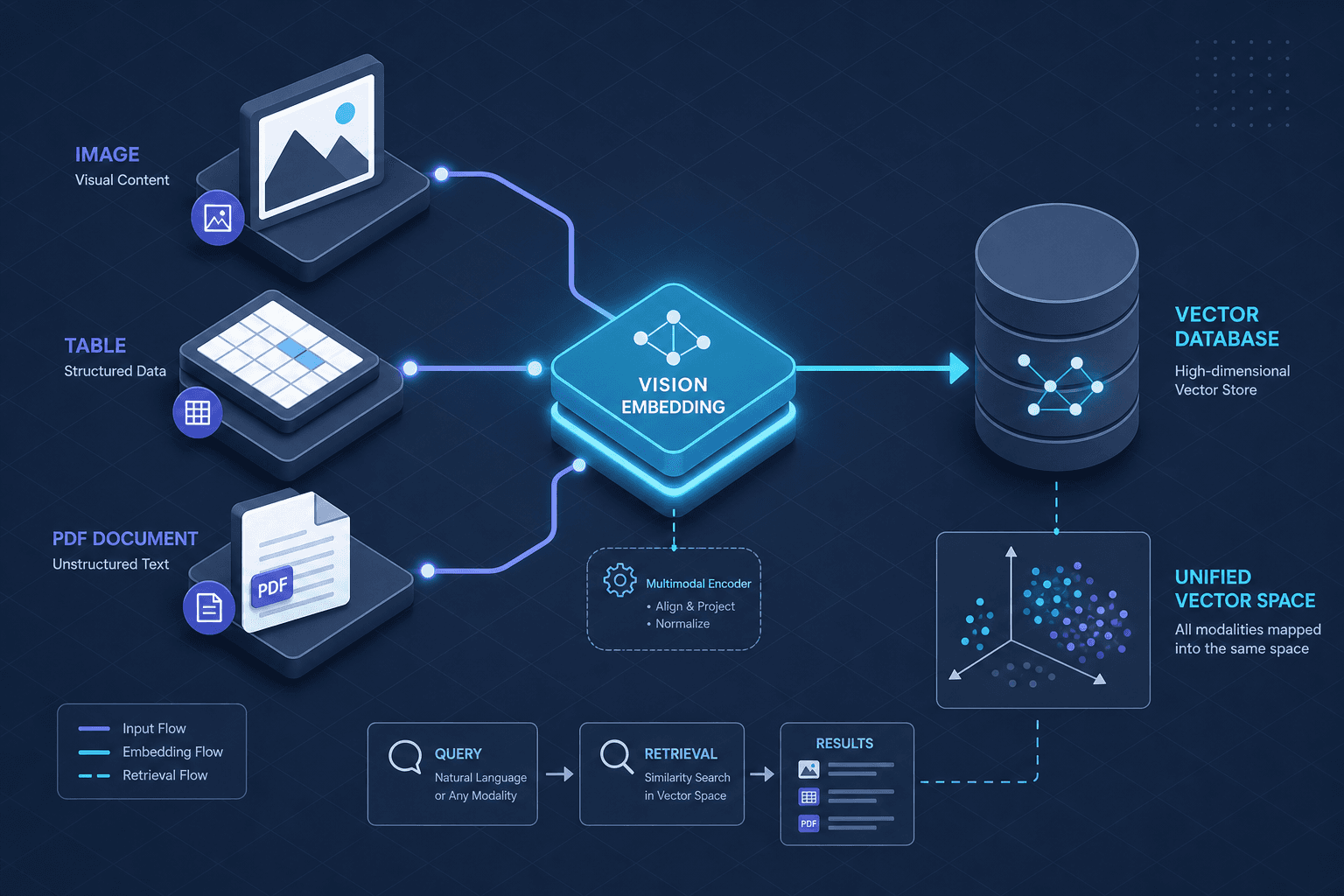
Standard Retrieval-Augmented Generation (RAG) systems often struggle with multimodal retrieval tasks where unstructured data is involved. When a user requests specific financial charts, a text-only system fails because the question contains no keywords present in the image file. The core problem is that unstructured data—PDFs, scanned documents, images—contains semantic information encoded in spatial relationships, not just lexical tokens. To build effective multimodal retrieval, we must move beyond simple Optical Character Recognition (OCR) and adopt vision embeddings and layout-aware parsing to capture spatial semantics.
This article details the mechanism for handling three critical modalities: raw images, structured tables, and complex PDFs. We will explore how vision embeddings create a unified vector space and how document AI pipelines extract structure before embedding.
Why OCR-First Fails
A naive approach to multimodal retrieval is to run OCR on every page, embed the resulting text, and store it in a vector database. This fails for two reasons:
- Loss of Spatial Context: OCR outputs linear text. In a table, "Revenue" and "Q3" might be adjacent in the text stream but far apart in the grid structure. A text embedding cannot distinguish between a header and a data cell without explicit structural markers.
- Visual Semantics Ignored: An image of a graph conveys trends. OCR extracts axis labels but misses the curve shape, which is often the primary semantic signal.
The solution is to treat visual layout as a first-class citizen in the retrieval pipeline.
Vision Embeddings: Bridging Images and Text
Vision embeddings allow us to search for images using text queries. The most common mechanism is the use of contrastive learning models like CLIP (Contrastive Language-Image Pre-training).
Mechanism: Dual-Encoder Architecture
CLIP uses two separate encoders: a Vision Encoder (usually ViT - Vision Transformer) and a Text Encoder (Transformer). Both are trained to map their inputs into a shared high-dimensional vector space (typically 512 or 768 dimensions).
During training, the model minimizes the cosine distance between matching image-text pairs while maximizing it for mismatched pairs. This alignment means that the vector for "a photo of a cat" is geometrically close to the vector for an actual image of a cat.
# Conceptual example using Hugging Face Transformers
from transformers import CLIPProcessor, CLIPModel
import torch

model = CLIPModel.from_pretrained("openai/clip-vit-base-patch32")
processor = CLIPProcessor.from_pretrained("openai/clip-vit-base-patch32")

# Encode text query
text_inputs = processor(text=["a diagram of a neural network"], return_tensors="pt", padding=True)
text_embeddings = model.get_text_features(**text_inputs)

# Encode image
image_inputs = processor(images=[image], return_tensors="pt", padding=True)
image_embeddings = model.get_image_features(**image_inputs)

# Compute similarity
similarity = torch.cosine_similarity(text_embeddings, image_embeddings)
In a retrieval system, you pre-compute image embeddings and store them in your vector database. At query time, you embed the user's text query and perform a nearest-neighbor search. This allows semantic retrieval like "find all diagrams showing error handling" across a corpus of images.
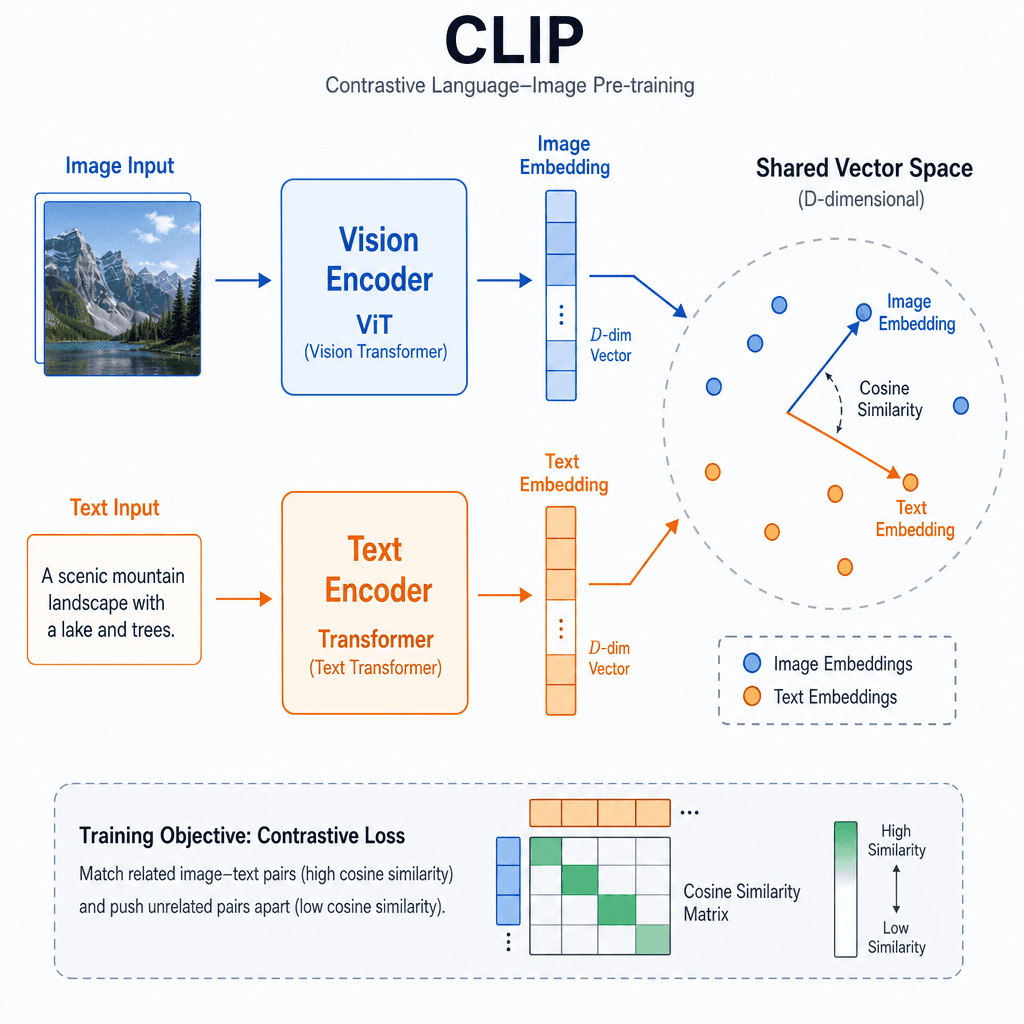
Table Extraction: Structure Before Embedding
Tables are the most challenging modality because they combine text with rigid grid structures. Embedding raw OCR text from a table results in noise. The correct mechanism is layout-aware extraction.
Mechanism: Object Detection and Grid Reconstruction
Modern Document AI models (e.g., Microsoft's LayoutLMv3, Microsoft's Table Transformer) use a multi-task learning approach:
- Object Detection: Identify bounding boxes for rows, columns, cells, and headers.
- Cell Classification: Classify each cell's role (header, data, footer).
- Grid Reconstruction: Assemble these boxes into a logical grid structure, handling merged cells and spanning rows.
Once the structure is extracted, you can create a structured representation (JSON or HTML) that preserves relationships.
{
  "table_id": "page_1_table_0",
  "headers": ["Region", "Q3 Revenue", "YoY Growth"],
  "rows": [
    {
      "cells": ["North America", "$1.2B", "+5%"]
    },
    {
      "cells": ["Europe", "$0.8B", "-2%"]
    }
  ]
}
This structured data is then embedded. You can embed the header row separately from the data rows, or concatenate them with structural markers (e.g., <header>Region</header>). This preserves the semantic link between the column name and its values.
PDF Processing: The Hybrid Pipeline
PDFs are not a single modality; they are containers for text, images, vector graphics, and layout instructions. A robust multimodal retrieval pipeline for PDFs uses a hybrid approach.
Step 1: Layout Analysis
Use a Document AI service (AWS Textract, Azure AI Document Intelligence, or open-source tools like Unstructured.io) to parse the PDF. The output should include:
- Text Blocks: With bounding box coordinates.
- Image Regions: With bounding box coordinates and extracted metadata.
- Table Structures: As described above.
Step 2: Modality-Specific Embedding
Split the parsed content by modality:
- Text Blocks: Embed using a standard text encoder (e.g.,
text-embedding-3-small). Store with metadata linking back to the original PDF page and bounding box. - Image Regions: Extract the image patch based on the bounding box. Embed using a vision encoder (e.g., CLIP). Store the image embedding in the vector DB.
- Tables: Convert the structured JSON to a textual representation (e.g., Markdown tables) and embed.
Step 3: Unified Retrieval with Metadata Filtering
When a user queries, the system performs a hybrid search:
- Vector Search: Find relevant text and image embeddings.
- Metadata Filtering: Filter by source document ID, page number, or modality type.
For example, if a user asks "What is the trend in the Q3 chart?", the system can prioritize image embeddings over text embeddings by weighting the search results based on the presence of visual elements in the top candidates.
Trade-offs and Considerations
- Latency: Vision embeddings are computationally heavier than text embeddings. Pre-computing embeddings for static assets is essential.
- Accuracy: Layout analysis is error-prone on scanned documents. Always implement a fallback mechanism, such as allowing users to manually tag or correct extracted content.
- Cost: Using cloud Document AI APIs incurs per-page costs. For large-scale ingestion, consider open-source models like LayoutLMv3 or Donut, though they require more GPU resources.
Conclusion
Multimodal retrieval requires a shift from text-centric processing to structure-aware parsing. By using vision embeddings for images, layout-aware models for tables, and hybrid pipelines for PDFs, you can unlock the semantic value hidden in unstructured data. The key is to preserve spatial and structural context during extraction, ensuring that the vector space reflects the true meaning of the document, not just its textual surface.
FAQ
What is the difference between OCR and vision embeddings? OCR converts visual text into a machine-readable string, losing spatial context. Vision embeddings convert the entire image (or visual regions) into a vector that captures visual semantics, layout, and context, allowing for similarity searches based on meaning rather than just text matches.
How do you handle merged cells in tables during extraction? Modern Document AI models use object detection and grid reconstruction to identify bounding boxes for rows and columns. They classify cells as headers, data, or footers, and then logically assemble these boxes into a grid structure, explicitly handling merged cells and spanning rows to preserve the table's integrity.
What are the cost considerations for cloud Document AI? Cloud Document AI APIs typically charge per page processed. For large-scale ingestion, this can become expensive. Consider using open-source models like LayoutLMv3 or Donut if you have the GPU resources, or implement caching strategies for static documents to reduce repeated processing costs.
Common Pitfalls
- Ignoring spatial context in tables: Treating table cells as a flat list of text loses the relationship between headers and values, leading to irrelevant retrieval results.
- Relying solely on OCR for visual semantics: OCR misses graphs, charts, and icons. If the semantic signal is visual (e.g., a trend line), OCR will fail to capture it.
- Not pre-computing embeddings for latency: Computing vision embeddings on-the-fly during query time introduces significant latency. Always pre-compute and store embeddings for static assets.
Practical Takeaways
- Use layout-aware extraction for tables to preserve header-data relationships.
- Pre-compute vision embeddings for static images to optimize query latency.
- Implement hybrid search with metadata filtering to combine vector similarity with precise document constraints.
Related posts
Chunking Complex PDFs: Tables, Columns & Scans
Strategies for chunking complex PDFs with tables, columns, and scanned images for accurate data ingestion.
Ragas, DeepEval, and TruLens Compared
A comparison of Ragas, DeepEval, and TruLens for RAG evaluation, helping ML engineers choose the right metric framework.
Caching Strategies for RAG Pipelines
Explore effective caching strategies for RAG pipelines, including embedding and retrieval caches, to improve hit rates and reduce latency, while managing invalidation effectively.
