Configuring SAML SSO: Service Provider Setup Guide
A practical guide to configuring SAML Service Provider settings, including Spring Security integration and metadata management.
The confusion surrounding SAML Service Provider (SP) setup usually stems from treating the protocol as a simple "login button" rather than a stateful, XML-based contract between two distinct security domains. To configure an SP correctly, you must understand that the SP does not authenticate users; it trusts the Identity Provider (IdP) to assert who the user is. This trust is established through a strict exchange of metadata, a defined set of cryptographic bindings, and a rigorous validation pipeline within your application server.

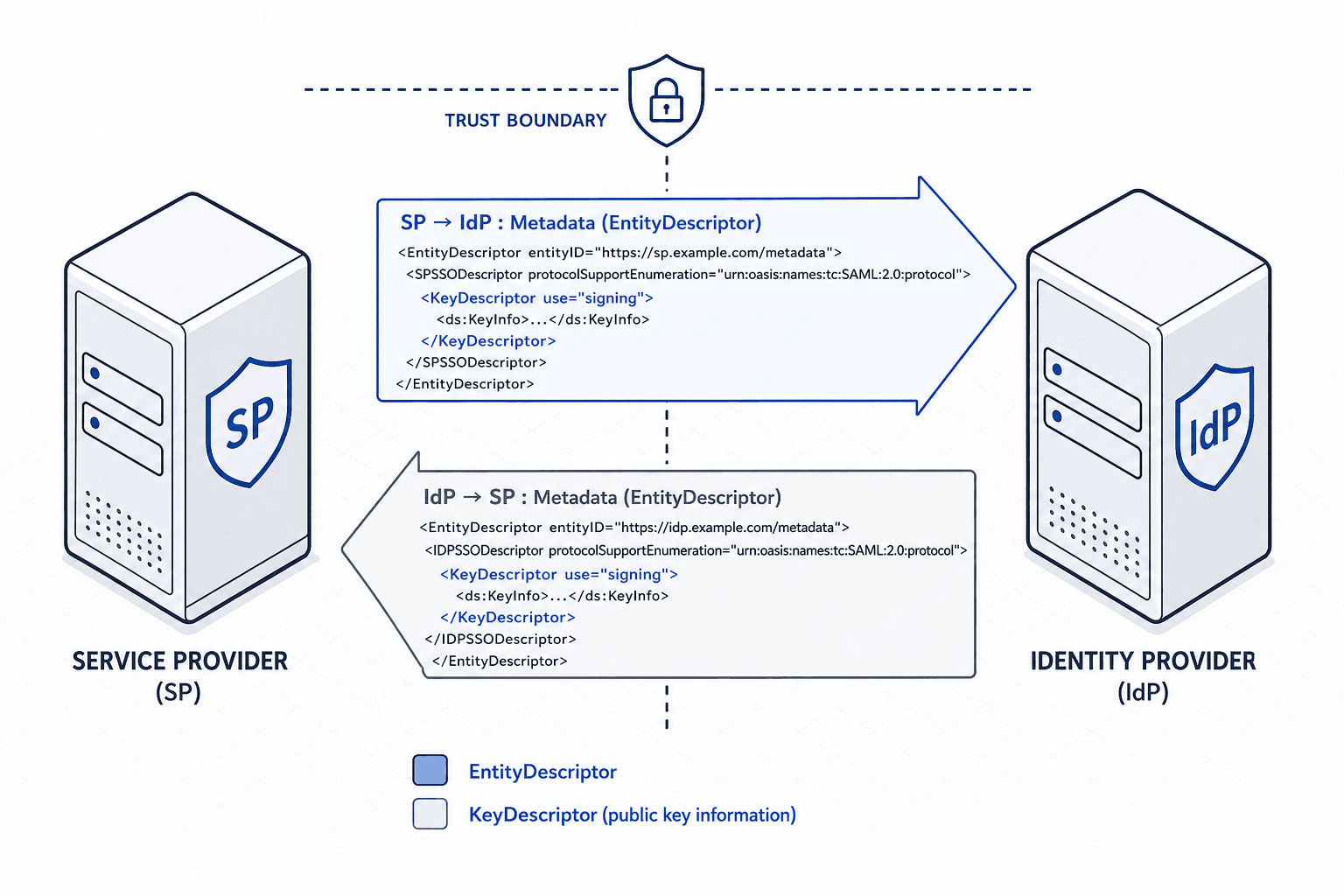
The Metadata Contract
Before any code touches the network, the SP and IdP must agree on the terms of engagement. This agreement is encoded in the SAML metadata XML file. When you configure an SP, you are essentially telling your application where to find the IdP's public keys and where to send authentication requests.
The mechanism here is the EntityDescriptor. This XML root element contains the KeyDescriptor for the IdP's signing certificate. Without this specific public key, your SP cannot verify that a SAML response actually came from the IdP and not an attacker.
Consider a scenario where your organization uses Okta as the IdP and a custom Spring Boot application as the SP. You must fetch the Okta metadata URL (e.g., https://{yourOktaDomain}/samlmetadata/{appId}) and parse the KeyDescriptor. This certificate is then embedded into your SP configuration. If you skip this step or use an expired certificate, the SP will reject the assertion immediately, often with a generic "Signature Invalid" error that hides the root cause.
The metadata also defines the SingleSignOnService endpoint. This is the URL where your SP sends the AuthnRequest. The Binding attribute on this endpoint is critical. It tells your SP which transport mechanism to use. If the IdP advertises HTTP-POST-Binding, your SP must construct a form post with base64-encoded XML. If it advertises HTTP-Redirect-Binding, your SP must URL-encode the request and redirect the user's browser. Mixing these up results in a 400 Bad Request because the IdP receives data in a format it does not expect.
Spring Security Configuration
Once the metadata is secured, the next mechanism is the Spring Security filter chain. In a Spring Boot application using Spring Security 5.7+ or 6.x, the Saml2WebSsoAuthenticationFilter is the primary gatekeeper. This filter does not perform the login itself; it orchestrates the entire handshake sequence.
When a user attempts to access a protected resource (e.g., /dashboard), the filter intercepts the request and checks for a valid session. If none exists, it generates a Saml2AuthenticationRequest. This object is serialized into an XML AuthnRequest based strictly on the metadata configuration provided. The request is then dispatched to the IdP via the configured binding.
The configuration in SecurityFilterChain must explicitly define the necessary beans to support this flow. You need to configure a Saml2MetadataRepository to point to your metadata file or dynamic URL. This allows the application to dynamically update its trust store if the IdP rotates its keys, ensuring continuous operation without manual intervention.
Here is how the configuration looks in code, focusing on the critical beans and the Saml2Registration setup:
@Bean
public SecurityFilterChain filterChain(HttpSecurity http) throws Exception {
    http
        .authorizeHttpRequests(authorize -> authorize
            .requestMatchers("/login", "/logout", "/saml2/**").permitAll()
            .anyRequest().authenticated()
        )
        .saml2Login(saml2 -> saml2
            .loginPage("/login")
            .logoutLogoutUrl("/logout")
            .logoutSuccessHandler((request, response, logout) ->
                logout.clearAuthentication(request, response)
            )
        );
    return http.build();
}

@Bean
public Saml2Registration saml2Registration() {
    return Saml2Registration.withMetadataUrl("https://your-idp/metadata.xml")
        .build();
}
The Saml2Registration bean handles the generation of the AuthnRequest and the parsing of the SAMLResponse back from the IdP. A common error here is misconfiguring the AssertionConsumerService (ACS) URL. This is the callback URL on your SP where the IdP sends the response. If your SP listens on /saml2/sso/jsp but the metadata says /saml2/sso, the IdP will send the response to a non-existent endpoint, resulting in a timeout or a 404.
Assertion Validation and State
The most dangerous part of SAML configuration is not sending the request, but validating the response. When the IdP returns the SAMLResponse, it contains an Assertion with the user's attributes. Your SP must validate this assertion cryptographically before creating a local session.
The mechanism involves three distinct checks. First, the SP verifies the digital signature on the Response and the Assertion using the public key from the metadata. If the signature is invalid, the response is discarded. Second, the SP checks the AudienceRestriction. The Assertion must contain an Audience URI that matches the SP's entity ID. If the IdP mistakenly includes the wrong audience (e.g., the IdP's own ID), the SP rejects it. This prevents an attacker from taking a valid assertion meant for one SP and replaying it to another.
Third, the SP handles the SessionIndex. While Spring Security provides the Saml2AuthenticationToken to manage the authentication context, persistence of the SessionIndex for logout correlation often requires explicit configuration of the SessionRepository or specific LogoutService settings. The IdP includes a unique identifier for the session in the response. The SP must store this index to correlate subsequent logout requests. If the SP does not track the SessionIndex, a user could log out of the IdP, but their session in the SP would remain active because the SP has no way to know the global session was terminated.
Spring Security handles much of the heavy lifting via the Saml2AuthenticationToken, but you must ensure your UserDetailsService maps the SAML attributes (like nameId or email) to a local UserDetails object. If the mapping fails, the authentication succeeds, but the user is logged out immediately because the system cannot find the corresponding user record.
Common Failure Modes
Troubleshooting SAML often requires looking at the raw XML rather than the application logs. The most frequent failure is a signature mismatch. This usually happens when the certificate in your SP configuration does not match the one currently active at the IdP. IdPs rotate keys periodically. If you hardcode a certificate in your configuration file instead of fetching it from the metadata URL, your SP will fail once the IdP rotates its keys.
Another common issue is time skew. SAML assertions include a NotBefore and NotOnOrAfter timestamp. If your SP's system clock is more than five minutes off from the IdP's clock, the assertion is considered expired or not yet valid, and the SP rejects it. This is a silent failure because the error message often just says "Invalid Assertion," hiding the fact that it was a clock synchronization issue. You should use NTP to ensure both servers are synchronized.
Finally, consider the XML parsing limits. If your IdP includes a large amount of attribute data in the assertion, some SP configurations might hit default buffer limits during parsing. If you see XMLStreamException or ParserConfigurationException in your logs, check your XML parser settings.
Common Pitfalls
To avoid the complexities discussed above, be vigilant against these three specific pitfalls that frequently derail SAML implementations:
- Hardcoded Certificates: Never embed the IdP's signing certificate directly into your source code or static config files. Always rely on the dynamic metadata URL so your application automatically updates when the IdP rotates keys.
- Clock Synchronization: Ensure all servers participating in the SAML handshake are synchronized via NTP. Even a few minutes of drift will cause valid assertions to be rejected with vague "Invalid Assertion" errors.
- ACS URL Mismatch: Double-check that the
AssertionConsumerServiceURL defined in your IdP metadata exactly matches the endpoint exposed by yourSaml2WebSsoAuthenticationFilter. A single trailing slash or path difference causes immediate timeouts.
Practical Takeaways
Adopting the right mental models can simplify your SAML configuration process:
- Trust is Explicit: Trust is not assumed; it is explicitly granted via the metadata exchange. If the metadata doesn't list a key, the SP will never trust a signature from that key.
- State is Stateful: SAML is not a stateless token exchange like JWT. The
SessionIndexcreates a binding between the IdP session and the SP session that must be managed. - Validation is Non-Negotiable: The
AudienceRestrictionand signature checks are the primary defense against replay attacks. Never disable these checks, even in development environments.
FAQ
Q: Do I need to manually configure the ACS URL in Spring Security?
A: Generally, no. Spring Security 5.7+ and 6.x automatically generate the ACS URL based on the Saml2Registration configuration and the URL patterns defined in your SecurityFilterChain. You typically only need to ensure this URL matches what is configured in the IdP's metadata.
Q: How do I handle multiple IdPs with a single SP?
A: You can configure multiple Saml2Registration beans or use a custom Saml2MetadataRepository that resolves the correct metadata based on the NameID or Issuer present in the incoming request.
Q: Can I use SAML with OAuth2/OIDC simultaneously? A: Yes, but they serve different purposes. SAML is often used for enterprise identity federation, while OAuth2/OIDC is preferred for API authorization. You can run both, but ensure your filter chains are ordered correctly to avoid conflicts where one protocol intercepts a request intended for the other.
Conclusion
In summary, configuring a SAML SP is not about enabling a feature; it is about establishing a secure, stateful contract. The SP must correctly parse the metadata, generate valid requests using the right bindings, and rigorously validate the incoming assertions. If any of these mechanisms break, the entire trust chain collapses.
While many frameworks offer "auto-discovery" features for SAML metadata, manual configuration or explicit metadata URL pointing is strongly recommended for production environments. Auto-discovery can hide configuration drift and make debugging signature failures significantly harder when the underlying certificate rotates unexpectedly.
Related posts
SAML Single Logout: Implementation Patterns and Pitfalls
An examination of SAML single logout implementation patterns, covering session management and pitfalls in SP-initiated and IdP-initiated logout flows.
Troubleshooting SAML: Common Issues and Fixes
An examination of common SAML errors, debugging techniques, and signature validation fixes for advanced users.
SAML Artifact Binding: Low-Latency SSO Architecture
An examination of SAML artifact binding for achieving low-latency SSO performance and reducing network overhead.