Integrating SAML with AWS IAM Federated Access
This guide covers integrating SAML with AWS IAM for federated access, explaining IAM roles, AWS SSO, and STS usage.
Part 7 of the SAML Mastery Series.
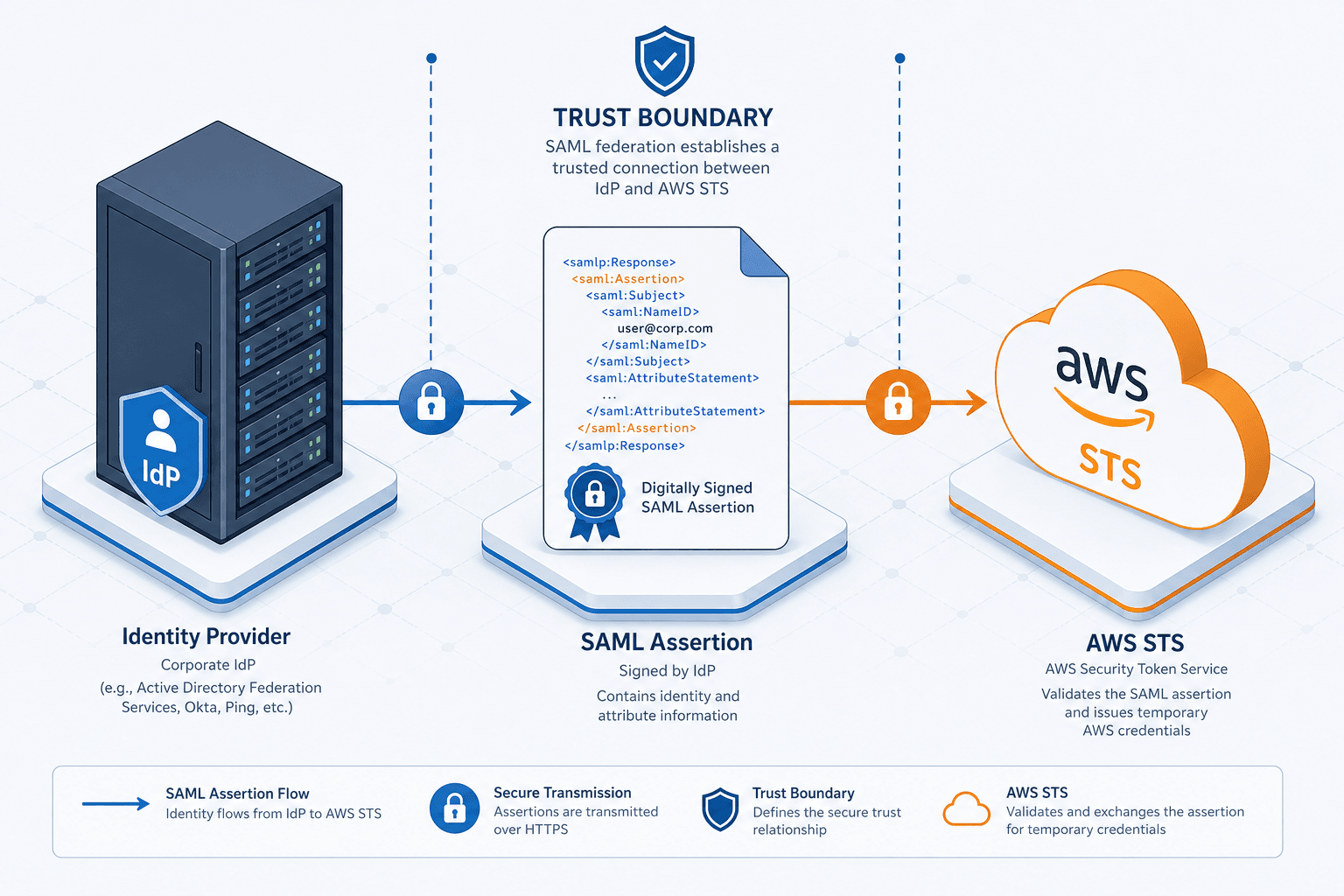
Federated access between an external Identity Provider (IdP) and AWS relies on trust delegation rather than direct login. AWS trusts a specific XML signature generated by your IdP, eliminating the need for long-lived access keys. When a user authenticates at the IdP, it issues a signed SAML assertion. AWS Security Token Service (STS) consumes this assertion to issue temporary credentials scoped to a specific IAM role, ensuring access is granted only when the assertion is valid and trusted.
The Trust Boundary and Assertion Validation
Consider the sequence of events when a user named Alice attempts to access the AWS Management Console. Alice initiates the login at her corporate IdP, which could be Okta, Azure AD, or Ping Identity. The IdP authenticates Alice using her corporate credentials, such as Multi-Factor Authentication (MFA). Upon successful authentication, the IdP constructs a SAML response. This response is an XML document containing <Assertion> elements. Crucially, the IdP signs this document using a private key. The public key for this signature is uploaded to AWS as part of the SAML provider configuration.
AWS does not check Alice's password; it only verifies the digital signature on the XML. If the signature is valid and the issuer matches the configured trust policy, AWS accepts the identity claim. This strict validation ensures that only assertions originating from the trusted IdP are processed.
Role Assumption Mechanics
The critical translation layer occurs at the AssumeRoleWithSAML API call. This is the mechanism that converts the SAML assertion into AWS security tokens. When Alice logs in via the AWS SSO portal or a custom application, her browser redirects her to AWS. After AWS receives the SAML response, the client (browser or application) invokes AssumeRoleWithSAML, specifying the target Role ARN.
This API operation requires three inputs:
- The ARN of the IAM role to assume.
- The ARN of the SAML provider.
- The SAML assertion itself.
The API returns a set of temporary security credentials: an Access Key ID, a Secret Access Key, and a Session Token. These credentials are valid only for the duration specified in the SAML assertion, typically 3600 seconds (1 hour).
Attribute Mapping and Policy Enforcement
The power of this integration lies in attribute mapping. The SAML assertion includes attributes like http://schemas.xmlsoap.org/ws/2005/05/identity/claims/name or custom attributes defined by the IdP. AWS maps these attributes to the RoleSessionName and can inject them into the IAM policy context.
For example, if your IdP sends an attribute Department: Engineering, AWS can use this in an IAM policy condition to restrict access. Note that the tag name in the policy must match the specific attribute name defined in the SAML provider configuration. A policy might look like this:
{
  "Version": "2012-10-17",
  "Statement": [
    {
      "Effect": "Allow",
      "Action": "ec2:DescribeInstances",
      "Resource": "*",
      "Condition": {
        "StringEquals": {
          "aws:PrincipalTag/Team": "Engineering"
        }
      }
    }
  ]
}
This allows you to enforce least privilege dynamically based on the user's identity attributes without maintaining separate IAM users for every employee.
Operational Implementation Scenario
Let's trace a concrete scenario: Alice at Acme Corp needs to deploy code to a staging environment. Acme uses Okta as the IdP and has configured a SAML provider in AWS IAM pointing to Okta's metadata URL. An IAM role named OktaDevAccessRole exists in the AWS account with a trust policy allowing sts:AssumeRoleWithSAML from the Okta provider ARN. The role's permission policy grants ec2:DescribeInstances but includes a condition requiring aws:PrincipalTag/Team to equal Dev.
When Alice clicks "Login" in the AWS console, Okta authenticates her and sends a SAML response containing the attribute Team: Dev. AWS receives this, validates the signature, and calls AssumeRoleWithSAML with the role ARN. The STS service issues temporary credentials. Alice's session is now active. If she tries to run an AWS CLI command like aws ec2 describe-instances, the request is signed with the temporary credentials. AWS evaluates the request against the role's policy. The condition Team: Dev matches the attribute in the session, so the action succeeds. If Alice were from the "Finance" team, the attribute would differ, and the policy condition would evaluate to false, denying access.
Operational Hygiene and Identity Lifecycle
This mechanism scales because the identity logic remains entirely within the IdP. You do not create or delete IAM users in AWS when employees join or leave; you simply manage their group membership in Okta. When an employee leaves, you remove them from the IdP group. The next time they attempt to authenticate, the IdP will not generate a valid SAML assertion, and AWS will reject the login immediately. This decouples identity lifecycle management from cloud resource access, reducing the attack surface of stale credentials.
A common point of confusion involves the distinction between AWS IAM Identity Center (formerly AWS SSO) and the raw SAML provider configuration. In a manual setup, you configure the SAML provider and trust relationship directly in the IAM console. In AWS SSO, the service automates the creation of permission sets and role trust relationships. The underlying mechanism remains the same: the SAML assertion is exchanged for a role assumption token. However, AWS SSO simplifies the distribution of these roles to multiple accounts via permission sets. The choice depends on whether you need centralized governance (AWS SSO) or granular, account-specific control (Direct SAML Provider). For most enterprise scenarios, AWS SSO provides better operational hygiene, but the cryptographic mechanism of AssumeRoleWithSAML is identical in both.
Security Implications
The security implications of this design are significant. Because the credentials are temporary, a compromised access key is only useful for the session duration. Furthermore, the session token cannot be used to assume other roles without a new authentication event. This prevents lateral movement across the account structure. The reliance on the IdP's MFA also means that the security posture of the federated session is as strong as the corporate authentication policy. If the IdP requires MFA, the SAML assertion includes a flag indicating MFA was satisfied. AWS can enforce this in the IAM policy using the saml:authn condition to ensure only authenticated sessions can assume the role.
Common Pitfalls
Even with a well-designed architecture, several common pitfalls can disrupt federated access.
- Mismatched Claim Names: A frequent error occurs when the attribute name in the SAML assertion (e.g.,
http://schemas.xmlsoap.org/ws/2005/05/identity/claims/name) does not exactly match theaws:PrincipalTagkey in the IAM policy. AWS is case-sensitive and requires exact string matches for conditions to evaluate correctly. - Stale Metadata: If the IdP rotates its signing certificates but the updated metadata is not refreshed in the AWS SAML provider configuration, all subsequent assertions will fail signature validation, locking users out immediately.
- Session Duration Limits: Default SAML session durations are often set to 1 hour. If an application requires longer-running background tasks, it may fail when credentials expire unless the SAML assertion explicitly requests a longer duration and the IAM role trust policy permits it.
Practical Takeaways
To effectively manage SAML federation, internalize these three mental models:
- Trust is established by signature, not password: AWS never sees or stores the user's password; it only verifies the cryptographic signature of the IdP.
- Attributes are dynamic context, not static users: IAM policies should rely on attributes (tags) passed in the session rather than hardcoding specific IAM user ARNs, enabling flexible access control.
- Identity lifecycle lives in the IdP: The source of truth for who has access is the IdP. AWS should only hold the trust relationship, not the list of individuals.
FAQ
Can I use multiple IdPs for the same AWS account? Yes, you can configure multiple SAML providers in AWS IAM. Each provider represents a distinct trust relationship. You can then configure IAM roles to trust one, multiple, or all of these providers depending on your access requirements.
How do I handle role switching after initial login?
Once a user has obtained temporary credentials via AssumeRoleWithSAML, they can use the AWS CLI or SDK to assume additional roles within the same session, provided they have the necessary permissions in the initial role's policy and the target roles trust the SAML provider.
What happens if the IdP certificate expires? If the signing certificate used by the IdP expires and the new certificate is not uploaded to AWS, the signature validation will fail. Users will be unable to log in until the metadata is updated in the AWS IAM console to include the new public key.
Related posts
AWS STS: AssumeRole, Federation, and Temporary Credentials
An examination of AWS STS capabilities including AssumeRole, federation, and temporary credentials for secure cross-account access.
Supply Chain Identity Security: Managing Third-Party Access
An examination of supply chain security strategies for managing third-party identity, vendor access, and federated identity in partner environments.
RFC 9700: The Mandatory Guardrails for OAuth 2.0
An examination of RFC 9700, detailing OAuth 2.0 security best current practices, including mitigation of mix-up attacks and redirect URI validation.