Deploying a Quantized Model End to End
A walkthrough of deploying quantized models end-to-end, covering model artifacts, kernel optimization, and serving strategies for ML engineers.
Quantization is often misunderstood as a simple compression algorithm, akin to zip-file reduction. In production environments, it is a hardware-aware transformation that fundamentally alters how data moves through memory and compute units. For ML and platform engineers, deploying a quantized model is not just about swapping a file; it is about managing a new artifact type, configuring kernel dispatchers, and ensuring numerical stability under load. This guide walks through the end-to-end mechanics of deploying quantized models, from artifact creation to serving infrastructure.
The Artifact Chain: From Weights to GGUF
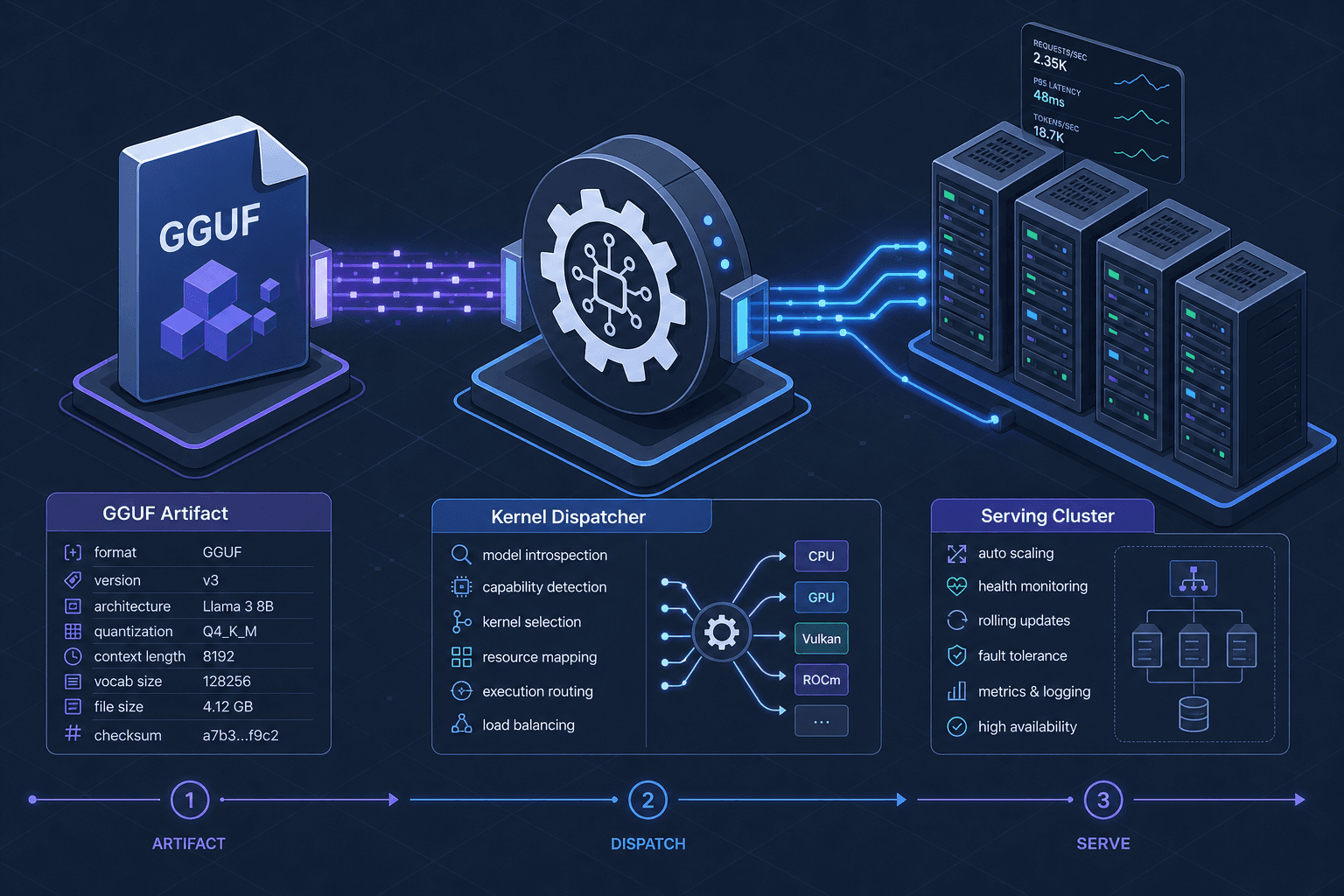
The first step in deployment is understanding the model artifact. A quantized model is not just a smaller file; it is a structured container with specific metadata that tells the runtime how to interpret the data.
In the context of Large Language Models (LLMs), the de facto standard artifact format has become GGUF (GPT-Generated Unified Format). Unlike traditional PyTorch .bin or TensorFlow .pb files, a GGUF file contains:
- Header: Version and metadata (model name, quantization type).
- Tensors: The actual weight matrices, stored in quantized formats (e.g., Q4_0, Q8_0).
- Context: Information about the model's architecture, allowing the loader to reconstruct the computational graph without external config files.
Consider a scenario where an engineer downloads a llama-2-7b.Q4_K_M.gguf file. The Q4_K_M suffix indicates a mixed-precision quantization strategy using 4-bit block-floating-point encoding. The artifact itself does not contain the computation logic; it only contains the static weights. The runtime (e.g., llama.cpp, Ollama, or a custom C++ server) must dynamically decode these weights into higher-precision values (usually FP16 or FP32) before passing them to the compute unit, or use specialized kernels that operate directly on the quantized data.
This distinction is critical for deployment. If you deploy an ONNX model, you must ensure the ONNX Runtime execution provider you use supports the quantized operators (e.g., QLinearMatMul, QLinearConv) required by the model. If you deploy a GGUF file, you must ensure the host system supports the instruction sets required for decoding (e.g., AVX2, AVX-512 on x86, or NEON on ARM).
Kernel Selection and Dispatch
Once the model artifact is loaded, the runtime must decide which code path (kernel) to execute for each layer. This is the core mechanism of quantized performance.
In a dense FP32 model, the GPU uses highly optimized GEMM (General Matrix Multiply) routines like cuBLAS. In a quantized INT8 model, the data is packed into 8-bit integers, but the arithmetic often needs to be performed in higher precision to maintain accuracy, or via specialized integer arithmetic units.
The Dispatch Mechanism
When llama.cpp loads a layer, it does not simply call a generic multiplication function. It performs a dispatch based on:
- Hardware Capabilities: Detected via CPUID (x86) or system properties (ARM).
- Quantization Type: Q4_0, Q5_0, Q8_0, etc.
- Layer Type: Attention, Feed-Forward, or Output.
For example, on an Apple M2 chip, the runtime might select a NEON-accelerated kernel for the attention mechanism because Apple’s unified memory architecture benefits from low-latency access to quantized data. On an NVIDIA A100, the runtime might use Tensor Cores via TensorRT-LLM, which can perform INT8 matrix multiplications directly in the tensor cores, bypassing the need to dequantize first.
# Pseudo-code illustrating kernel dispatch logic
def select_kernel(layer_type, quantization_type, hardware_backend):
    if hardware_backend == "CUDA" and quantization_type == "INT8":
        return TensorRT_INT8_GEMM
    elif hardware_backend == "CPU" and quantization_type == "Q4_K_M":
        return LLAMA_Q4_K_M_DEQUANTIZE_AND_MATMUL
    else:
        return GENERIC_FP32_FALLBACK
If the correct kernel is not available, the runtime falls back to a generic, slower implementation. This fallback is often the cause of unexpected latency spikes in production. Platform engineers must verify that the serving environment matches the kernel requirements of the quantized artifact. For instance, deploying a model quantized for AVX-512 on a server lacking AVX-512 support will result in a severe performance penalty, potentially making the quantized model slower than its FP16 counterpart due to the overhead of emulation or fallback.
Serving Infrastructure and Memory Bandwidth
Quantization reduces memory footprint, but it also shifts the bottleneck from compute to memory bandwidth in many scenarios. This is particularly true for large language models, where the weight matrix size exceeds the GPU VRAM.
Memory Bandwidth Optimization
In a FP16 model, the weights are 2 bytes per parameter. In a Q4 quantized model, they are 0.5 bytes per parameter. This 4x reduction means the model can fit into memory with less pressure, but it also means the memory subsystem must handle more frequent reads if the compute unit is fast enough.
However, the real benefit comes from cache locality. Smaller weights fit better in CPU L1/L2 caches and GPU L2 caches. This reduces cache misses, which are expensive operations. When deploying, engineers should monitor cache hit rates. If the cache hit rate is low, it indicates that the batch size or sequence length is causing excessive cache thrashing, regardless of quantization.
Batch Handling Strategies
Quantized models often allow for larger batch sizes because they consume less VRAM/HBM. However, increasing the batch size increases the computational load per iteration. The key is to find the sweet spot where memory bandwidth is fully utilized without saturating the compute units.
For example, in a production setting using vLLM or TGI (Text Generation Inference), you might configure the max_num_batched_tokens parameter. With a quantized model, you can often increase this value by 2-4x compared to a FP16 model, leading to higher throughput. But this must be validated with load testing, as excessive batching can lead to increased latency for individual requests due to scheduling overhead.
Rollback and Observability
Deploying quantized models introduces new failure modes. Numerical instability, kernel mismatches, and unexpected latency are common. A robust rollback strategy is essential.
Shadow Deployments
Before routing production traffic to a quantized model, run a shadow deployment. In this setup, every incoming request is processed by both the existing FP16 model and the new quantized model. The responses are compared offline for accuracy metrics (e.g., BLEU score, perplexity) and latency.
# Example: Running a shadow deployment with curl
# Request sent to both models
curl -X POST http://fp16-model/api/generate -d '{"input": "Hello"}'
curl -X POST http://quantized-model/api/generate -d '{"input": "Hello"}'
Monitor the divergence between the two outputs. If the quantized model starts producing significantly different or nonsensical outputs, trigger an immediate rollback.
Key Metrics to Monitor
- Quantization Error: Track the difference between the output of the quantized model and a high-precision reference. A sudden spike in this error may indicate a kernel mismatch or hardware issue.
- Latency Percentiles (p99): Quantized models can have variable latency depending on the kernel selected. Monitor p99 latency closely, as outliers often indicate fallback to slow kernels.
- Memory Usage: Ensure that the expected memory savings are realized. Unexpected memory growth may indicate a bug in the quantization artifact or a memory leak in the serving runtime.
Rollback Procedure
If anomalies are detected, the rollback should be atomic:
- Stop Traffic: Redirect all incoming requests to the FP16 model.
- Verify Health: Ensure the FP16 model is healthy and processing requests normally.
- Investigate: Analyze logs and metrics to determine the root cause (e.g., kernel incompatibility, numerical instability).
- Re-deploy: Once fixed, re-deploy the quantized model with appropriate safeguards (e.g., smaller initial batch size, stricter monitoring thresholds).
Conclusion
Deploying a quantized model is a multidisciplinary challenge involving artifact management, hardware-aware kernel selection, and careful infrastructure tuning. By understanding the mechanisms behind quantization artifacts, kernel dispatch, and memory bandwidth, engineers can optimize resource utilization while maintaining reliability. Always validate with shadow deployments, monitor key metrics, and have a clear rollback strategy. Quantization is not a set-and-forget solution; it is a technical modification that requires precise handling to deliver its promised benefits.
Common Pitfalls
- Kernel Mismatch: Deploying a model quantized for specific instruction sets (e.g., AVX-512) on hardware that lacks support causes runtime fallbacks, resulting in severe latency penalties.
- Numerical Instability: Aggressive quantization (e.g., INT4) can lead to accuracy degradation in specific tasks. Without shadow testing, this may go unnoticed until production errors occur.
- Cache Thrashing: Incorrectly sized batch configurations can cause excessive cache misses, negating the memory bandwidth benefits of quantization and increasing latency.
Related posts
Disaggregated Prefill & Decode: Optimizing LLM Serving
An examination of disaggregated serving architectures that separate prefill and decode phases to optimize KV cache transfer and inference throughput.
Measuring Quantization Damage: Perplexity Isn't Enough
An examination of why perplexity alone fails to capture model degradation during quantization, exploring alternative metrics for accurate quality regression assessment.
Quantizing the KV Cache Without Wrecking Quality
Explore techniques for quantizing the KV cache to reduce memory usage and improve throughput for long context windows in LLMs.
