Number Matching and Push Notification Hardening
Examines number matching and push notification hardening to prevent MFA prompt flooding and blind approvals in identity systems.
The rise of push-based Multi-Factor Authentication (MFA) solved the usability problem of typing time-based one-time passwords (TOTP), but it introduced a new class of social engineering attacks. Attackers who have obtained valid credentials no longer need to guess a second factor; they only need to bombard the victim with authentication requests until the user, frustrated or confused, approves one. This is known as MFA prompt flooding or "MFA fatigue." To combat this, identity systems have adopted two primary countermeasures: number matching and push notification hardening. These mechanisms shift the security model from passive approval to active, context-aware verification.
The Vulnerability: Blind Approvals and Flooding
In a standard push notification flow, the authentication server sends a request to the user’s mobile app. The app displays a prompt: "Approve login?" with a simple "Yes" or "No" button. The cryptographic handshake happens in the background. If the user taps "Yes," the session is authenticated.
This simplicity is the vulnerability. An attacker with stolen username and password can trigger this prompt repeatedly. The victim receives a barrage of notifications. In many cases, the user is distracted, tired, or simply annoyed by the interruptions. Without additional context, the user cannot distinguish between a legitimate login attempt and a malicious flood. They may tap "Yes" blindly to stop the notifications, granting the attacker access.
This attack does not require sophisticated technical exploitation of the MFA protocol. It relies on human psychology and the lack of contextual information in the notification. The "blind approval" occurs because the user trusts the channel (the official app) but lacks the information to verify the intent of the specific request.
The Mechanism: Number Matching
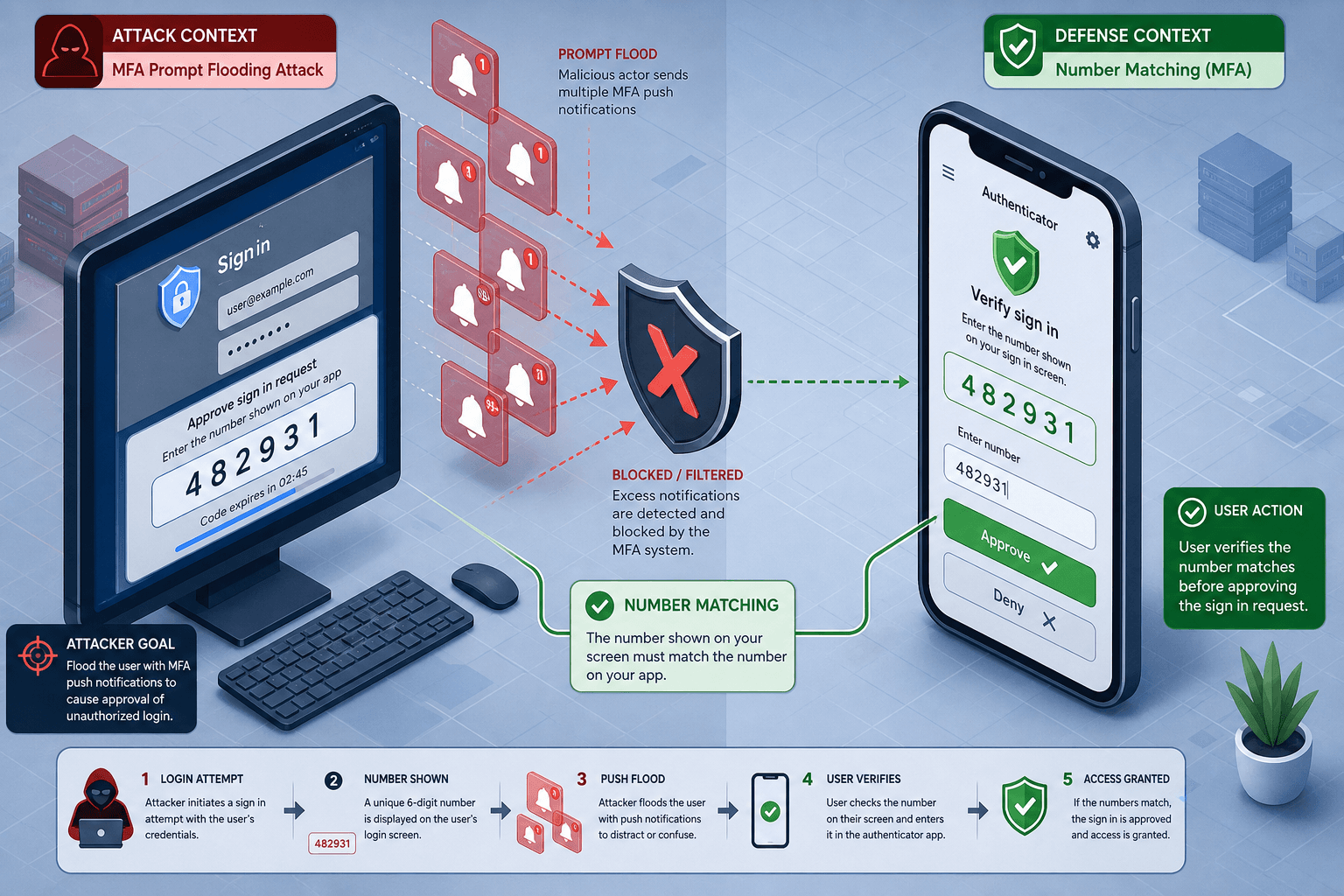
Number matching is a challenge-response protocol designed to force the user to actively engage with the login context rather than passively approving a notification. It breaks the automatic association between the login attempt and the approval.
How It Works
- Login Attempt: The user enters their username and password on the target application (e.g., a web portal).
- Challenge Generation: The authentication server generates a unique, random numeric code (typically 2 digits). This code is bound to the specific login session.
- Display: The web portal displays this code prominently on the screen.
- Push Notification: The server sends a push notification to the user’s mobile app. The notification does not contain the number. It simply asks for approval.
- User Verification: The user looks at their phone screen, sees the prompt, and then checks their computer screen. They must manually type the number shown on the computer into the MFA app on their phone.
- Verification: The app sends the entered number back to the server. The server compares it against the generated code for that specific session. If they match, the login is approved.
Security Properties
The security of number matching lies in the fact that the attacker, who is controlling the computer screen where the code is displayed, cannot see the user’s mobile device. The user must visually verify that the code on the computer matches the code they are about to submit. If the attacker is trying to log in from a different machine or is using a phishing site, the code will not match what the user expects, or the user will notice the discrepancy.
More importantly, it prevents blind approvals. The user cannot approve the request without looking at the code. This introduces a "cognitive pause," forcing the user to acknowledge the specific login attempt. If the user did not initiate the login, they will not see a code on their screen and will not enter it.
Push Notification Hardening
While number matching addresses the "blind approval" issue through active input, push notification hardening focuses on providing sufficient context within the notification itself to allow the user to make an informed decision without necessarily entering a code. This is often referred to as "contextual binding."
Contextual Data Binding
A hardened push notification includes specific details about the login attempt. Instead of just "Approve login?", the notification displays:
- Application Name: Which service is requesting access?
- Device/Location: Where is the login originating from? (e.g., "New York, USA" or "Unknown Device").
- IP Address: The source IP of the connection.
- Time: The timestamp of the request.
Implementation Challenges
Implementing this requires the identity provider to capture and transmit these attributes securely to the mobile app. The app must then render this information in a way that is difficult to spoof.
One common approach is to include a hash of the contextual data in the cryptographic payload of the push notification. The app verifies the signature and displays the data. If the attacker tries to intercept and modify the notification, the signature check will fail, and the app will reject it.
However, there is a limit to what can be displayed. Users may still suffer from "notification fatigue" if they receive many legitimate requests from different services. Therefore, number matching is often preferred for high-security contexts because it requires active user input, whereas hardening relies on the user reading and interpreting the displayed information.
Tradeoffs and Implementation Considerations
User Experience Friction
Number matching introduces friction. The user must switch context between their computer and their phone. In high-volume environments, this can slow down the login process. However, this friction is intentional and necessary for security. The tradeoff is clear: convenience vs. security. For most enterprise and consumer applications, the security benefit outweighs the minor inconvenience.
Compatibility and Support
Not all MFA apps support number matching or hardened push notifications. Identity providers must ensure that their mobile apps are updated to support these features. Legacy devices or outdated app versions may fall back to less secure methods, creating a potential weak link. It is crucial to enforce minimum app versions in the identity policy.
Regulatory Compliance
Number matching and push notification hardening are no longer optional best practices. NIST Special Publication 800-63B explicitly recommends out-of-band authentication methods that require user interaction to prevent unauthorized access. Major identity providers such as Okta, Microsoft Entra ID, and Auth0 have implemented these features as standard options.
Conclusion
MFA prompt flooding and blind approvals represent a significant threat to push-based authentication. By relying on passive approvals, identity systems leave users vulnerable to social engineering attacks. Number matching and push notification hardening provide defenses by introducing active user verification and contextual awareness.
For identity engineers, implementing these mechanisms is essential. It requires careful design of the user interface and secure transmission of contextual data. For product engineers, understanding these mechanisms helps in explaining the security benefits to users and managing expectations regarding login friction. As identity systems evolve, the shift from passive to active authentication will continue to strengthen the overall security posture against evolving threats.
Related posts
Detecting Account Takeover and Credential Stuffing
Strategies for detecting account takeover and credential stuffing attacks using bot detection and login anomaly analysis.
Identity Analytics: Which Algorithms Actually Work
An examination of effective algorithms for identity analytics, focusing on anomaly detection, peer group analysis, and handling imbalanced data in security contexts.
Risk-Based Authentication With ML Scoring
Explore how machine learning enhances risk-based authentication by generating dynamic risk scores for adaptive identity verification.
