Ollama vs vLLM vs llama.cpp: Picking the Right Runtime
A technical comparison of Ollama, vLLM, and llama.cpp inference runtimes for developers and ML engineers.
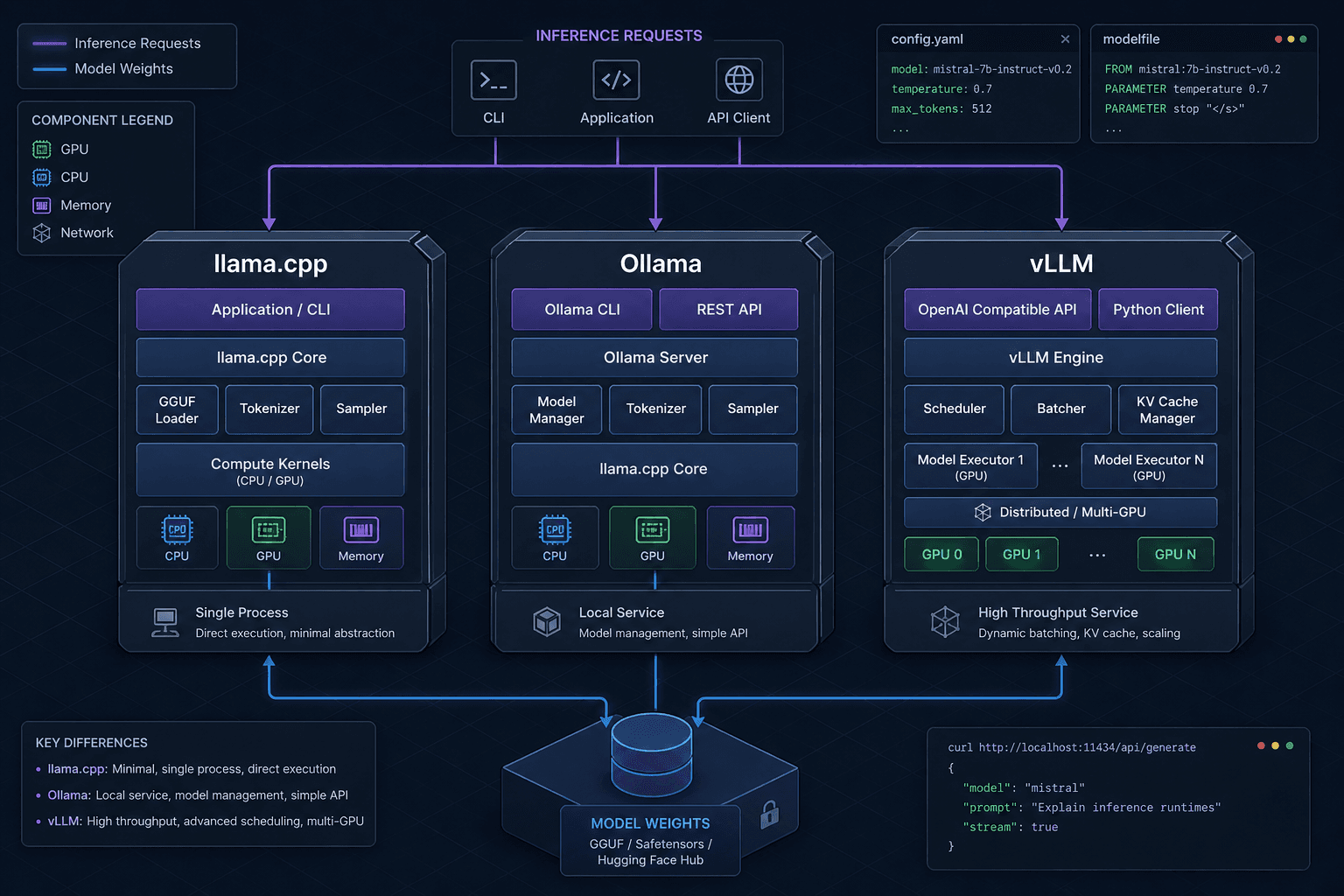
Choosing an inference runtime for Large Language Models (LLMs) is often confused with choosing a model itself. While the model determines what the AI knows, the runtime determines how that knowledge is retrieved and generated. For developers and ML engineers, the decision landscape is dominated by three distinct architectures: llama.cpp, Ollama, and vLLM.
These are not interchangeable tools. They represent different points on the spectrum between minimal overhead, developer convenience, and raw throughput. Understanding the mechanism behind each is critical to selecting the right one for your deployment pipeline.
llama.cpp: The Minimalist Kernel
llama.cpp is not a framework; it is a low-level inference engine written in C and C++. It was designed from the ground up to run LLMs efficiently on consumer hardware, particularly Apple Silicon, without relying on heavy Python dependencies or large GPU memory footprints.
The Mechanism: GGUF and Quantization
The core innovation of llama.cpp is the GGUF (GPT-Generated Unified Format) format. Unlike traditional PyTorch models that store weights in full precision (FP16/BF16), llama.cpp relies heavily on quantization. It converts model weights into lower-bit formats (e.g., Q4_K_M, Q8_0) with minimal accuracy loss. This allows models that require 80GB of VRAM to run on a single GPU with 24GB of VRAM, or even entirely on CPU RAM.
llama.cpp achieves this by implementing custom kernels for various hardware backends. For NVIDIA GPUs, it uses optimized CUDA kernels that manage memory transfers between the host (CPU) and device (GPU) with extreme precision. This is crucial for models that don't fit entirely in VRAM. llama.cpp supports layer-wise offloading, where specific layers are computed on the GPU while others remain on the CPU, bridging the gap between limited VRAM and high compute needs.
// Example: Loading a model with llama.cpp
#include "llama.h"

struct llama_model_params model_params = llama_model_default_params();
model_params.n_gpu_layers = 35; // Offload layers to GPU

llama_model *model = llama_model_load_from_file("gguf-model.gguf", model_params);
Use Case
Use llama.cpp when you need:
- Zero-dependency deployment: Embedding an inference engine into a C++ application.
- Maximum hardware flexibility: Running on edge devices, Apple Macs, or servers with limited VRAM.
- Fine-grained control: Direct access to quantization parameters and memory management strategies.
Ollama: The Local-First Abstraction
Ollama is often mistaken for a standalone competitor to llama.cpp, but it is fundamentally a wrapper around it. Ollama provides a unified interface for downloading, managing, and running models locally by leveraging Go bindings to the C/C++ llama.cpp library. While llama.cpp itself remains a C/C++ engine, Ollama abstracts its complexity by introducing the Modelfile. A Modelfile is a declarative configuration file that defines the model, system prompt, temperature, and quantization level. When you run ollama run llama3, Ollama fetches the appropriate GGUF file, parses the Modelfile, and initializes the llama.cpp backend automatically.
Crucially, Ollama implements a pull-to-run workflow. It manages a local library of models, handling versioning and storage in ~/.ollama/models. This removes the friction of manually locating GGUF files and constructing command-line arguments. The server also supports streaming responses, making it ideal for integrating LLMs into local applications via standard HTTP requests. Additionally, Ollama's primary engine for GGUF models remains the C/C++ llama.cpp core.
# Example: Creating a Modelfile
FROM llama3.gguf
PARAMETER temperature 0.7
SYSTEM "You are a helpful assistant."

# Example: Running the model
ollama create my-model -f Modelfile
ollama run my-model
Use Case
Use Ollama when you need:
- Rapid prototyping: Quickly testing different models and prompts without writing custom inference code.
- Local development environments: Setting up a consistent LLM endpoint for frontend or mobile app development.
- Simplified model management: Centralized storage and versioning of multiple models.
vLLM: The High-Throughput Engine
If llama.cpp is about efficiency and Ollama is about convenience, vLLM is about throughput. Developed by the University of California, Berkeley, vLLM is designed for serving large language models in production environments where hundreds or thousands of users may be querying the same model simultaneously.
The Mechanism: PagedAttention
The bottleneck in LLM serving is not just computation; it is memory management. Traditional frameworks allocate contiguous memory blocks for the KV (Key-Value) cache of each request, leading to significant fragmentation and wasted memory.
vLLM solves this with PagedAttention. Inspired by virtual memory paging in operating systems, PagedAttention breaks the KV cache into non-contiguous blocks. This allows:
- Zero fragmentation: Memory is allocated dynamically as needed.
- High GPU utilization: More requests can be served concurrently because memory is used efficiently.
- Continuous Batching: Instead of waiting for all requests in a batch to finish before processing the next batch, vLLM dynamically adds new requests to the batch as soon as any request finishes. This drastically reduces idle time and increases tokens-per-second throughput.
vLLM also leverages CUDA Graphs to reduce the overhead of kernel launches, further optimizing performance on NVIDIA GPUs.
# Example: Serving with vLLM
from vllm import LLM, SamplingParams

llm = LLM(model="meta-llama/Llama-2-7b-chat-hf")
sampling_params = SamplingParams(temperature=0.8, top_p=0.95)

prompts = [
    "Hello, my name is",
    "The president of the United States is",
]
outputs = llm.generate(prompts, sampling_params)

for output in outputs:
    print(output.outputs[0].text)
Use Case
Use vLLM when you need:
- High-concurrency serving: Deploying models to handle many simultaneous users.
- Maximum throughput: Optimizing for tokens per second in a production setting.
- NVIDIA GPU clusters: While vLLM has experimental support for CPU and Apple Silicon, its primary optimization focus and highest performance gains are realized on NVIDIA GPU clusters (A100/H100).
Comparison and Decision Matrix
| Feature | llama.cpp | Ollama | vLLM |
|---|---|---|---|
| Primary Goal | Efficiency & Portability | Developer Convenience | Throughput & Scale |
| Backend | C/C++ Custom Kernels | Wrapper (llama.cpp) | Python/C++ Hybrid (PagedAttention) |
| Best Hardware | CPU, Apple Silicon, NVIDIA | CPU, Apple Silicon, NVIDIA | NVIDIA GPUs (A100/H100) |
| Memory Management | Layer-wise Offloading | Automatic (via llama.cpp) | PagedAttention (Virtual Memory) |
| Concurrency | Low (Single Request Focus) | Moderate (REST API) | High (Continuous Batching) |
| Ease of Use | Hard (CLI/Code) | Easy (API/Library) | Medium (Deployment Config) |
How to Choose
-
Are you building an embedded system or running on a Mac? Choose llama.cpp. Its ability to run on CPU and Apple Silicon with minimal overhead makes it the only viable option for edge cases and local-first applications where GPU availability is not guaranteed.
-
Are you developing a local application or prototype? Choose Ollama. It provides the fastest path from "download model" to "send API request." The REST API is simple, and the Modelfile abstraction allows you to tweak parameters without understanding the underlying C++ implementation.
-
Are you deploying a public-facing API with many users? Choose vLLM. If you have NVIDIA GPUs and need to serve hundreds of requests per minute, vLLM’s PagedAttention and continuous batching will provide significantly higher throughput and lower latency than the other two options.
Conclusion
There is no "best" runtime. llama.cpp is the foundation, Ollama is the user-friendly interface built on top of it, and vLLM is a specialized engine for high-scale production. Your choice should be dictated by your hardware constraints and your concurrency requirements. Start with Ollama for exploration, move to llama.cpp for integration, and scale to vLLM when your user base grows.
Actionable Next Steps
Audit your current deployment infrastructure today. If you are currently using generic Python wrappers for production workloads, benchmark them against vLLM to quantify potential latency reductions. If you are developing locally, install Ollama and experiment with Modelfiles to streamline your prompt engineering workflow. Finally, if you are targeting edge devices, review your quantization strategy using llama.cpp to ensure optimal memory usage.
FAQ
Can I use vLLM on a Mac? While vLLM has experimental support for Apple Silicon, it is not optimized for it. For Mac-based development, Ollama or llama.cpp are significantly better choices due to their native support for Apple Silicon via Metal.
Is Ollama just llama.cpp? Ollama is a wrapper that primarily uses llama.cpp as its backend for GGUF models. It adds a layer of convenience including a REST API, model management, and a simple configuration format (Modelfile).
Which runtime is best for fine-tuning? None of these are fine-tuning engines. llama.cpp, Ollama, and vLLM are inference runtimes. You should use frameworks like Hugging Face Transformers or Axolotl for fine-tuning, then export the model to GGUF (for llama.cpp/Ollama) or HF format (for vLLM) for inference.
Does quantization hurt model quality? Modern quantization methods like Q4_K_M used by llama.cpp result in minimal accuracy loss for most tasks. The trade-off between reduced memory footprint and slight precision loss is generally favorable for most production applications.
Common Pitfalls
Using vLLM for Local Development A common mistake is attempting to use vLLM for local application development. Because vLLM is heavily optimized for high-throughput NVIDIA clusters, it can be overkill and difficult to configure for single-user local environments. Ollama is the preferred choice for local dev due to its simplicity.
Ignoring Quantization Benefits Developers often overlook the benefits of quantization in llama.cpp, assuming full-precision models are always necessary. In reality, quantized models (e.g., Q4_K_M) often run faster and consume less memory with negligible impact on output quality for most use cases.
Misunderstanding Backend Dependencies Assuming Ollama is a standalone engine can lead to confusion when debugging performance issues. Remember that Ollama delegates heavy lifting to llama.cpp, so performance bottlenecks often lie in the underlying C++ kernels or hardware limits rather than the Ollama layer itself.
Practical Takeaways
- For Edge/Local/Apple Silicon: Choose llama.cpp or Ollama. They offer the best balance of hardware compatibility and ease of use.
- For Rapid Prototyping: Choose Ollama. Its REST API and Modelfile system allow for quick iteration without deep infrastructure knowledge.
- For Production/High Concurrency: Choose vLLM. It provides superior throughput and memory efficiency for serving many users simultaneously on NVIDIA hardware.
- For Integration/Embedding: Choose llama.cpp. Its C/C++ core allows for seamless integration into existing non-Python applications.
Related posts
Prefix Caching in vLLM: When It Wins and When It Doesn't
An examination of prefix caching in vLLM, analyzing when automatic prefix caching improves TTFT and cache hit rates, and when it may not provide benefits.
Disaggregated Prefill & Decode: Optimizing LLM Serving
An examination of disaggregated serving architectures that separate prefill and decode phases to optimize KV cache transfer and inference throughput.
Benchmarking and Load-Testing a vLLM Deployment
A practical guide to benchmarking vLLM deployments, covering load testing, throughput analysis, latency curves, and capacity planning for ML infrastructure.
