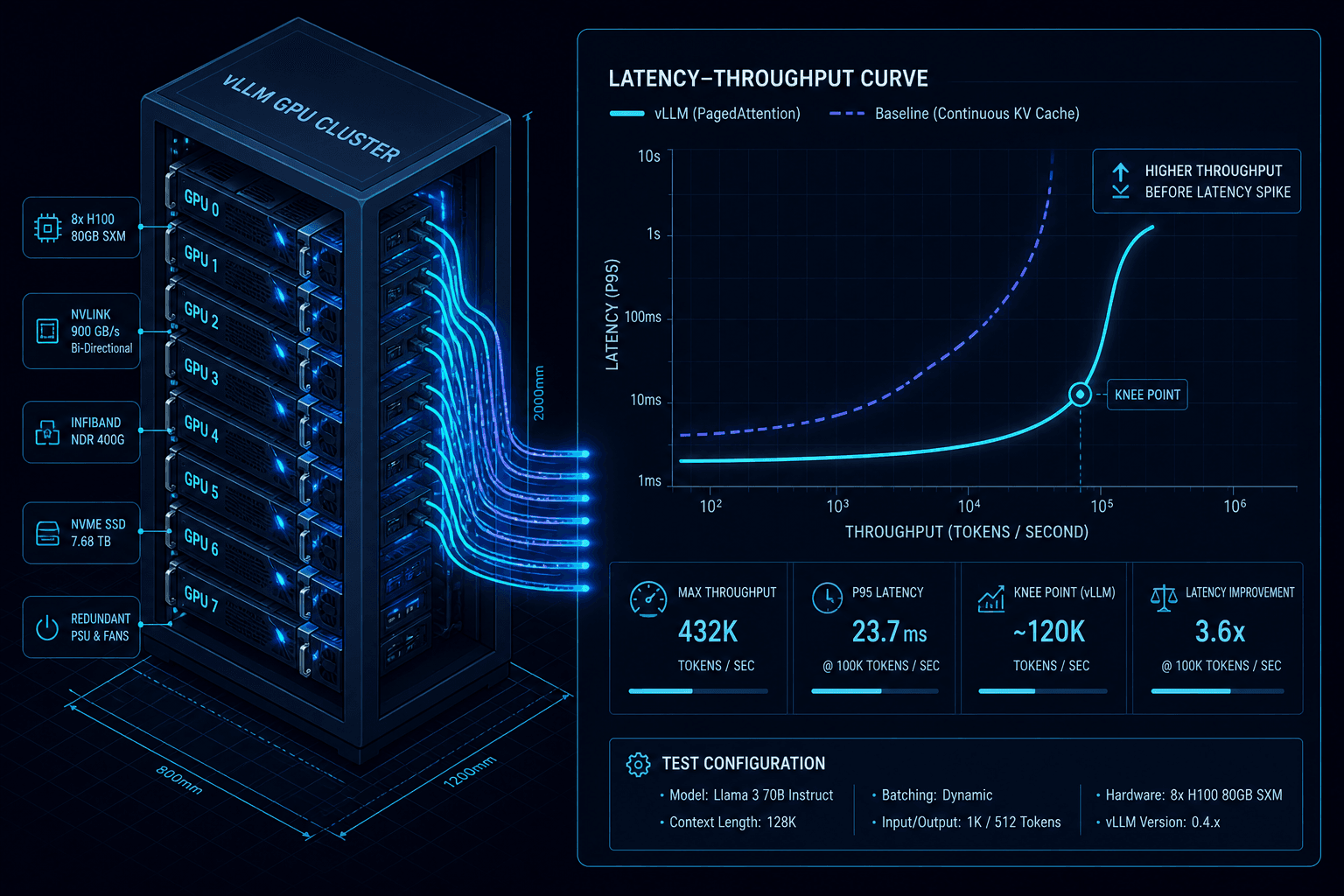
Benchmarking and Load-Testing a vLLM Deployment
A practical guide to benchmarking vLLM deployments, covering load testing, throughput analysis, latency curves, and capacity planning for ML infrastructure.
In production machine learning infrastructure, a model’s accuracy is only half the equation; the other half is its behavior under load. For Large Language Models (LLMs), this behavior is defined by the complex interplay between GPU memory bandwidth, attention computation, and scheduling overhead. Simply stating that a vLLM deployment "handles 100 requests per second" is meaningless without defining the request profile, the latency distribution, and the memory state.
This guide details the mechanism-level approach to benchmarking vLLM. We will move beyond simple throughput checks to map the full latency-throughput frontier, identifying the exact point where adding more concurrency degrades user experience due to KV cache saturation.
The Metrics That Matter
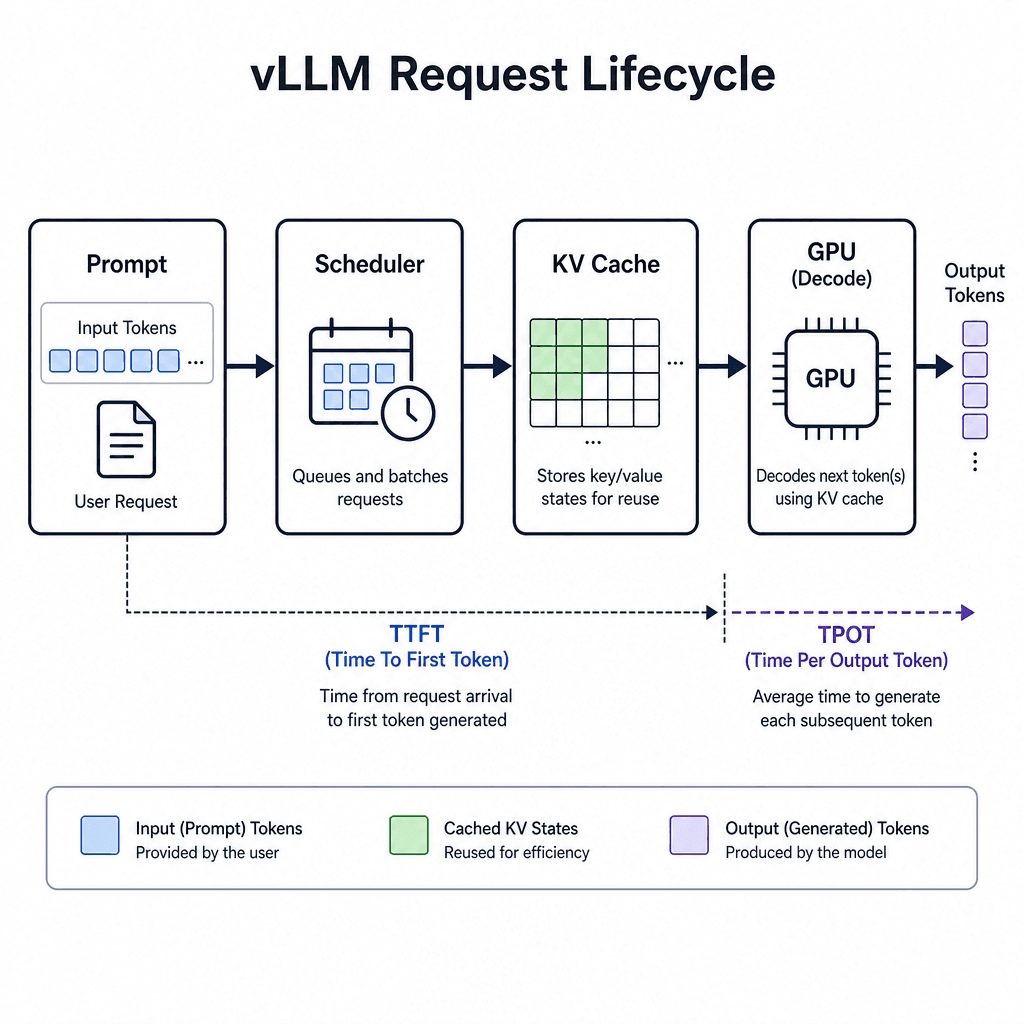
To benchmark effectively, you must separate metrics that measure system health from metrics that measure user satisfaction. In vLLM, these are primarily Throughput, Time-to-First-Token (TTFT), and Time-per-Output-Token (TPOT).
Throughput is the total number of tokens generated per second across all concurrent requests. While important for cost efficiency, it is a lagging indicator. A system can have high throughput while having unacceptable latency if it is processing large batches with long wait times. Measuring system throughput accurately requires isolating compute-bound scenarios from memory-bound ones, as vLLM’s PagedAttention allocator introduces variable overhead depending on memory fragmentation.
TTFT is the latency between sending a prompt and receiving the first token of the response. This metric is critical for interactive applications like chatbots and agents, where user perception of responsiveness is paramount. It is heavily influenced by prefill performance and scheduler queue depth. If the scheduler is blocked waiting for KV cache space, TTFT spikes dramatically. In vLLM, TTFT is directly correlated with the time required to allocate contiguous blocks in the KV cache; if fragmentation is high, the allocator must perform multiple searches, increasing the prefill time before any tokens are generated.
TPOT is the average time between subsequent tokens. This reflects the decode performance. In vLLM, TPOT is relatively stable until the GPU memory is nearly full, at which point it increases as the scheduler must swap blocks or manage memory fragmentation. Specifically, KV cache fragmentation impacts TPOT stability by forcing the scheduler to defer execution when no single contiguous block is available for the next step of decoding. This deferral adds scheduling overhead to every iteration, causing a gradual but noticeable increase in TPOT. In code-generation scenarios, where prompts are often long but outputs are structured, stable TPOT is crucial for maintaining a smooth typing experience. In contrast, chat scenarios may tolerate slightly higher TPOT variability if TTFT remains low, as users are more sensitive to initial delay than streaming speed.
Synthetic Load Generation
Real-world traffic is rarely uniform. Users send prompts of varying lengths, and requests arrive in bursts. To benchmark accurately, you must simulate these distributions using vLLm’s built-in benchmarking tools. The primary tool for a vllm benchmark is vllm bench serve, which allows you to define input and output length distributions.
Consider a scenario where you are running a code-generation assistant. Your users typically send prompts of 500 tokens and expect outputs of 200 tokens. However, edge cases exist: some users paste entire files (2000+ tokens), and some generate short snippets (50 tokens).
Using uniform random data for benchmarking creates a false sense of security. If your benchmark uses fixed-length inputs of 100 tokens, you will underestimate the memory pressure caused by longer prompts. Instead, introduce a range of lengths around your typical values:
vllm bench serve \
  --endpoint http://localhost:8000/v1/completions \
  --dataset-name random \
  --random-input-len 500 \
  --random-output-len 200 \
  --random-range-ratio 0.2 \
  --num-prompts 1000 \
  --request-rate 10
This command sends 1000 requests at a rate of 10 QPS. Crucially, it varies the input and output lengths around the specified targets rather than using fixed values. The --request-rate parameter controls the arrival process, simulating Poisson-distributed arrivals typical in web traffic.
The Concurrency-Latency Curve
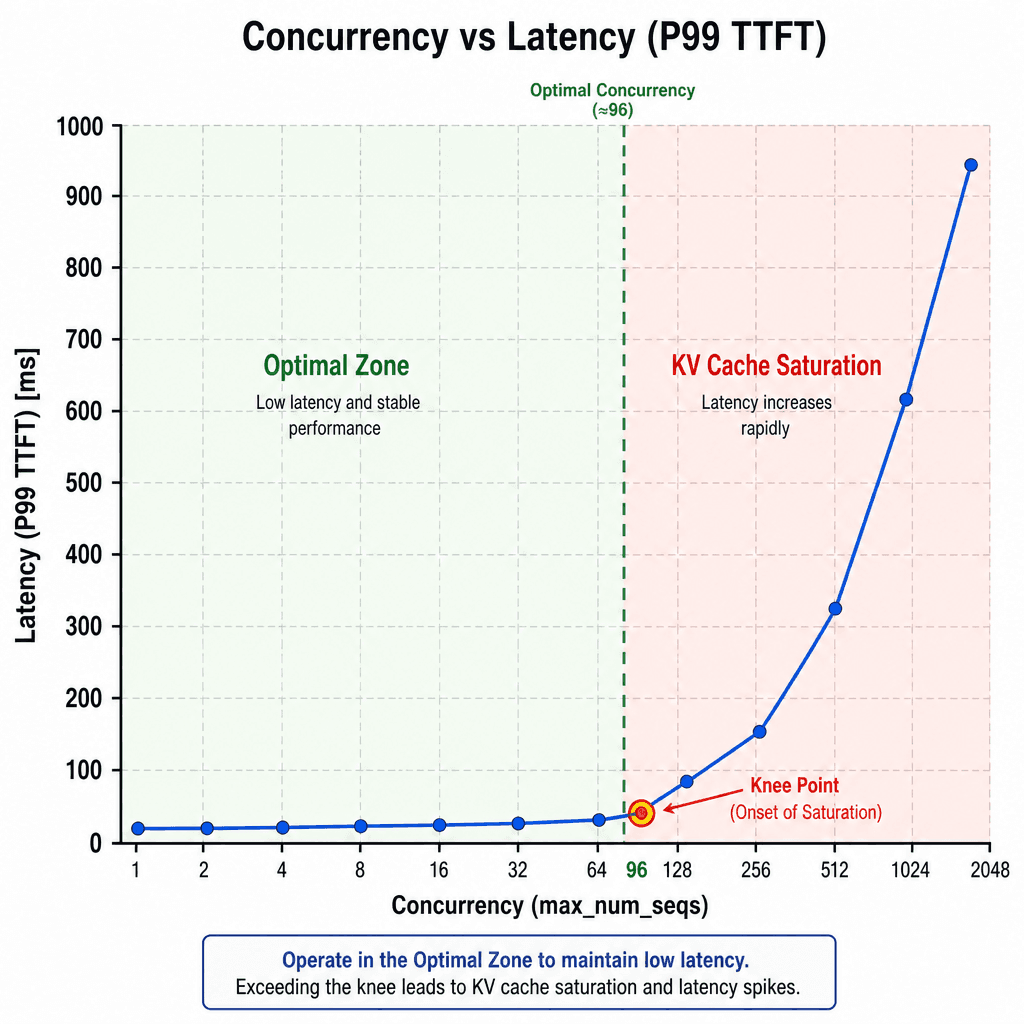
The core challenge in vLLM capacity planning is understanding how concurrency (max_num_seqs) affects the latency curve. As you increase the number of concurrent sequences, vLLM packs more requests into a single batch, maximizing GPU utilization. This increases throughput. However, it also increases the time each request waits in the scheduler queue.
There is a "knee" in the latency curve. Before the knee, increasing concurrency reduces per-request latency because the GPU is kept busy. After the knee, increasing concurrency causes latency to spike because the KV cache becomes fragmented or full, forcing the scheduler to delay new requests or swap blocks to CPU memory.
To find this knee, you must run a sweep of benchmarks varying max_num_seqs. For example, test with values of 64, 128, 256, and 512. Plot the P99 TTFT against the number of concurrent requests. You will likely see a flat line followed by a sharp upward curve. The optimal operating point is just before the sharp rise.
This mechanism is driven by the PagedAttention allocator. When memory is available, allocation is O(1). When memory is scarce, the allocator must search for contiguous blocks, leading to fragmentation. If no contiguous blocks exist, the request is deferred, causing a latency spike.
Capacity Planning and SLOs
Once you have mapped the latency-throughput frontier, you can execute effective capacity planning by aligning your infrastructure resources with your Service Level Objectives (SLOs). For example, assume your SLO requires P99 TTFT < 500ms and Throughput > 500 tokens/sec.
From your benchmark results, identify the maximum request_rate that satisfies the TTFT SLO. Let’s say this is 20 QPS. Now, calculate the total tokens per second at this rate. If the average output length is 200 tokens, 20 QPS * 200 tokens = 4000 tokens/sec. If your target throughput is 500 tokens/sec, you have sufficient headroom. However, if your target was 10,000 tokens/sec, you need more GPUs.
Use this formula to estimate GPU count:
However, this is a simplification. You must also account for the prompt length. Long prompts consume more KV cache slots. If your users send 2000-token prompts, you may need more GPUs not because of compute, but because of memory bandwidth and capacity. Always benchmark with the worst-case prompt length expected in production.
Finally, monitor the KV cache hit rate during your load testing phase. A low hit rate indicates that your sequence lengths vary too much, leading to fragmentation. In such cases, consider using continuous batching with smaller batch sizes or implementing request prioritization to keep the KV cache efficient.
By treating benchmarking as a mechanism exploration rather than a simple speed test, you ensure your vLLM deployment is resilient, predictable, and cost-effective under real-world load.
Conclusion
Benchmarking vLLM is not about maximizing raw tokens/sec in isolation, but about mapping the relationship between concurrency (QPS), latency (TTFT/TPOT), and GPU memory pressure to find the stable operating envelope for production SLOs. By treating every vllm benchmark as a mechanism exploration, you gain insight into how specific configuration changes impact performance. By understanding the metrics that matter, generating realistic synthetic load, and analyzing the concurrency-latency curve, you can make informed decisions about capacity planning and SLO adherence. This approach ensures your load testing protocols accurately reflect production traffic patterns, allowing you to identify the optimal point on the latency curve where performance degrades. Ultimately, this rigorous process allows teams to balance throughput requirements with strict latency SLOs, ensuring that your vLLM deployment remains performant and reliable under varying load conditions.
Related posts
Building an LLM Load Test That Reflects Real Traffic
A guide to building LLM load tests that reflect real traffic patterns using capacity planning, arrival rates, and saturation metrics.
Shadow Traffic for LLM Deployments
Explore how shadow traffic and traffic mirroring enable safe comparison of candidate LLM models in production without impacting user experience.
Speculative Decoding: 2x Throughput for Free?
An examination of speculative decoding techniques that offer up to 2x throughput improvements for large language models by leveraging draft models and acceptance rates.
