Prompt Caching Across Providers: A Practical Comparison
A practical comparison of prompt caching mechanisms across major AI providers, focusing on cache TTL, cost savings, and prefix matching strategies for backend developers.
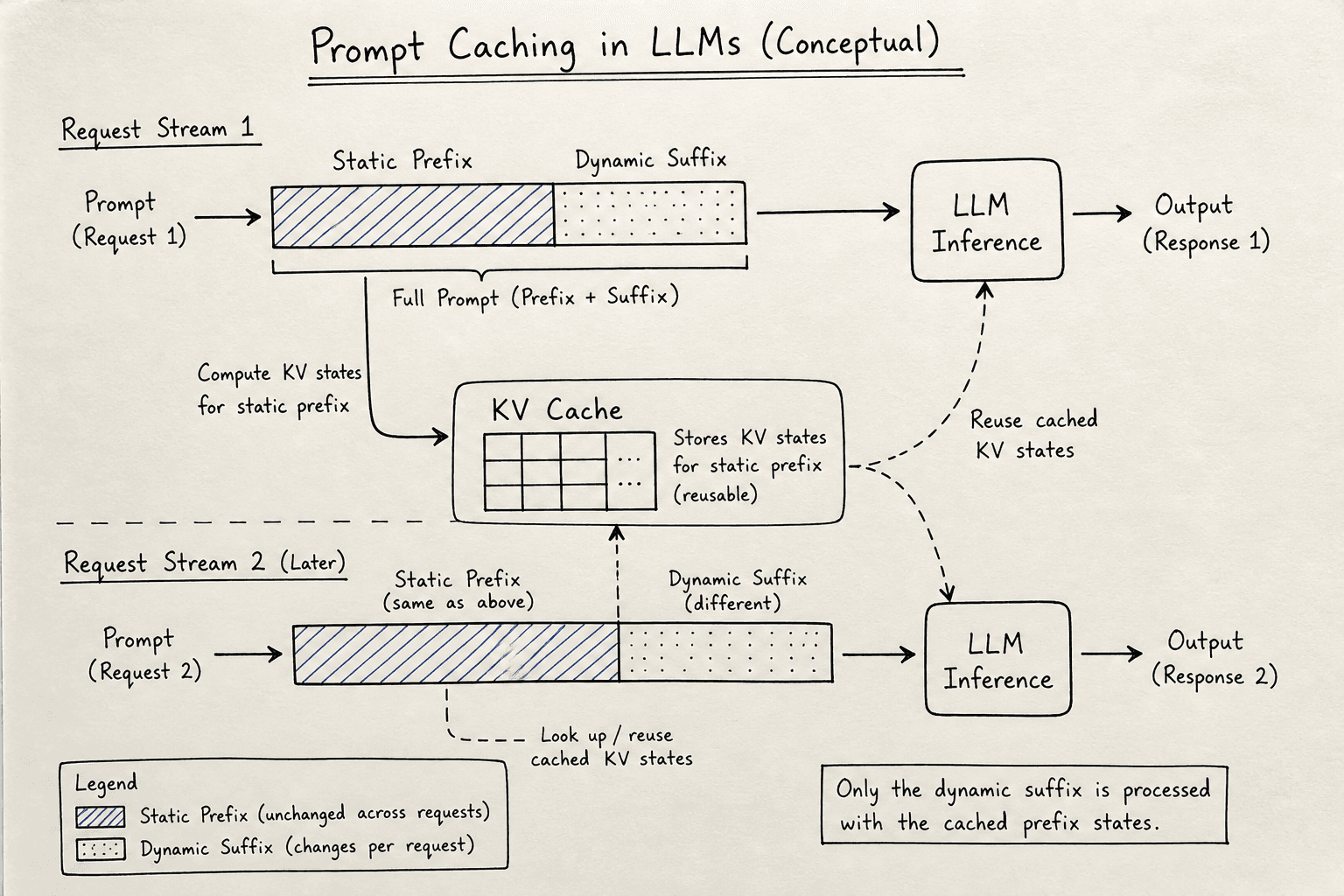
For backend developers integrating Large Language Models (LLMs), input token costs are a significant operational expense. LLM prompt caching operates at the inference engine level, reusing previously computed key-value (KV) states for the initial part of a request—the prefix. This reduces computational load. However, caching is not a uniform protocol; each provider implements distinct mechanisms, TTL limits, and billing models. Understanding these differences is essential for optimizing API usage and controlling costs.
The Mechanism of Prefix Caching
To understand why caching matters, one must look at how LLMs process text. When an LLM processes a prompt, it computes numerical representations called keys and values (KV pairs) for every token in the input sequence. This computation is memory-intensive and time-consuming. If the next request contains the same prefix, the inference engine can reuse these pre-computed KV pairs instead of recalculating them from scratch. This is known as KV-cache reuse.
The critical constraint is prefix matching. Caching only works if the beginning of your prompt is identical to a previous request. Any deviation—a single character change, a different timestamp, or a randomized user ID at the start—invalidates the cache. Therefore, the architecture of your prompt template determines your cache hit rate.
Provider-Specific Implementations
This provider comparison highlights how major AI platforms handle caching differently. While the underlying physics of KV-cache reuse is similar, the API-level implementation varies significantly.
OpenAI: Context Window Caching
OpenAI introduced prompt caching to reduce latency and cost for long prompts. The mechanism relies on exact prefix matching within the context window. When you send a request, OpenAI’s infrastructure checks if the prefix has been seen recently. If it matches, the system reuses the cached KV states.
OpenAI provides explicit feedback in the response body. You can inspect the usage object, which includes a prompt_tokens_details.cached_tokens field indicating how many tokens were served from the cache. This allows developers to audit their caching efficiency directly in the application logs, as documented in OpenAI's Usage Objects documentation.
OpenAI’s caching is automatic based on the payload content. There is no explicit TTL parameter exposed to the user; the provider manages the lifecycle of the cached prefixes internally. However, the cache is not persistent across sessions indefinitely—it is tied to the current context window availability and recent request history.
Anthropic: Explicit Cache Control
Anthropic takes a more granular approach by allowing developers to explicitly define which parts of the prompt should be cached. This is achieved using special control tokens. In the API request, you can wrap specific messages or content blocks with cache control metadata.
For example, you can mark a system prompt or a large block of reference text as "ephemeral." This gives you precise control over what enters the cache and what does not. Anthropic also provides detailed usage statistics in the response, showing cache_creation_input_tokens and cache_read_input_tokens.
The key difference here is intent. With OpenAI, the system guesses based on repetition. With Anthropic, you declare the caching intent. This is particularly useful for prompts that have static sections (like instructions) and dynamic sections (like user queries). You can cache the static part explicitly, ensuring high hit rates even if the dynamic part changes. See Anthropic's Cache Control documentation for implementation details.
Google Vertex AI: Caching for Long Contexts
Google Cloud’s Vertex AI offers caching for long context windows, primarily aimed at reducing latency for very long prompts. Similar to OpenAI, Google’s caching is based on prefix matching. However, the implementation details are tied to the specific model version and the configuration of the Vertex AI endpoint.
Google provides metrics through its monitoring dashboards, allowing you to track cache hit rates over time. The cost benefit is realized through reduced compute time for the input processing phase. Unlike OpenAI, Google lets you specify an explicit TTL when creating cached content, after which the cache is automatically evicted.
Cost Implications and Attribution
The financial impact of prompt caching is substantial, but it is often misunderstood. Caching does not reduce the number of tokens sent; it reduces the cost of those tokens.
Most providers offer a discounted rate for cached input tokens. For example, OpenAI charges a lower price per million tokens for cached inputs compared to uncached inputs. The output tokens are never cached, so their cost remains unchanged. This means the savings are limited to the input portion of the request.
To accurately calculate savings, you must analyze the breakdown of token usage. If your prompt is 90% cached, you only pay the discounted rate for that 90%. The remaining 10% (the dynamic suffix) is paid at the standard rate. For high-volume applications, this discount can reduce overall LLM costs by 30-50%, depending on the prompt structure.
It is crucial to monitor the cached_tokens metric in your API responses. If this value is low, it indicates that your prefix matching strategy is ineffective. Common reasons include:
- Dynamic Prefixes: Including timestamps, user IDs, or random seeds at the start of the prompt.
- Inconsistent Formatting: Extra whitespace or different JSON structures in the static part of the prompt.
- Cache Eviction: Requests that are too old or too infrequent may have been evicted from the cache by the provider.
Practical Strategies for Backend Engineers
Optimizing for prompt caching requires a shift in how you design your API contracts and prompt templates. Here are actionable strategies:
1. Static-Dynamic Separation
Structure your prompts so that the most frequently repeated content appears at the very beginning. For example, if you are building a customer support bot, the system instructions, brand voice guidelines, and company policies should be at the top of the prompt. The user’s specific query should be at the end. This ensures that the bulk of the prompt is cached, regardless of the changing user input.
# Good: Static prefix
prompt = f"""
System: You are a helpful assistant.
... [500 tokens of static instructions] ...
User: {user_query}
"""

# Bad: Dynamic prefix
prompt = f"""
User: {user_query}
System: You are a helpful assistant.
... [500 tokens of static instructions] ...
"""
2. Idempotent Request Design
Ensure that your API requests are idempotent for the same logical operation. If two users ask the same question, the payload sent to the LLM should be identical. Avoid injecting unique identifiers, session IDs, or timestamps into the prompt unless absolutely necessary. If you must include such data, place it at the very end of the prompt to avoid breaking the cache for the static prefix.
3. Monitor and Iterate
Use the usage statistics provided by each provider to track cache hit rates. Set up alerts for low hit rates and investigate the root cause. If you notice a drop in cache hits after a code deployment, check if the prompt template was inadvertently modified. Small changes in whitespace or formatting can invalidate the cache.
4. Understand TTL Limits
While you cannot control the TTL for every provider, you can influence it by maintaining consistent request patterns. If your application has sporadic usage, the cache may be evicted before your next request. For critical applications, consider keeping a warm pool of requests or using a secondary layer of application-level caching for the LLM’s output, rather than relying solely on the provider’s input cache.
Common Pitfalls
When implementing prompt caching, backend engineers often fall into specific traps that negate the benefits. Be aware of these common mistakes:
- Ignoring Whitespace Sensitivity: Most providers treat spaces, newlines, and indentation as significant tokens. A single extra space in a static header string will cause a cache miss. Always normalize whitespace in your static prompt segments.
- Caching Dynamic User IDs: Including user-specific identifiers (like UUIDs or session tokens) in the prefix is a primary cause of cache misses. If user context is required, append it to the end of the prompt, after the static instructions.
- Assuming Output Caching Exists: Prompt caching only applies to input tokens. The model’s generation (output) is never cached by the provider. Do not expect caching to reduce the latency of the streaming response itself, only the time-to-first-token (TTFT).
- Overlooking Model Versioning: Caches are often specific to the model version used. If you A/B test different model versions (e.g.,
gpt-4-0613vsgpt-4-0125-preview), they typically do not share cache states, leading to unexpected costs during transitions.
Conclusion
Prompt caching is an effective tool for reducing LLM costs and latency, but it is not a set-it-and-forget-it feature. It requires careful design of prompt templates and continuous monitoring of API usage metrics. By understanding the specific mechanisms of each provider—whether it’s OpenAI’s automatic prefix matching, Anthropic’s explicit cache control, or Google’s context window caching—you can build more efficient and cost-effective AI-powered applications. The key is to treat the prompt as a cacheable artifact, structuring it for maximum reuse and minimal variance.
FAQ
Does prompt caching reduce output token costs? No. Caching only applies to input tokens. Output tokens are generated in real-time and are billed at the standard rate regardless of how the input was processed.
How long does a cached prefix last? TTLs are not standardized and are managed by the provider. They typically depend on request frequency and recency. If a prefix is not used for a certain period, it may be evicted.
Can I manually clear the cache? Generally, no. Providers manage the cache lifecycle automatically. You cannot force a cache eviction or invalidation through API parameters.
Does caching work across different models? Usually not. Caches are typically bound to specific model versions. Switching models may result in a cache miss even if the prompt text is identical.
Related posts
SGLang's RadixAttention, Explained
An examination of SGLang's RadixAttention mechanism, focusing on prefix caching, radix trees, and throughput optimization for ML infrastructure.
Estimating LLM Costs Before You Build
A practical guide for engineering managers and architects on estimating LLM costs using unit economics, token forecasting, and sensitivity analysis to build within budget.
Multi-Provider Failover with LiteLLM
Implement resilient AI routing using LiteLLM to handle multi-provider failover and fallback strategies for backend systems.
