Prompt Management, Versioning, and Rollback
Explore prompt management, versioning, and rollback strategies for LLMOps. Learn to maintain a prompt registry and configuration for stable production deployments.
In production LLMOps, prompt management treats prompts as immutable configuration artifacts, not code. Treating them as such requires a dedicated registry, semantic versioning, and atomic rollback capabilities to ensure deterministic behavior despite the non-deterministic nature of LLMs. This guide explores how to maintain a prompt registry and configuration for stable production deployments.
As part of the LLMOps in Production series, we move beyond basic prompt engineering to address the operational challenges of managing prompts at scale. Without proper versioning and isolation, LLM applications suffer from "silent drift," where changes in prompt text or parameters degrade performance without clear attribution.
The Artifact Problem: Prompts Are Not Code
In traditional software engineering, code is the source of truth. In Large Language Model (LLM) applications, the prompt is the logic. However, unlike code, prompts are rarely compiled, linted, or strictly typed. They are often embedded directly into application code as multi-line strings, creating a coupling between the business logic and the model interaction layer. This creates a fragility in production environments: when an LLM’s behavior degrades, it is often unclear whether the issue lies in the application code, the model weights, or the prompt text itself.
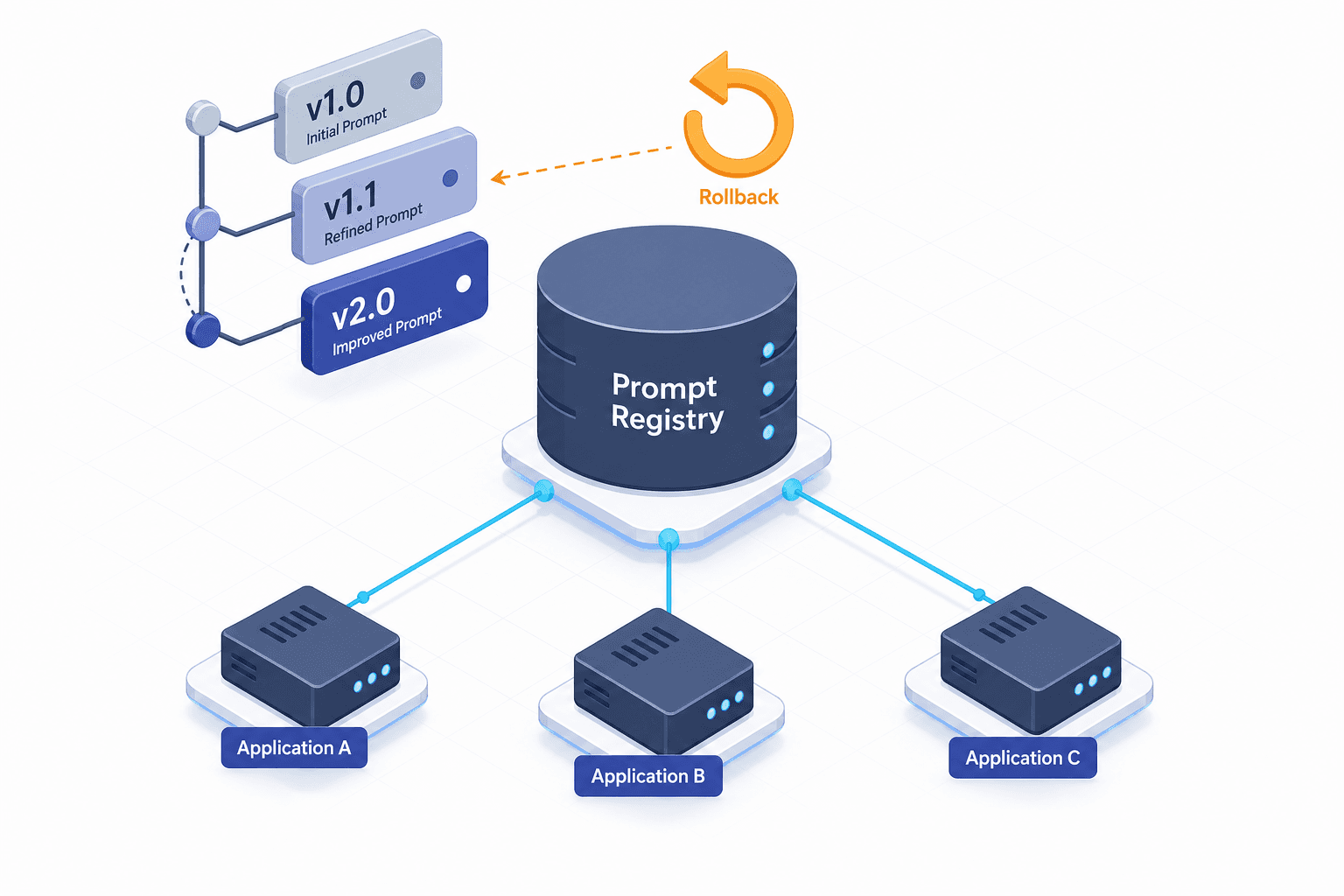
To solve this, production LLMOps treats prompts as configuration artifacts. A prompt is not just text; it is a template combined with specific inference parameters (temperature, top_p, max_tokens) and a target model ID. This composite object is stored in a Prompt Registry—a centralized, version-controlled store that decouples the prompt definition from the application code.
By externalizing prompts, you reduce coupling between your application logic and model interaction. This separation allows independent iteration on prompts without triggering full application redeployments, directly addressing the fragility mentioned earlier. When a user asks a question and receives a poor response, you can trace that specific interaction back to the exact version of the prompt template and its parameters that generated it. Without a registry, debugging becomes an exercise in guessing which inline string was active at what time.
Versioning Mechanics: Semantic Control Over Drift
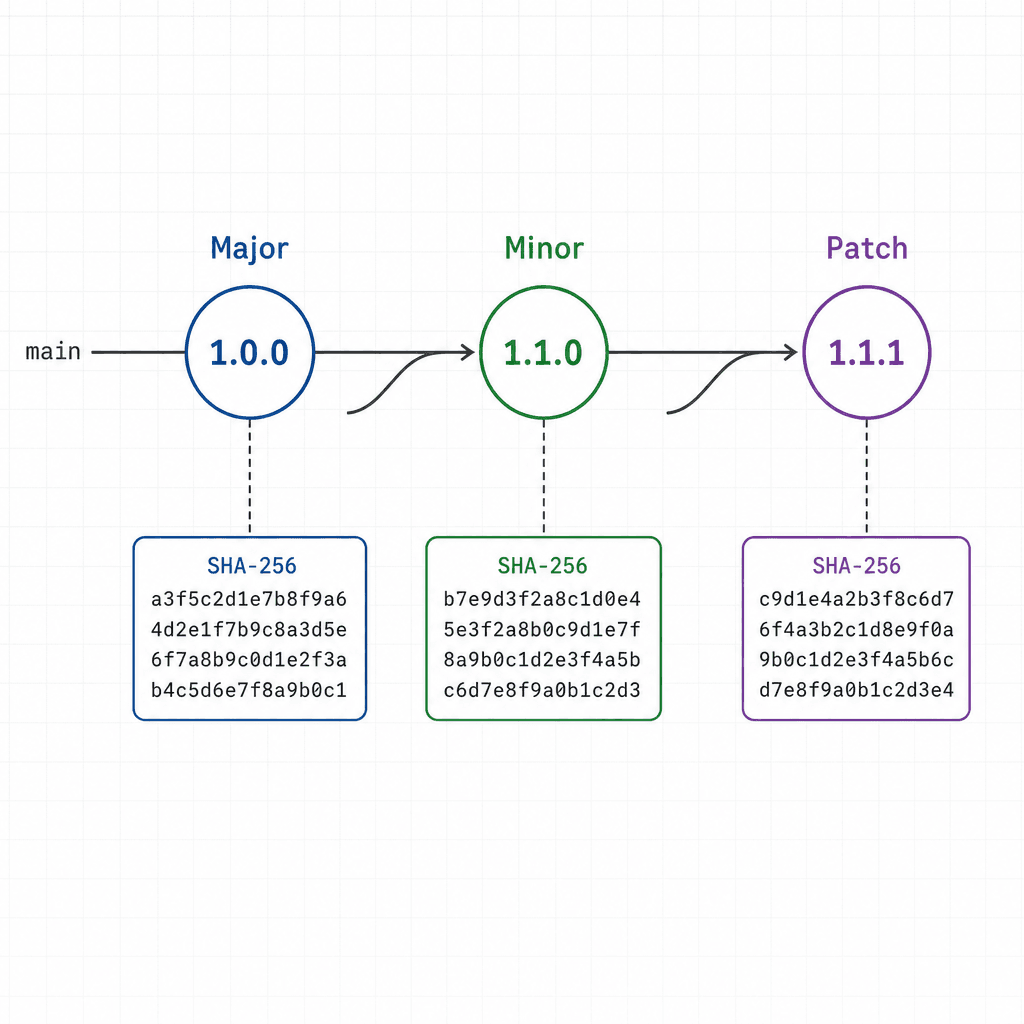
Versioning in LLMOps follows a pattern similar to semantic versioning (SemVer) used in software libraries, but applied to the prompt template and its configuration. Each entry in the prompt registry is assigned a unique identifier, typically structured as prompt-name:v<major>.<minor>.<patch>.
- Major Version: Changes in the fundamental structure of the prompt (e.g., switching from a zero-shot instruction to a few-shot example format). This often requires re-evaluation of the model’s performance and may break downstream dependencies.
- Minor Version: Additions to the prompt content that do not change the core logic (e.g., adding new examples to a few-shot list or refining system instructions).
- Patch Version: Trivial changes (e.g., fixing a typo) that should have no impact on model output, though in practice, LLMs can be sensitive to even minor text changes.
The key mechanism here is the Prompt Hash. When a prompt version is registered, the system computes a cryptographic hash (e.g., SHA-256) of the combined template and configuration. This hash serves as the immutable identifier for that specific configuration state.
Consider a Python-based registry implementation using a hypothetical PromptManager client:
# Registering a new prompt version
response = prompt_manager.register(
    name="customer_support_agent",
    version="v1.2.0",
    template="You are a helpful assistant. Context: {{context}}. Question: {{question}}",
    config={
        "model": "gpt-4-1106-preview",
        "temperature": 0.7,
        "max_tokens": 500
    }
)
print(f"Registered with hash: {response.hash}")
This hash is then attached to every inference request. If the application logs an error, the log entry contains prompt_hash: 8a3f.... This allows engineers to instantly retrieve the exact prompt that was used, eliminating ambiguity.
Rollback Strategies: Code vs. Runtime
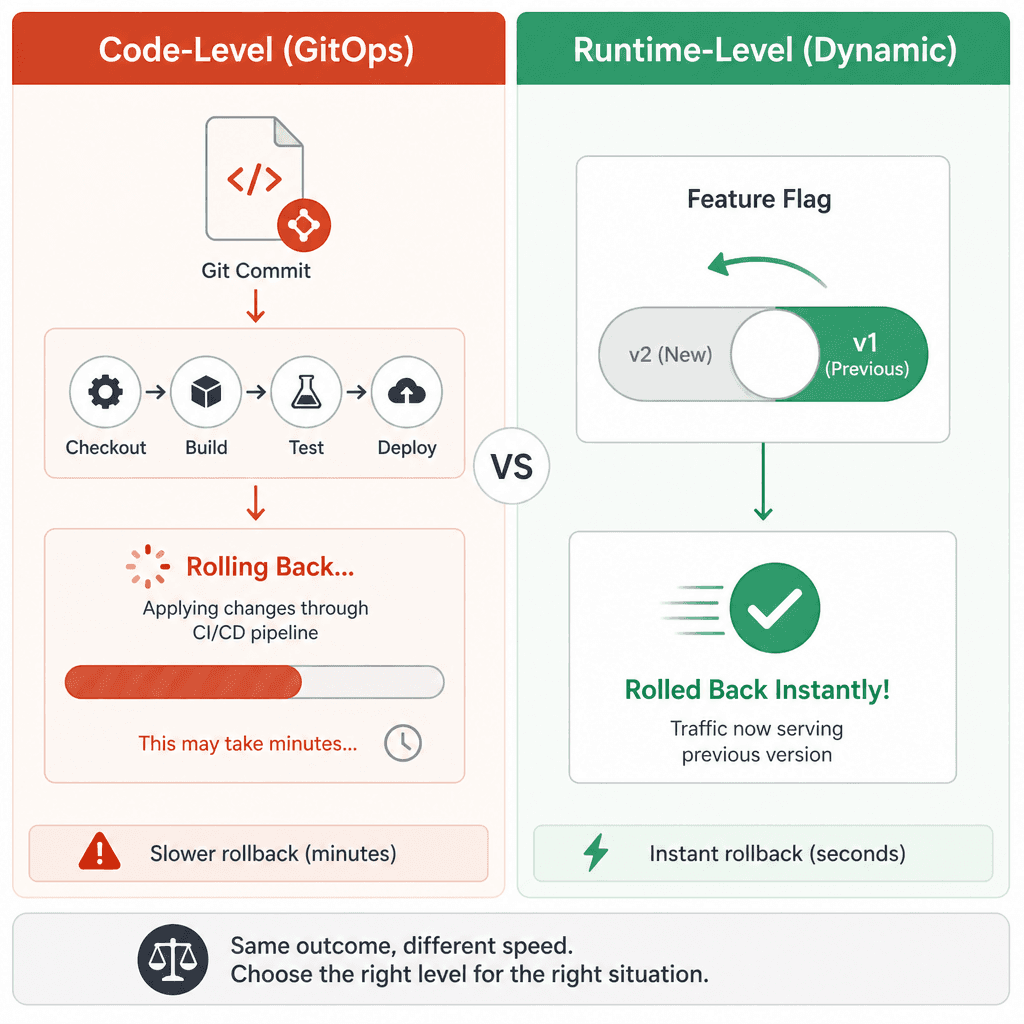
Rollback in LLMOps operates at two distinct layers, each addressing different failure modes. Understanding the difference is critical for platform engineers designing reliable systems.
1. Code-Level Rollback (GitOps)
This is the traditional approach. If a new prompt version causes a regression in accuracy or safety, the engineering team reverts the Git commit that introduced the problematic prompt. The CI/CD pipeline then rebuilds and deploys the application with the previous prompt version.
Mechanism: The deployment artifact bundles the prompt configuration artifacts. Reverting the code reverts the bundled definitions. Pros: Simple, auditable via Git history. Cons: High latency. Requires a full redeployment cycle (build, test, deploy), which can take minutes to hours. During this window, the system continues to use the broken prompt.
2. Runtime-Level Rollback (Dynamic Configuration)
A more robust strategy involves separating the prompt registry from the application deployment. The application fetches the active prompt version from the registry at runtime (or caches it with a short TTL). If a regression is detected, the platform engineer can switch the "active" pointer in the registry from v1.2.0 back to v1.1.0 without touching the application code.
Mechanism: The application checks a feature flag or a configuration endpoint that points to customer_support_agent:v1.1.0. The next inference request uses this version.
Pros: Near-instant recovery. No redeployment required.
Cons: Requires the application to be designed with dynamic prompt loading in mind. Caching strategies must be carefully managed to avoid stale prompts.
For example, using a feature flag service like LaunchDarkly or a simple database-driven configuration:
# Application code fetching active prompt
active_version = config_service.get_active_version("customer_support_agent")
prompt_template = prompt_registry.get_by_version(active_version)
response = llm.invoke(prompt_template.format(context=ctx, question=q))
If v1.2.0 fails, the platform team executes:
# Switch active version in registry
prompt_registry.set_active("customer_support_agent", "v1.1.0")
The application picks up the change on the next request (or cache refresh), effectively rolling back the prompt behavior without restarting the service.
Configuration Management and Stability
Maintaining a prompt registry is not just about versioning; it is about managing dependencies. Prompts often rely on external data sources, such as vector embeddings for RAG (Retrieval-Augmented Generation) or specific tool definitions. A stable production deployment requires that these dependencies are also versioned and locked.
If a prompt v1.2.0 relies on a specific vector index schema, and that schema changes, the prompt may fail or produce hallucinations. Therefore, the configuration object should include a reference to the Data Version or Schema Version.
Additionally, A/B Testing mechanisms should be integrated into the registry. Instead of simply rolling back, teams can route 10% of traffic to v1.3.0 (canary) while keeping 90% on v1.2.0. If metrics degrade, the router automatically shifts traffic back. This requires the registry to support weighted routing rules. Industry best practices for ML systems, such as those outlined in Google's SRE books, emphasize canary deployments as a primary method for mitigating risk during model updates.
Conclusion
Prompt management in production is not a luxury; it is a prerequisite for reliability. By treating prompts as versioned, hash-identified configuration artifacts stored in a dedicated registry, organizations can achieve the same level of control over LLM interactions as they do over traditional code. The ability to rollback instantly via runtime configuration, combined with the auditability of version hashes, transforms the LLM from a black box into a manageable component of the software stack. For platform engineers, this means building pipelines that treat prompt files with the same rigor as source code: reviewed, tested, and version-controlled.
Common Pitfalls
When implementing prompt versioning, avoid these common mistakes:
- Ignoring Parameter Drift: Versioning the prompt text but ignoring changes in inference parameters (like temperature or top_p) can lead to false confidence in version stability. Always version the entire configuration object.
- Not Versioning System Prompts Separately: System prompts often drive the overall behavior of the model. Treat them as distinct artifacts from task-specific user prompts to allow granular control and testing.
- Lack of Automated Testing: Manual evaluation of prompt versions is error-prone. Integrate automated regression tests that run against new prompt versions before they are promoted to production.
Related posts
Semantic Caching That Actually Saves Money
Learn how semantic caching reduces LLM costs by storing similar prompts, managing similarity thresholds, and handling invalidation for platform engineers.
Shadow Traffic for LLM Deployments
Explore how shadow traffic and traffic mirroring enable safe comparison of candidate LLM models in production without impacting user experience.
Zero-Downtime Model Rollouts: Strategies for Continuous ML Availability
Explore strategies for zero-downtime model rollouts, including blue-green deployments, rolling updates, and readiness probes to ensure continuous availability.
