React Authentication with Auth0 and OIDC: A Developer Guide
A developer guide to implementing React authentication using Auth0 and OIDC for secure frontend integration.
The Mechanism of React Authentication with Auth0
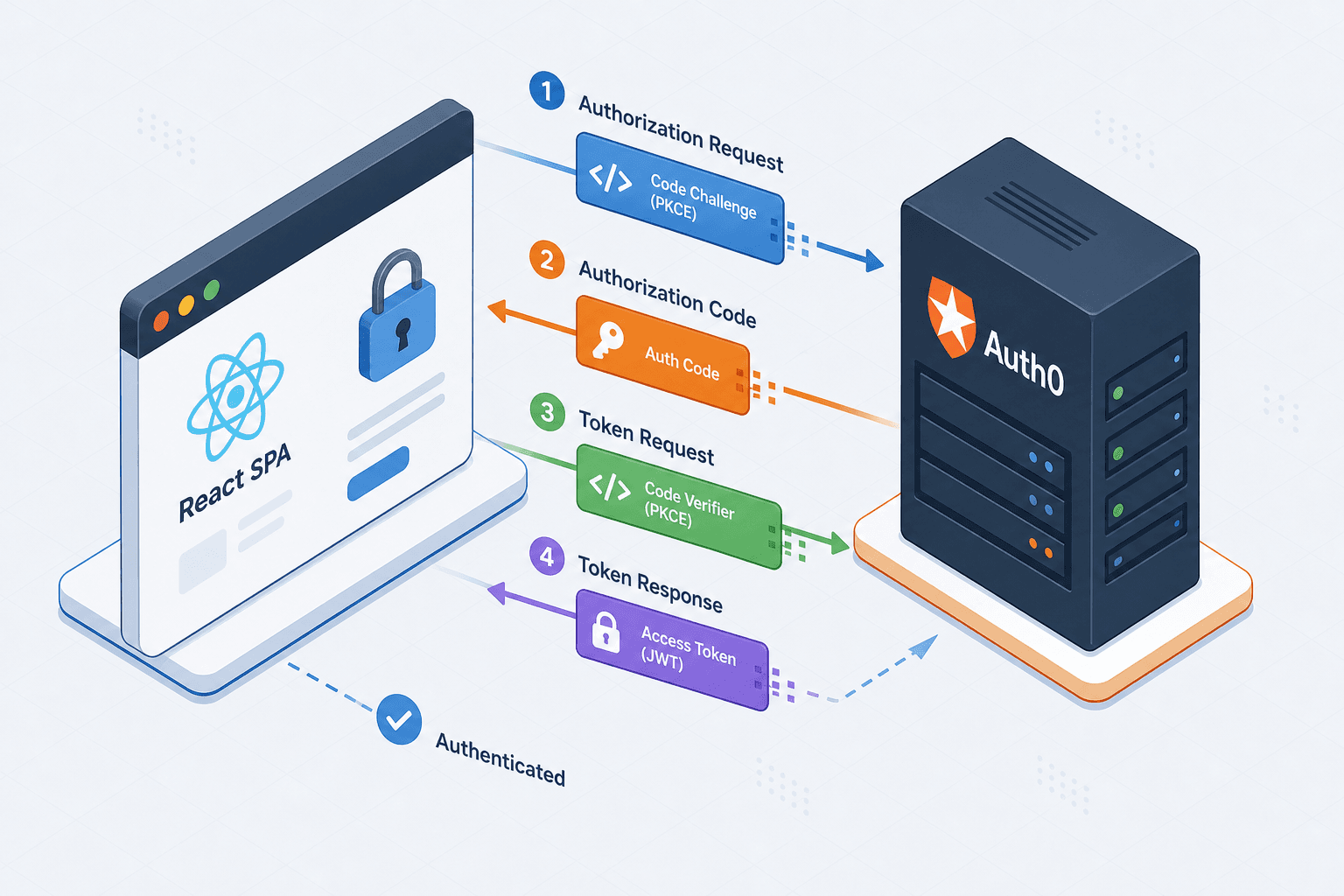
When building a single-page application (SPA) like React, the browser cannot securely store a client secret. If you attempt to use the standard OAuth 2.0 Authorization Code Grant, an attacker inspecting the bundle could steal that secret and impersonate your application. The solution is not a different protocol, but a specific variation: the Authorization Code Flow with Proof Key for Code Exchange (PKCE). This mechanism transforms the browser into a "public client" by generating a dynamic code verifier on the fly, ensuring that even if a token is intercepted, it cannot be exchanged without the original verifier generated in the browser session.
Consider a scenario where Alice opens my-shop.com in her browser. The React application, running in the DOM, needs to verify Alice's identity. It does not call a backend API to log her in; instead, it redirects her browser to Auth0's authorization endpoint. This redirect includes a code_challenge (the hash of a code_verifier generated locally). The code_verifier is kept in memory and sent only to the token endpoint. Alice sees a login screen, authenticates with her credentials, and Auth0 redirects her back to my-shop.com/callback with an authorization code. The React app then takes this code and the original code_verifier to the token endpoint. Auth0 validates that the code matches the challenge. If the attacker stole the code but not the verifier (which never left the browser's memory), the exchange fails.
The SDK Abstraction Layer
Implementing this flow manually involves handling complex state machines, redirect URI management, and token parsing. The @auth0/auth0-react SDK abstracts this by injecting a React Context provider that manages the entire lifecycle of the authentication state. When you wrap your application root with <Auth0Provider>, the SDK initializes the configuration (domain, client ID, audience) and listens for the return parameters from the Auth0 redirect.
The core mechanism here is the useAuth0 hook. This hook subscribes to the context changes. When the redirect returns, the SDK parses the id_token, decodes the JWT payload to extract claims like sub (subject) and email, and stores the accessToken in memory. It then updates the React context, triggering a re-render of any component consuming useAuth0.
import { Auth0Provider } from '@auth0/auth0-react';

function App() {
  return (
    <Auth0Provider
      domain="your-domain.auth0.com"
      clientId="your-client-id"
      redirectUri={window.location.origin}
    >
      <YourApp />
    </Auth0Provider>
  );
}
In this setup, the domain and clientId are the only static identifiers. The redirectUri is critical; it must match exactly what is registered in the Auth0 dashboard, or the browser will reject the callback. The SDK handles the heavy lifting of detecting the code and state parameters in the URL, validating the state parameter to ensure the request wasn't tampered with (CSRF protection), and then silently exchanging the code for tokens in the background.
Token Lifecycle and Memory Management
A common misconception is that storing the access_token in localStorage is safe for SPAs. While convenient for persistence across reloads, localStorage is vulnerable to Cross-Site Scripting (XSS) attacks. If a malicious script runs in your page, it can read localStorage and steal the token. The mechanism recommended by Auth0 and modern security standards is to keep the access_token in memory (JavaScript closure) and only persist the refresh_token (if using a confidential client, though usually handled server-side) or rely on the SDK's silent renewal.
The Auth0 React SDK implements a "silent renewal" strategy. When the access_token expires (typically after 8 hours or less), the SDK attempts to fetch a new token using an iframe or hidden fetch to the /oauth/token endpoint with a refresh token, provided the session is still valid on the Auth0 side. This happens transparently. If the user's session has expired on Auth0, the silent renewal fails, and the SDK flags the user as isAuthenticated: false, prompting a re-login.
const { isAuthenticated, user, getAccessTokenSilently, isLoading } = useAuth0();

// Accessing the token securely in memory
const token = isAuthenticated ? await getAccessTokenSilently() : null;
The getAccessTokenSilently method is the mechanism for fetching the token without redirecting the user. It checks the local cache first. If the cache is stale, it attempts the silent flow. This ensures that the token never touches localStorage unless explicitly configured otherwise, reducing the attack surface. While standard public client flows rely on session cookies for silent renewal, the SDK can be configured for refresh token rotation, but the primary mechanism described (silent iframe) relies on the existing session, not direct refresh token exposure in memory.
##END_IMAGE_BLOG : react-authentication-auth0-oidc-guide-inline-2 : react-authentication-auth0-oidc-guide-inline-2 : Architecture diagram contrasting insecure localStorage storage vs secure in-memory storage for access tokens in a React application, showing XSS threat vector against localStorage. Style: technical schematic, red and green indicators, dark mode background, clear labels. ##END_IMAGE_BLOG
Protecting Routes with Guards
Securing the UI is the final layer. The mechanism here is conditional rendering based on the isAuthenticated flag provided by the context. You do not need to manually check tokens in every component. Instead, you create a higher-order component (HOC) or a custom hook that wraps your protected routes.
The withAuthenticationRequired HOC is the standard pattern. It accepts a component (e.g., Dashboard) and returns a new component. When a user visits /dashboard, the wrapper checks isAuthenticated. If true, it renders the Dashboard. If false, it redirects the browser to the Auth0 login page, preserving the original destination so the user returns to the dashboard after login.
import { withAuthenticationRequired } from '@auth0/auth0-react';

const Dashboard = () => <h1>Welcome to the Dashboard</h1>;
const ProtectedDashboard = withAuthenticationRequired(Dashboard, {
  onRedirecting: () => <div>Loading...</div>,
});
This redirection is not just a UI change; it triggers the full OIDC flow again. The onRedirecting prop allows you to show a loading state while the user is being sent to Auth0 and back. This mechanism ensures that no protected resource is ever accessible without a valid token, and the token itself is never exposed to the network traffic unless the user explicitly requests it via an API call.
Common Pitfalls
When integrating Auth0 with React, several common errors can compromise security or break functionality.
- Misconfigured Redirect URIs: The most frequent cause of authentication failures is a mismatch between the
redirectUriin yourAuth0Providerconfiguration and the settings in the Auth0 Dashboard. Even a trailing slash difference will cause the callback to be rejected. Always verify these match exactly, including the protocol (https://). - Storing Tokens in localStorage: Despite its convenience,
localStorageis susceptible to XSS attacks. Storing access tokens there allows any malicious script injected into your page to exfiltrate them. Stick to the SDK's default behavior of keeping tokens in memory or using short-lived session storage if persistence is absolutely necessary. - Exposing Secrets in Client-Side Code: Never embed your Auth0 Client Secret in your React code. Since the React bundle is public, anyone can view the source and steal the secret. The React SDK is designed for public clients and should only use the Client ID and Domain.
Practical Takeaways
- Enforce PKCE: Always use the Authorization Code Flow with PKCE for SPAs to prevent token interception attacks.
- Trust the SDK: Leverage
@auth0/auth0-reactfor handling state management and token renewal rather than writing custom logic. - Secure by Default: Keep tokens in memory and configure your application to require authentication for all protected routes.
FAQ
Q: Does PKCE require a client secret? A: No, PKCE is specifically designed for public clients (like SPAs) that cannot safely store a client secret. It uses a code verifier and challenge instead.
Q: Why shouldn't I store the access token in localStorage?
A: localStorage is accessible by any JavaScript running on the page. If an XSS vulnerability exists, an attacker can read the token and hijack the user's session.
Q: How does silent renewal work without a refresh token? A: For public clients, silent renewal typically relies on the existing session cookie on the Auth0 domain. The SDK uses a hidden iframe to communicate with Auth0 to renew the access token without requiring the user to re-enter credentials.
Conclusion
Using Auth0 with React shifts the complexity of token management and security boundaries to the identity provider. The tradeoff is reliance on the third-party service's uptime and configuration accuracy. However, the mechanism of PKCE and the SDK's in-memory token storage provide a strong defense against common frontend attacks like XSS and CSRF. The developer's responsibility narrows to configuring the redirect URIs correctly and ensuring the AuthProvider wraps the entire application tree, leaving the cryptographic heavy lifting to the Auth0 infrastructure.
Related posts
Multi-Factor Authentication with OIDC: Implementing MFA
An examination of implementing multi-factor authentication using OIDC, covering Keycloak, WebAuthn, TOTP, and step-up authentication via ACR.
Standalone Angular: provideOAuthClient and Bootstrapping
Learn how to use provideOAuthClient for bootstrapping OAuth2/OIDC in standalone Angular applications without NgModules.
Angular OAuth2/OIDC Token Storage: localStorage, sessionStorage, and In-Memory
Compare localStorage, sessionStorage, and in-memory storage for Angular OAuth2 OIDC tokens to mitigate XSS risks and secure authentication.