Calling mTLS Services With RestClient and WebClient
Learn how to configure Java's RestClient and WebClient for mutual TLS authentication, handling client certificates and resolving handshake failures in Spring Boot applications.
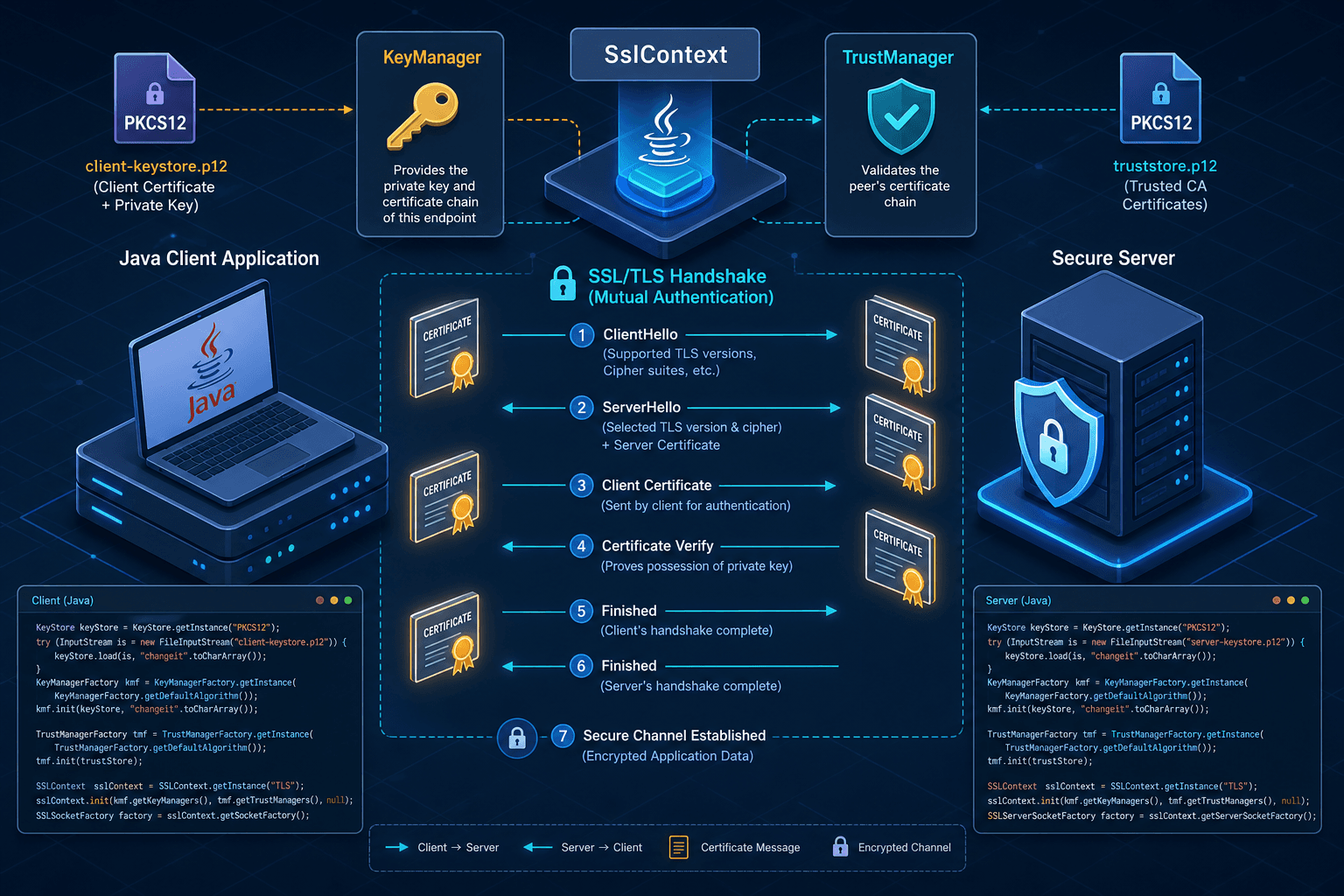
Mutual TLS (mTLS) is often misunderstood as a specific "mTLS mode" in HTTP clients. It is not. mTLS is simply the standard TLS handshake where the client presents a certificate to prove its identity, in addition to the server presenting its certificate to prove its identity. As a core component of application security, mTLS ensures that both parties in a communication channel are verified.
In java, this mechanism relies on two components:
- KeyManager: Holds the client’s private key and certificate chain. It answers the server’s request: "Who are you?"
- TrustManager: Holds the list of trusted Certificate Authorities (CAs). It answers the client’s question: "Can I trust this server?"
Most developers configure the TrustManager (to trust the server) but forget the KeyManager (to identify themselves). This results in handshake failure. Below, we configure both RestClient and WebClient correctly within a Spring Boot context.
The Mechanism: Building the SslContext
Before configuring any HTTP client, you must build an SslContext. This object encapsulates both the client credentials and the trust store.
Assume you have:
client-cert.p12: A PKCS12 keystore containing the client’s private key and certificate.truststore.p12: A keystore containing the CA certificates that sign the server’s certificate.- Passwords for both.
import io.netty.handler.ssl.SslContext;
import io.netty.handler.ssl.SslContextBuilder;
import org.springframework.http.client.reactive.ReactorClientHttpConnector;
import org.springframework.web.reactive.function.client.WebClient;
import org.springframework.web.client.RestClient;

import javax.net.ssl.KeyManagerFactory;
import javax.net.ssl.TrustManagerFactory;
import java.io.FileInputStream;
import java.security.KeyStore;

public class MtlsConfig {

    public static SslContext createSslContext(
            String clientCertPath, String clientPassword,
            String trustStorePath, String trustPassword) throws Exception {

        // 1. Load Client Keystore (for KeyManager)
        KeyStore clientKeyStore = KeyStore.getInstance("PKCS12");
        try (FileInputStream fis = new FileInputStream(clientCertPath)) {
            clientKeyStore.load(fis, clientPassword.toCharArray());
        }
        KeyManagerFactory kmf = KeyManagerFactory.getInstance(KeyManagerFactory.getDefaultAlgorithm());
        kmf.init(clientKeyStore, clientPassword.toCharArray());

        // 2. Load Trust Store (for TrustManager)
        KeyStore trustStore = KeyStore.getInstance("PKCS12");
        try (FileInputStream fis = new FileInputStream(trustStorePath)) {
            trustStore.load(fis, trustPassword.toCharArray());
        }
        TrustManagerFactory tmf = TrustManagerFactory.getInstance(TrustManagerFactory.getDefaultAlgorithm());
        tmf.init(trustStore);

        // 3. Build SslContext
        return SslContextBuilder.forClient()
                .keyManager(kmf) // Provides client identity
                .trustManager(tmf) // Validates server identity
                .build();
    }
}
This SslContext is the artifact you inject into WebClient's Netty-based transport. (For RestClient's JDK-based transport, build an equivalent javax.net.ssl.SSLContext using the same KeyManagerFactory and TrustManagerFactory pattern.)
Configuring RestClient
RestClient (introduced in Spring Framework 6.1) is a synchronous, blocking HTTP client. It uses ClientHttpRequestFactory under the hood. In Spring Boot 3.2+, you can configure it via a RestClient.Builder.
The critical step is passing the SSL configuration to the underlying HTTP client factory. JdkClientHttpRequestFactory wraps a java.net.http.HttpClient, so you configure TLS by building that HttpClient with a standard javax.net.ssl.SSLContext (built the same way as above, via KeyManagerFactory and TrustManagerFactory) and passing it to HttpClient.Builder.sslContext(...). The most robust way in modern Spring Boot is to let Spring manage the bean lifecycle by exposing that configured HttpClient as the request factory.
@Bean
public RestClient mTLSRestClient(SSLContext sslContext) {
    HttpClient httpClient = HttpClient.newBuilder()
            .sslContext(sslContext)
            .build();

    return RestClient.builder()
            .requestFactory(new JdkClientHttpRequestFactory(httpClient))
            .baseUrl("https://secure-service.internal")
            .build();
}
Why this works: We wrap a java.net.http.HttpClient configured with our SSLContext inside a JdkClientHttpRequestFactory. When RestClient makes a request, the underlying HttpClient uses this SSLContext to negotiate TLS. The KeyManager inside the context will automatically present the client certificate when the server requests it.
Note: If you are using Spring Boot 3.1 or earlier,
RestClientis not available. You should useRestTemplatewith a similarClientHttpRequestFactoryconfiguration.RestTemplateremains a valid choice for legacy systems, butRestClientis the recommended future-proof approach in modern spring-boot applications.
Configuring WebClient
WebClient is reactive and non-blocking. It does not use RestClient’s blocking factory. Instead, it uses a ClientHttpConnector. The default connector in Spring Boot is often Netty-based, which requires a different approach.
You must create a ReactorClientHttpConnector and inject the SslContext into it.
@Bean
public WebClient mTLSWebClient(SslContext sslContext) {
    HttpClient httpClient = HttpClient.create()
            .secure(spec -> spec.sslContext(sslContext));

    ClientHttpConnector connector = new ReactorClientHttpConnector(httpClient);

    return WebClient.builder()
            .clientConnector(connector)
            .baseUrl("https://secure-service.internal")
            .build();
}
Mechanism difference: HttpClient from Project Reactor’s Netty module consumes the SslContext via the SslContextSpec callback passed to its .secure() method. When WebClient sends a request, Netty initiates the TLS handshake, using the KeyManager from the context to present the client certificate.
Troubleshooting Handshake Failures
When mTLS fails, the error messages are often generic. You must interpret them based on the TLS handshake flow. Issues often arise when client certificates are misconfigured or missing from the client's trust store.
1. PKIX path building failed or unable to find valid certification path
Mechanism: This error occurs during the server verification phase. The client’s TrustManager cannot build a chain from the server’s certificate to a trusted root CA.
Cause:
- The server is using a self-signed certificate or a certificate from a CA not in your
truststore.p12. - The
truststore.p12was not loaded correctly into theSslContext.
Fix:
- Ensure the server’s CA certificate is imported into the trust store used by the
TrustManager. - For debugging, temporarily add
.trustManager(InsecureTrustManagerFactory.INSTANCE)(not for production) to see if the server cert is the issue.
2. alert handshake_failure or No available certificate or key corresponds to the server cipher suites
Mechanism: This error occurs when the server rejects the client’s certificate. The server requested a client certificate, but the client either:
- Did not present any certificate (missing
KeyManager). - Presented a certificate that the server does not trust (client cert not signed by a CA the server trusts).
- Presented a certificate with incompatible parameters (e.g., RSA key but server only accepts ECDSA).
Cause:
- The
KeyManagerwas not passed to theSslContext(most common error). - The client certificate is expired or revoked.
- The server requires a specific CA for client authentication, and your client cert is not signed by that CA.
Fix:
- Verify that
keyManager(kmf)is called inSslContextBuilder.forClient(). - Check the server logs for
CertificateVerifyfailures. - Ensure the client certificate’s private key matches the public key in the certificate.
3. Protocol version mismatch or Unsupported cipher suite
Mechanism: The client and server cannot agree on a TLS version or encryption algorithm.
Cause:
- The server requires TLS 1.3, but the
SslContextis configured for TLS 1.2 or lower. - The client’s JVM does not support the cipher suites offered by the server.
Fix:
- Explicitly set the TLS version in the
SslContextBuilder:.protocols("TLSv1.3") - Update your JVM’s security policy if custom cipher suites are disabled.
Conclusion
mTLS in java is not a black box. It is a configuration of two managers: KeyManager for identity and TrustManager for trust. Whether you use RestClient or WebClient, the core task is the same: build an SslContext with both, and inject it into the HTTP client’s transport layer.
- RestClient: Use a
JdkClientHttpRequestFactorywrapping ajava.net.http.HttpClientconfigured with ajavax.net.ssl.SSLContext. - WebClient: Use
ReactorClientHttpConnectorwith a NettyHttpClientconfigured with theSslContext.
Always verify both the trust store (server cert) and the key store (client cert) are correctly loaded. Most handshake failures stem from one of these two being misconfigured. For legacy applications still using RestTemplate, ensure the underlying ClientHttpRequestFactory is similarly configured with the appropriate SSL socket factory.
Related posts
Enabling TLS and mTLS in Spring Boot
A practical guide to configuring TLS and mutual TLS (mTLS) in Spring Boot using SSL bundles and server.ssl properties for secure communication.
Spring Security X.509: Client Certificate Authentication
Implement X.509 client certificate authentication in Spring Security to secure mutual TLS connections using SubjectPrincipalRegex and UserDetailsService.
SecurityFilterChain in Spring Security 6
A technical walkthrough of configuring SecurityFilterChain in Spring Security 6 using the Lambda DSL and RequestMatchers for Java developers.