Generating a Test PKI With OpenSSL and keytool
A comprehensive walkthrough for Java developers on generating a test PKI using OpenSSL and keytool, covering Root CA generation, PKCS12 conversion, JKS keystores, and Subject Alternative Names.
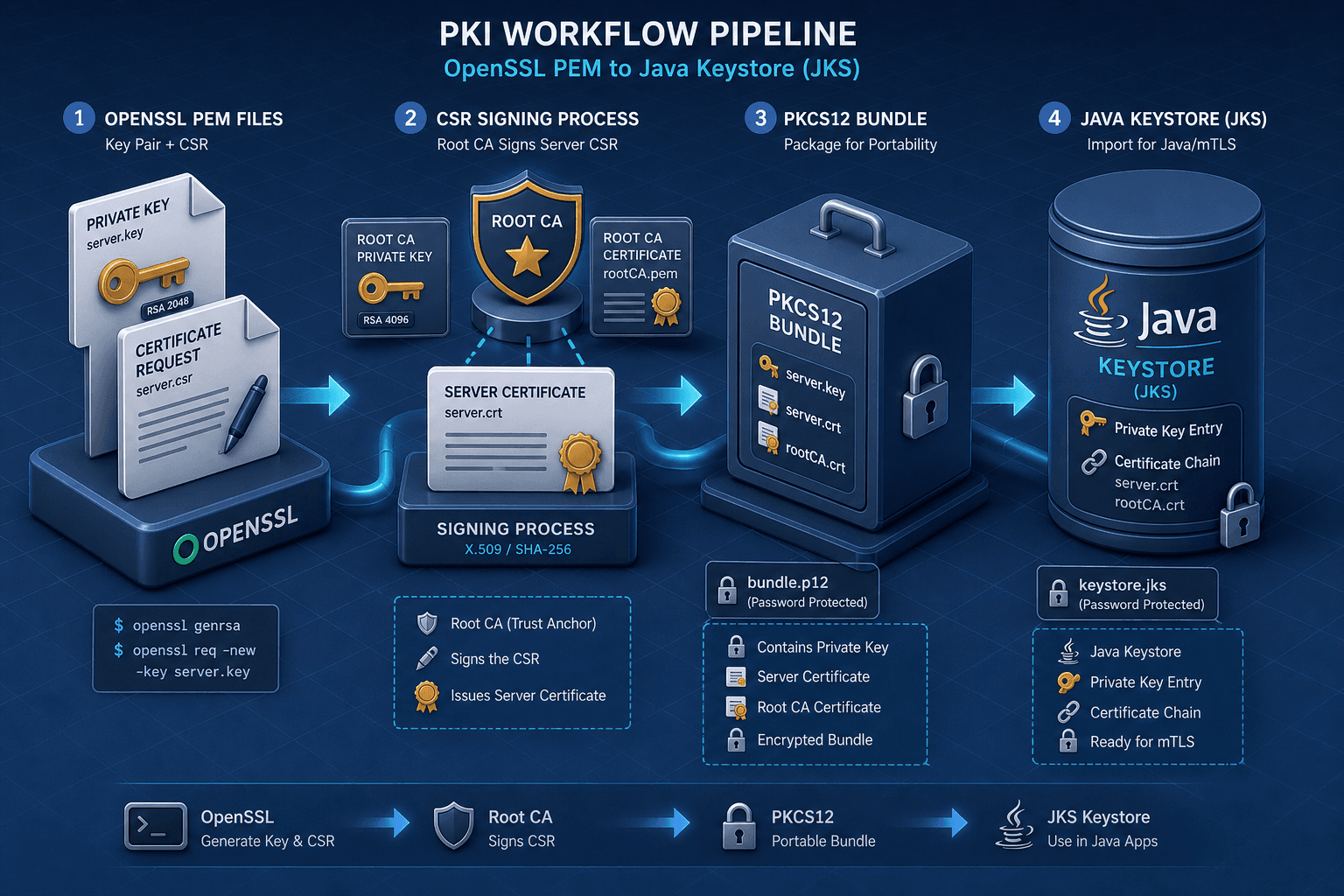
In a development environment, you often need a full Public Key Infrastructure (PKI) to test mutual TLS (mTLS), certificate pinning, or trust store configurations. While production systems rely on external Certificate Authorities (CAs), local testing requires you to generate your own Root CA, sign server certificates, and package them for Java applications. This process involves two distinct toolchains: OpenSSL for cryptographic operations and keytool for Java-specific keystore management. Understanding the mechanism of how data moves between these tools is critical, especially when handling Subject Alternative Names (SANs) and format conversions.
This is Part 2 of the mTLS With Spring Boot series.
The Root CA Mechanism
A Root CA is the trust anchor. It consists of a private key and a self-signed certificate. In OpenSSL, we generate this using the req subcommand with the -x509 flag, which tells OpenSSL to output a self-signed certificate instead of a Certificate Signing Request (CSR) [1].
We start by generating an RSA private key and immediately signing it. The following command creates a 4096-bit RSA key and a self-signed certificate valid for 3650 days (10 years). We use the -nodes flag to ensure the private key is not encrypted with a passphrase, simplifying automation in test environments.
openssl req -newkey rsa:4096 -nodes -keyout ca.key -x509 -days 3650 -out ca.crt \
  -subj "/C=US/ST=California/L=San Francisco/O=TestOrg/OU=Dev/CN=Test Root CA"
The -subj parameter defines the Distinguished Name (DN) of the certificate. For a Root CA, the Common Name (CN) should clearly indicate its role. The resulting ca.crt is the public certificate that Java applications will eventually import into their trust stores to verify the identity of servers signed by this root ca.
The Server Certificate & SANs
Server certificates must identify the service they protect. Modern TLS implementations, including Java’s HttpsURLConnection and Spring Boot’s embedded Tomcat, strictly validate the hostname against the san extension, not just the Common Name. If you omit SANs, Java will reject the connection with a javax.net.ssl.SSLHandshakeException.
To generate a server certificate, we first create a CSR. However, to include SANs, we cannot rely solely on command-line arguments. We must define an OpenSSL configuration file (openssl.cnf) that specifies the v3_req extension block.
Create a file named server.cnf:
[req]
default_bits = 2048
prompt = no
default_md = sha256
distinguished_name = dn
req_extensions = v3_req

[dn]
C = US
ST = California
L = San Francisco
O = TestOrg
OU = Dev
CN = localhost

[v3_req]
basicConstraints = CA:FALSE
keyUsage = digitalSignature, keyEncipherment
subjectAltName = @alt_names

[alt_names]
DNS.1 = localhost
DNS.2 = *.localhost
IP.1 = 127.0.0.1
The subjectAltName section lists the DNS names and IPs that this certificate will validate. Using *.localhost covers subdomains like app.localhost, which is common in microservices architectures.
Generate the CSR using this config:
openssl req -newkey rsa:2048 -nodes -keyout server.key -out server.csr \
  -config server.cnf
This produces server.key (private key) and server.csr (certificate signing request). The CSR contains the public key and the DN, but the SANs are embedded in the request structure, ready for the CA to sign.
Signing the Certificate
Now, the Root CA signs the Server CSR. This step binds the server’s identity to the trust anchor. We use the x509 subcommand to sign the CSR, specifying the CA’s key and certificate, and crucially, re-applying the extensions from our config file to ensure SANs are included in the final certificate.
openssl x509 -req -in server.csr -CA ca.crt -CAkey ca.key \
  -CAcreateserial -out server.crt -days 365 -sha256 \
  -extensions v3_req -extfile server.cnf
The -CAcreateserial flag initializes a serial number file for the CA, ensuring each certificate signed has a unique identifier. The -extensions flag ensures that the v3_req block from server.cnf is processed and embedded into server.crt.
Verify the result with:
openssl x509 -in server.crt -text -noout | grep -A 2 "Subject Alternative Name"You should see the DNS and IP entries defined earlier. If they are missing, the certificate will fail Java’s hostname verification, which strictly checks SANs against RFC 6125 standards [2].
PKCS12 Conversion
Java’s keytool cannot directly import separate .key and .crt files into a single keystore entry easily. The standard interchange format for bundling a private key and its certificate chain is pkcs12 (also known as .p12 or .pfx). We use OpenSSL to create this bundle.
openssl pkcs12 -export -out server.p12 -inkey server.key -in server.crt \
  -certfile ca.crt -name "server-cert"
The -export flag creates the PKCS12 file. -inkey provides the server’s private key, -in provides the server certificate, and -certfile includes the CA certificate to form the full chain. The -name parameter assigns an alias to the entry within the PKCS12 bundle.
Note: You will be prompted for an export password. Record this, as it is required when importing into Java.
Java Keystore (JKS) Import
Finally, we import the PKCS12 bundle into a Java Keystore (JKS). While Java 9+ defaults to PKCS12 keystores, many legacy Spring Boot applications or platform engineering pipelines still rely on jks due to historical compatibility [3].
Use keytool to import the bundle:
keytool -importkeystore \
  -srckeystore server.p12 -srcstoretype PKCS12 \
  -destkeystore server.jks -deststoretype JKS \
  -deststorepass changeit -destkeypass changeit \
  -srcstorepass <your_pkcs12_export_password>
This command reads the PKCS12 source, decrypts it, and writes the entries into a new JKS file named server.jks. The -deststorepass and -destkeypass set the password for the new keystore and key entry. Using changeit is common for test environments, but should never be used in production.
To verify the import:
keytool -list -v -keystore server.jks -storepass changeitLook for the Certificate fingerprints and Subject Alternative Names sections. If SANs are present, your Java application can now use server.jks as its trust store or key store, and ca.crt as the trust anchor for mTLS validation.
Conclusion
Generating a test PKI involves precise steps: creating a Root CA, defining SANs in a configuration file, signing the server certificate with those extensions, bundling into PKCS12, and importing into JKS. Each step has a specific mechanism that, if skipped or misconfigured, leads to TLS handshake failures. By understanding the data flow from OpenSSL’s PEM files to Java’s keystore format, you can reliably automate test environments for secure communication.
[1] OpenSSL Documentation, "openssl req". [2] IETF RFC 6125, "Representation and Verification of Domain-Based Application Service Identity within Internet Public Key Infrastructure Using X.509 (PKIX) Certificates in the Context of Transport Layer Security (TLS)". [3] Oracle Java Documentation, "Key and Certificate Storage Tools".
Related posts
Keycloak Production Mode: Hostname, Proxy, and TLS
Configure Keycloak production mode by setting correct hostnames, proxy headers, and TLS certificates to ensure secure and reliable authentication.
Certificate Rotation and Truststore Operations on Kubernetes
Explore certificate rotation and truststore operations in Kubernetes, covering cert-manager, CA rotation, and expiry monitoring for platform engineers.
Enabling TLS and mTLS in Spring Boot
A practical guide to configuring TLS and mutual TLS (mTLS) in Spring Boot using SSL bundles and server.ssl properties for secure communication.