Your First Production Inference Server: A Complete Walkthrough
A walkthrough for building a production-grade inference server using Docker, covering deployment, streaming, and health checks for backend and ML engineers.
Part 8 of the LLM Inference from Scratch series.
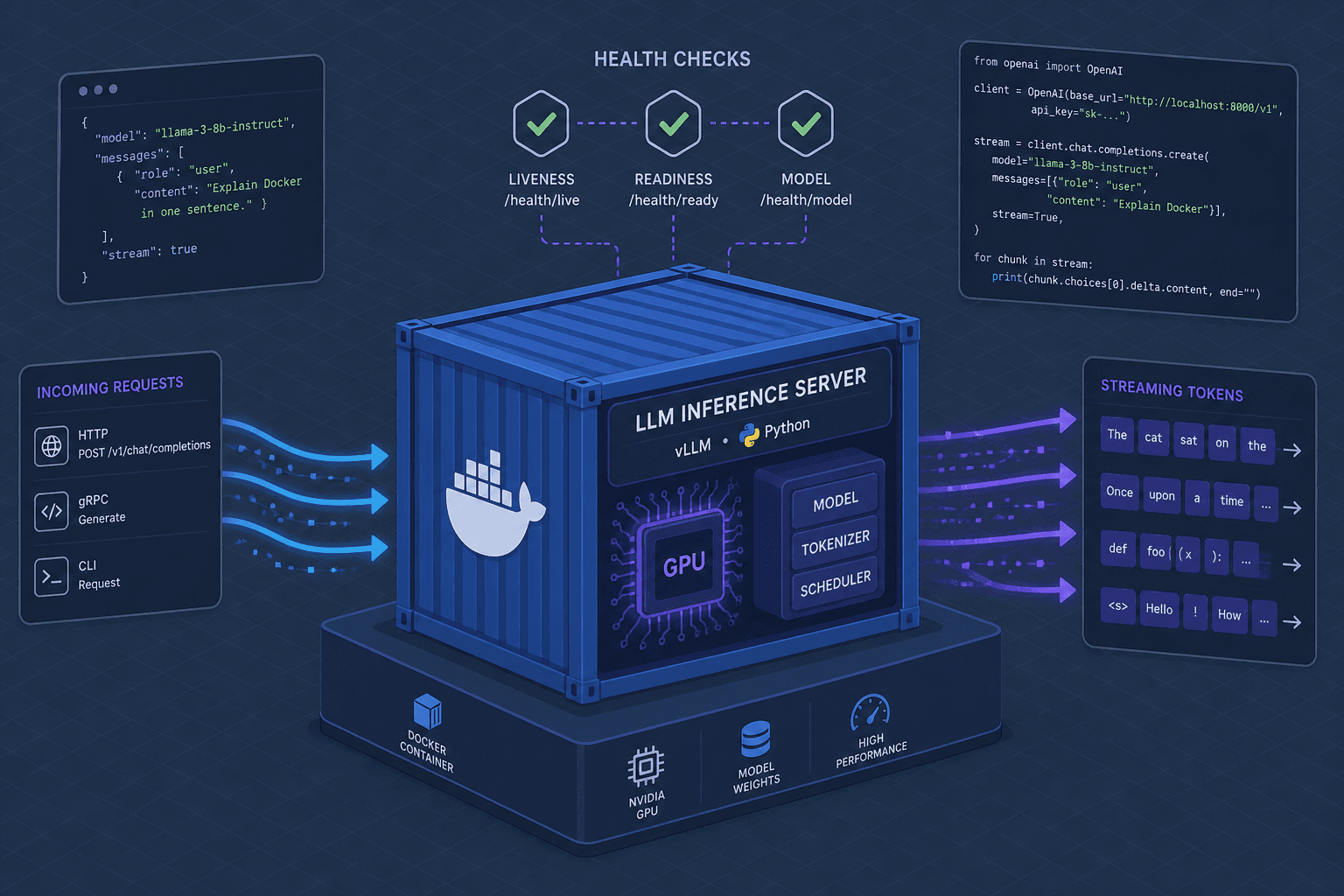
Most engineers treat an inference server as a black box that takes text in and gives text out. In production, this view breaks immediately. When latency spikes, when GPU memory fragments, or when the network drops mid-generation, the system fails silently unless you have built explicit mechanisms for resilience. This walkthrough moves beyond pip install transformers to build a containerized inference service that handles streaming, validates its own health, and survives orchestration restarts.
We will build a minimal but production-ready service using Python, FastAPI, and Docker. The focus is not on model architecture, but on the infrastructure patterns that make ML models deployable.
The Container Foundation
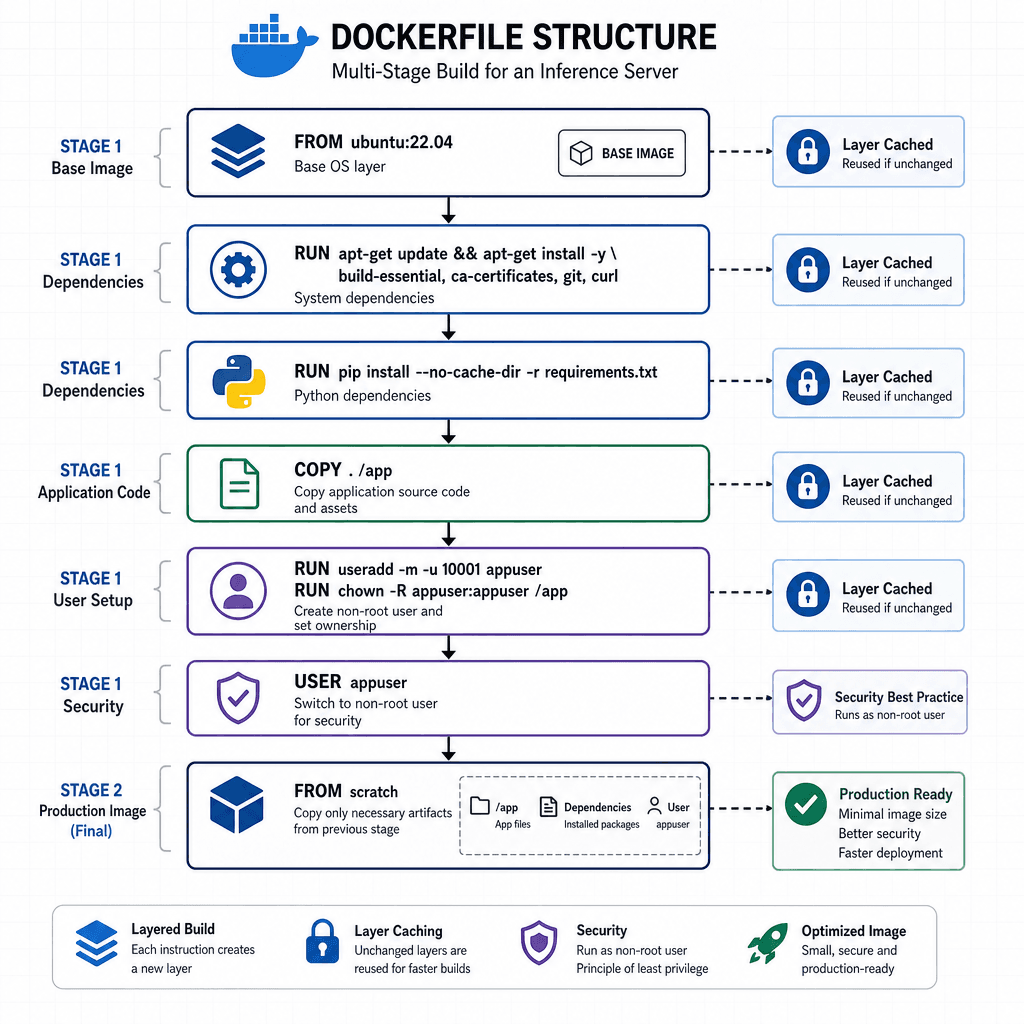
A production inference server must be reproducible and secure. The first step is a Dockerfile that prioritizes layer caching and security. We use a multi-stage build to keep the final image lean, though for simplicity, we’ll focus on the essential layers for a Python-based service. Choosing python:3.11-slim over the full python:3.11 image reduces the attack surface and download size by excluding unnecessary build tools and documentation. This smaller footprint speeds up deployment and reduces the resources required to store and transfer the image.
FROM python:3.11-slim AS base

WORKDIR /app

# Install system dependencies first to leverage Docker layer caching
RUN apt-get update && apt-get install -y --no-install-recommends \
    libgl1-mesa-glx \
    libglib2.0-0 \
    && rm -rf /var/lib/apt/lists/*

# Copy requirements first to cache pip install layers
COPY requirements.txt .
RUN pip install --no-cache-dir -r requirements.txt

# Copy application code
COPY . .

# Run as non-root user for security
RUN useradd -m appuser
USER appuser

CMD ["python", "server.py"]
The critical mechanism here is layer caching. By copying requirements.txt before the application code, Docker reuses the cached pip layer unless dependencies change. This reduces build time significantly in CI/CD pipelines. Additionally, running as a non-root user (appuser) mitigates the risk of container escape vulnerabilities. This practice limits the blast radius of any potential compromise, ensuring that even if an attacker gains access to the container process, they cannot easily modify the host system or other containers sharing the node.
Streaming: The Mechanism of Responsiveness
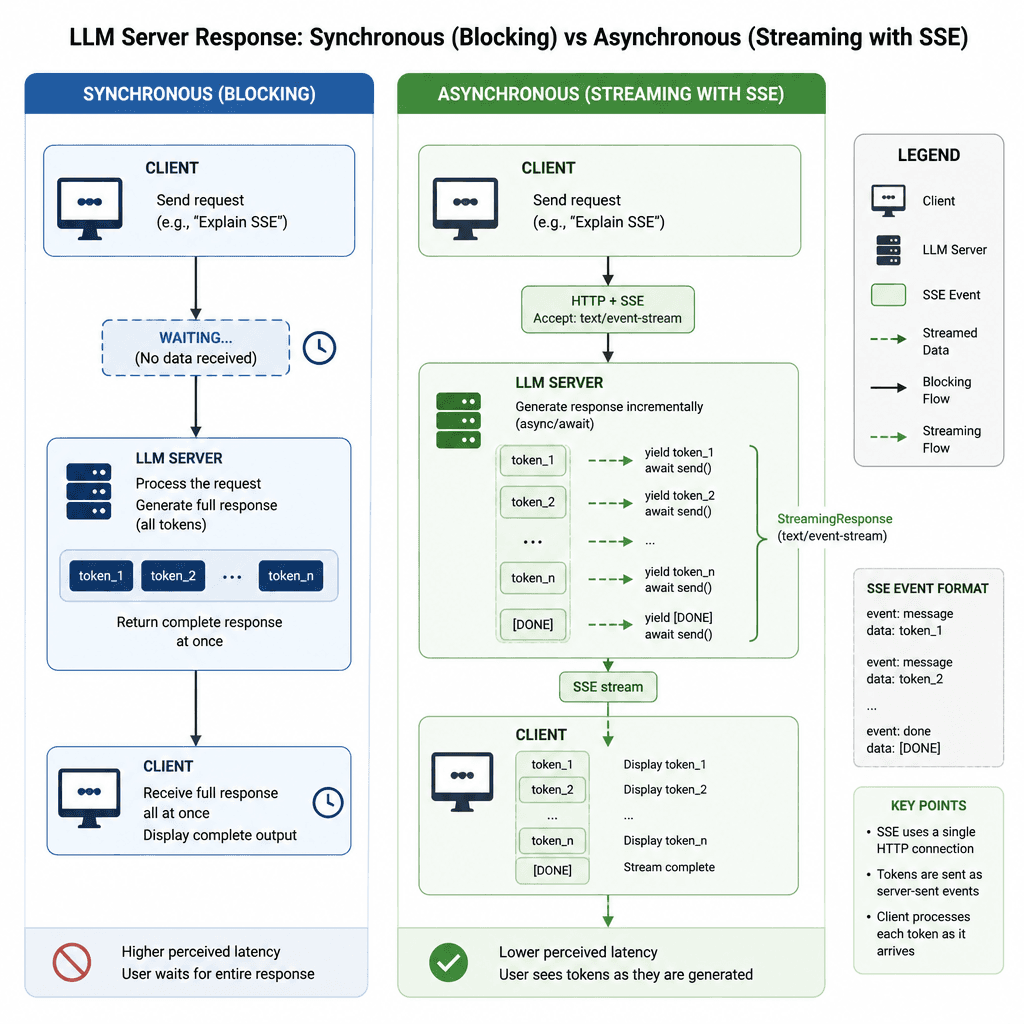
In a synchronous API, the client waits for the entire generation to complete. For an LLM generating 500 tokens, this can take seconds. If the network hiccups, the client times out, and the request is lost. Production inference servers must use HTTP chunking or Server-Sent Events (SSE) to stream tokens as they are generated.
FastAPI’s StreamingResponse provides the mechanism to yield tokens asynchronously. Here is how the endpoint works:
from fastapi import FastAPI, Request
from fastapi.responses import StreamingResponse
import asyncio

app = FastAPI()

async def generate_stream(prompt: str):
    """
    Simulates an LLM generating tokens one by one.
    In production, this wraps your model's generation loop.
    """
    for i in range(10):
        token = f"token_{i} "
        # Yield data in SSE format
        yield f"data: {token}\n\n"
        await asyncio.sleep(0.1)  # Simulate inference latency

@app.post("/v1/chat/completions")
async def completions(request: Request):
    body = await request.json()
    prompt = body.get("prompt", "")

    return StreamingResponse(
        generate_stream(prompt),
        media_type="text/event-stream"
    )
The mechanism here is asynchronous iteration. The server does not block the main thread while waiting for the model. Instead, it yields control back to the event loop after each token. This allows the server to handle multiple concurrent requests efficiently, provided the underlying model inference engine (like vLLM or TGI) supports concurrent batched execution.
Health Checks: Liveness vs. Readiness
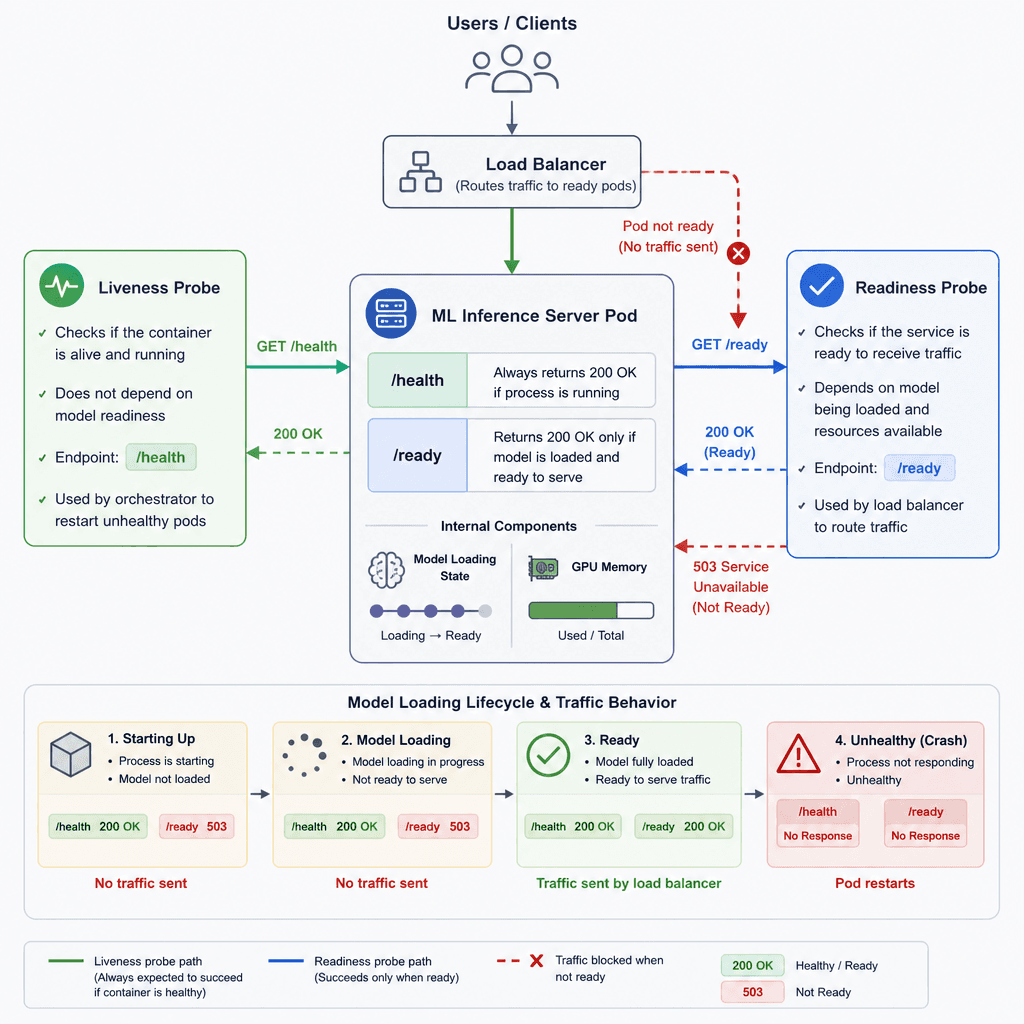
Orchestration systems like Kubernetes or ECS rely on health checks to manage traffic. However, there are two distinct types of checks, and confusing them causes deployment failures.
- Liveness Probe (
/health): Asks, "Is the process alive?" If this fails, the container is restarted. This should be a lightweight check, such as a simple pong or a check that the Python process is responsive. - Readiness Probe (
/ready): Asks, "Is the service ready to accept traffic?" This is critical for inference servers. During startup, the model weights must be loaded from disk into GPU memory. If the readiness probe returns success before this load completes, the load balancer sends traffic to a server that cannot respond, causing immediate errors.
Here is how to implement both:
import torch
import psutil
from fastapi.responses import JSONResponse

model_loaded = False

@app.get("/health")
def health_check():
    return {"status": "ok"}

@app.get("/ready")
def readiness_check():
    global model_loaded
    if not model_loaded:
        return JSONResponse(content={"status": "not_ready"}, status_code=503)

    # Optional: Check GPU memory availability
    if torch.cuda.is_available():
        free_mem = torch.cuda.mem_get_info()[0] / 1024**3
        if free_mem < 1.0: # Less than 1GB free
            return JSONResponse(content={"status": "gpu_oom"}, status_code=503)

    return {"status": "ready"}
The model_loaded flag is set after the model initialization block in your application startup. This ensures that no traffic hits the server until it is fully capable of serving requests. This pattern prevents the "thundering herd" problem where a restarted pod receives 100% of traffic before it has warmed up.
Integration and Observability
A production server does not exist in isolation. It sits behind a reverse proxy (like Nginx or Traefik) and exposes metrics for monitoring.
For observability, you should integrate a metrics exporter. Prometheus is the standard. You can expose a /metrics endpoint that reports:
inference_requests_total: Total number of requests.inference_latency: Exposed as a Histogram, which automatically creates_bucket,_sum, and_counttime series for detailed latency analysis.gpu_memory_used_bytes: Current GPU memory usage.
This data allows you to set alerts. For example, if gpu_memory_used_bytes approaches the hardware limit, you can trigger a scale-up event before OOM kills occur.
Conclusion
Building a production inference server is less about the model and more about the container lifecycle. By implementing streaming responses, you ensure usability under latency. By separating liveness and readiness probes, you ensure reliability during deployments. By securing the container and exposing metrics, you ensure maintainability. These mechanisms transform a local script into a service that can handle the unpredictability of production traffic.
Common Pitfalls
- Ignoring GPU OOM in readiness checks: Assuming the model is ready simply because the process started, without verifying that sufficient GPU memory is available to serve requests.
- Using liveness probes for model loading status: Restarting a container every time the model needs to reload or warm up, creating an infinite restart loop instead of allowing the service to become ready.
- Not handling SIGTERM for graceful shutdown: Failing to catch termination signals can lead to dropped connections and corrupted state when the orchestrator attempts to stop the pod.
Practical Takeaways
- Readiness is for traffic, Liveness is for restarts: Use readiness to gate traffic entry and liveness to detect dead processes.
- Stream tokens, don't block requests: Always use SSE or chunked encoding for LLM outputs to maintain client responsiveness and network efficiency.
- Cache dependencies before code: Structure your Dockerfile to copy and install dependencies before copying source code to maximize layer caching benefits.
FAQ
Why use SSE over WebSockets? Server-Sent Events (SSE) are simpler to implement for unidirectional server-to-client streaming (like token generation) and work seamlessly with existing HTTP infrastructure, whereas WebSockets require a persistent bidirectional connection and more complex handshake management.
How to handle model reloading?
Implement a graceful reload mechanism where the new model loads in a separate process or thread. Only update the global reference (e.g., model_loaded = True) once the new model is fully initialized and verified, ensuring zero downtime for active requests.
What is the difference between liveness and readiness? Liveness checks determine if the application is alive and needs restarting if it fails. Readiness checks determine if the application is ready to serve traffic; if it fails, traffic is removed from the load balancer until it recovers.
Related posts
Keycloak Production: TLS, DB Tuning & K8s
A step-by-step guide to deploying Keycloak in production environments using Docker and Kubernetes with SSL and monitoring.
Shadow Traffic for LLM Deployments
Explore how shadow traffic and traffic mirroring enable safe comparison of candidate LLM models in production without impacting user experience.
Evaluating Tool-Calling Accuracy
A technical examination of function call accuracy, error taxonomy, and benchmarking strategies for evaluating tool-calling capabilities in large language models.
