State Machines and Graphs for Agent Control Flow
Explore how state machines and graph structures manage agent control flow, checkpointing, and reliability in LangGraph applications.
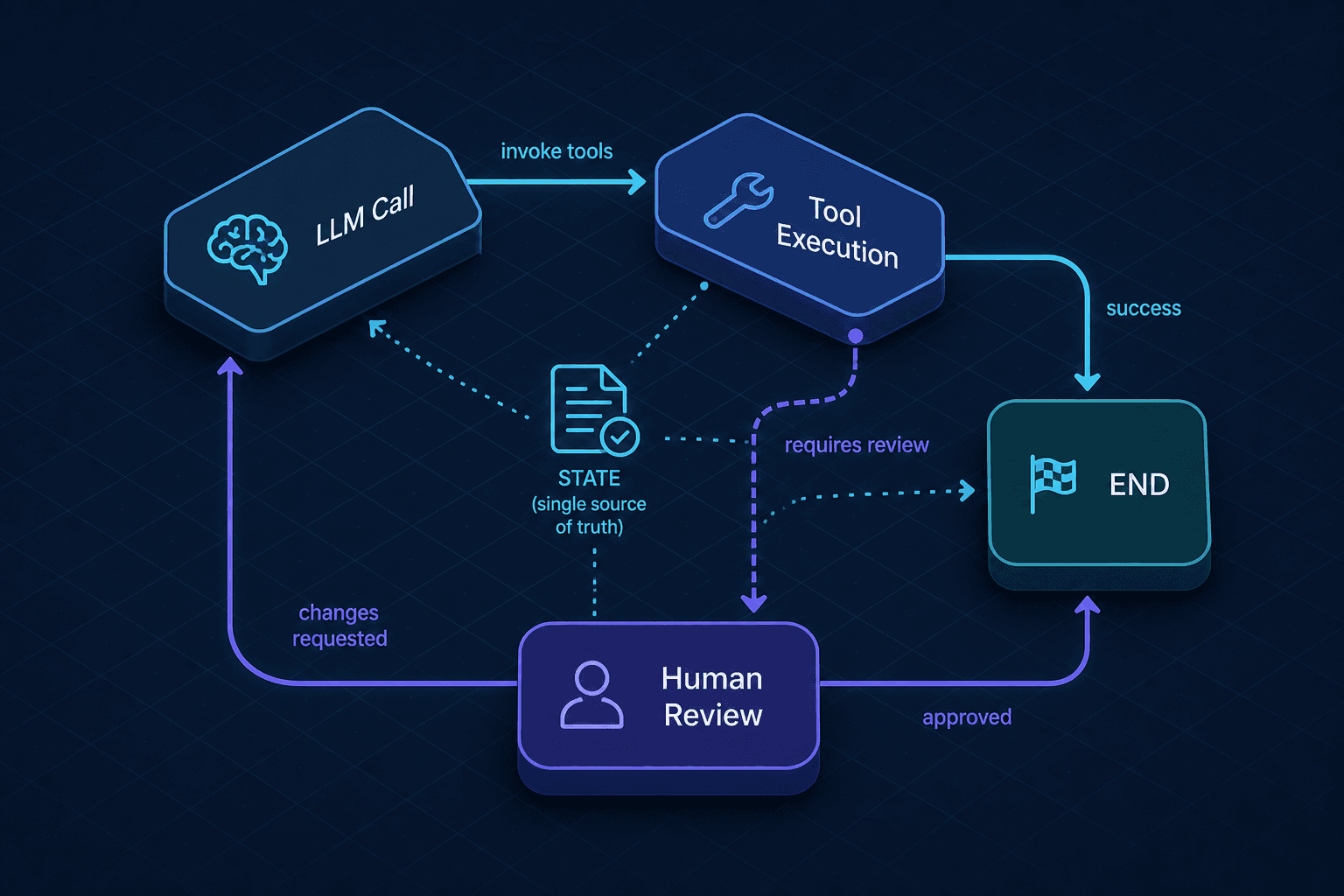
LangGraph implements a state machine architecture where explicit, directed graphs manage agent control flow, enabling deterministic execution and crash-resilient checkpointing. This architectural shift is essential for building reliable, production-grade agents that can handle complex, non-deterministic workflows.
Part 4 of the Building AI Agents series.
The Failure of Linear Chains
Traditional agent architectures often rely on linear chains of thought or simple ReAct (Reason + Act) loops. In these models, an agent performs an action, observes the result, and moves to the next step. This approach feels intuitive but suffers from a critical architectural flaw: it lacks explicit control flow. When a tool call fails, returns unexpected data, or triggers a security policy, the linear chain has no predefined "else" branch. It must hallucinate a recovery path or terminate.
LangGraph addresses this by treating agent execution not as a sequence of steps, but as a traversal of a Directed Graph. In this model, the agent’s logic is defined by Nodes (computation units like LLM calls or tool executions) and Edges (transitions between nodes). This structure enforces a strict contract: the system’s behavior is determined by the current state and the graph topology, not by implicit code execution order. This shift is essential for building reliable, production-grade agents.
State as the Single Source of Truth
In a typical Python function, state is often passed implicitly via closures or stored in global variables. In LangGraph, state is an explicit, typed data structure (usually a TypedDict or Pydantic model) that flows through every node. This is the core mechanism that enables both determinism and checkpointing.
Consider a simple customer support agent. Its state might look like this:
from typing import TypedDict, Annotated
import operator

class AgentState(TypedDict):
    messages: Annotated[list, operator.add]
    is_complaint: bool
    resolution: str
Here, messages is annotated with operator.add. This tells the graph engine that when multiple nodes write to this key, their outputs should be concatenated rather than overwritten. is_complaint and resolution are simple boolean and string fields.
Why does this matter? Because every node in the graph receives this entire state dictionary as input and returns an update dict. The graph engine merges these updates. This means a node doesn’t need to know how the state got there; it only needs to know what it can modify. This decoupling allows for complex, non-linear workflows where different parts of the system can update the same state fields without conflict.
Graph Construction and Edges
The power of the graph lies in its edges. Unlike linear chains, graphs can have conditional edges that route execution based on the current state. This allows the agent to make dynamic decisions about its own workflow.
Let’s build a graph for an agent that can handle both general queries and complaints.
from langgraph.graph import StateGraph, END

# Define the graph
workflow = StateGraph(AgentState)

# Add nodes
workflow.add_node("llm", call_llm)
workflow.add_node("tools", execute_tools)
workflow.add_node("human_review", review_resolution)

# Define edges
workflow.set_entry_point("llm")

# Conditional routing: Did the LLM decide to use a tool?
def should_use_tools(state: AgentState) -> str:
    last_message = state["messages"][-1]
    if last_message.tool_calls:
        return "tools"
    else:
        return "human_review"

workflow.add_conditional_edges(
    "llm",
    should_use_tools,
    {
        "tools": "tools",
        "human_review": "human_review"
    }
)

# After tools, go back to LLM to process the result
workflow.add_edge("tools", "llm")

# Final edge to end
workflow.add_edge("human_review", END)
In this example, the should_use_tools function inspects the state after the LLM node has executed. If the LLM generated tool calls, the graph routes to the tools node. If not, it assumes the LLM has provided a final answer and routes to human_review for validation. This is a control flow decision made at runtime, based on data, not hard-coded logic.
Checkpointing and Persistence
The most critical feature for production agents is checkpointing. In a long-running agent that might take minutes or hours to complete (e.g., waiting for human approval), a crash or timeout would normally result in total data loss. LangGraph solves this by serializing the entire AgentState at every node boundary and storing it in a persistent backend (like SQLite or Postgres).
When you compile the graph, you pass a Checkpointer:
from langgraph.checkpoint.sqlite import SqliteSaver

checkpointer = SqliteSaver.from_conn_string(":memory:")
app = workflow.compile(checkpointer=checkpointer)
Every time the agent completes a node (e.g., call_llm), the graph engine:
- Takes the current state.
- Serializes it into a JSON blob.
- Writes it to the database with a unique thread ID and checkpoint ID.
If the process crashes, you can restart the agent by providing the same thread ID. The graph engine loads the last saved checkpoint, restores the state, and continues execution from the next node. This is not just "saving progress"; it is deterministic replay. The agent will always resume from the exact same state, ensuring reproducibility.
This mechanism also enables time travel. You can query previous checkpoints to see what the state looked like at any point in the agent’s history. This is invaluable for debugging: you can inspect why an agent made a specific routing decision or what data it had when it failed.
Tradeoffs and Operational Reality
Using graphs introduces complexity. You must define your state schema explicitly, which requires more upfront design than a simple script. You also need to manage the persistence layer, which adds operational overhead. However, the tradeoff is worth it for any agent that interacts with external systems, humans, or critical business logic.
Linear chains are brittle because they assume a perfect world where every step succeeds. Graphs are reliable because they acknowledge that execution is non-deterministic and state is transient. By making state explicit and persistence automatic, LangGraph transforms agents from experimental prototypes into reliable software components.
For backend developers, this means treating agent logic as a workflow engine problem, not just an AI problem. You are building a state machine where the transitions are driven by LLM reasoning. This perspective allows you to apply standard software engineering practices—unit testing, versioning, and monitoring—to your AI agents, ensuring they behave predictably under load.
Common Pitfalls
Implementing LangGraph state machines introduces specific challenges that can derail development if not anticipated.
- Circular Dependencies: LangGraph allows cycles, but infinite loops are a risk. Ensure that conditional edges have exit conditions or maximum iteration limits, especially when looping back to an LLM node. Without a break condition (like a
max_iterationsparameter), an agent can spin indefinitely if the LLM keeps generating invalid tool calls. - State Schema Mismatches: Since state is explicit, any change to the
AgentStatedefinition must be propagated correctly. If a node expects a field that another node hasn't initialized, it will raise aKeyError. Always ensure all nodes handle missing keys gracefully or that the entry point initializes the full schema. - Checkpoint Bloat: Storing the entire state at every node can lead to significant storage growth, especially if the
messageslist grows large. Be mindful of the data volume in your checkpoints, particularly when using long-running conversations. Consider pruning old messages or using a more efficient serialization format if storage becomes a bottleneck.
Practical Takeaways
- Explicit State: Define your state schema clearly using
TypedDictor Pydantic. This is the foundation of determinism in LangGraph. - Use Conditional Edges: Leverage conditional edges to handle non-linear workflows and error recovery paths without hard-coding logic in nodes.
- Enable Checkpointing: Always compile your graph with a checkpointer for production use. This enables crash recovery, time travel debugging, and human-in-the-loop workflows.
- Test Graph Logic: Treat your graph topology and state transitions as testable code. Use LangGraph's testing utilities to verify that nodes update state correctly and edges route as expected.
FAQ
Q: Can I use LangGraph with any LLM provider? A: Yes. LangGraph is model-agnostic. You can use any LLM provider (OpenAI, Anthropic, local models via Ollama, etc.) as long as you wrap the provider's API call in a node function that accepts and returns the defined state.
Q: How does checkpointing affect performance? A: Checkpointing adds a small overhead due to serialization and database writes. For most applications, this is negligible. However, for high-throughput scenarios, consider using a faster checkpointer (like Redis) or batching state updates if your workflow allows it.
Q: Is LangGraph suitable for simple chatbots? A: For very simple, linear chatbots, a basic chain might suffice. However, LangGraph is beneficial even for simpler apps if you anticipate needing features like human review, retry logic, or complex branching in the future. It provides a scalable foundation.
Conclusion
LangGraph represents a fundamental shift in how we architect AI agents. By moving from linear chains to directed graphs with explicit state management, we gain the ability to build systems that are not only more capable but also more resilient. The combination of conditional edges for dynamic control flow and checkpointing for crash recovery provides the robustness required for production environments. As AI agents become more integrated into critical business processes, adopting these state machine principles will be essential for ensuring reliability, observability, and maintainability.
Related posts
Durable Execution for Agents with Temporal
Explore how Temporal enables durable execution for AI agents, ensuring resilience through checkpointing and replay mechanisms.
LangGraph vs CrewAI vs Pydantic AI vs Raw SDK
A technical comparison of LangGraph, CrewAI, Pydantic AI, and raw SDKs for building LLM agents, helping developers and architects choose the right framework.
Computer-Use Agents: Architecture and Limits
An examination of computer-use agent architecture, focusing on GUI agents, screenshot processing, accessibility trees, and browser automation limits.
