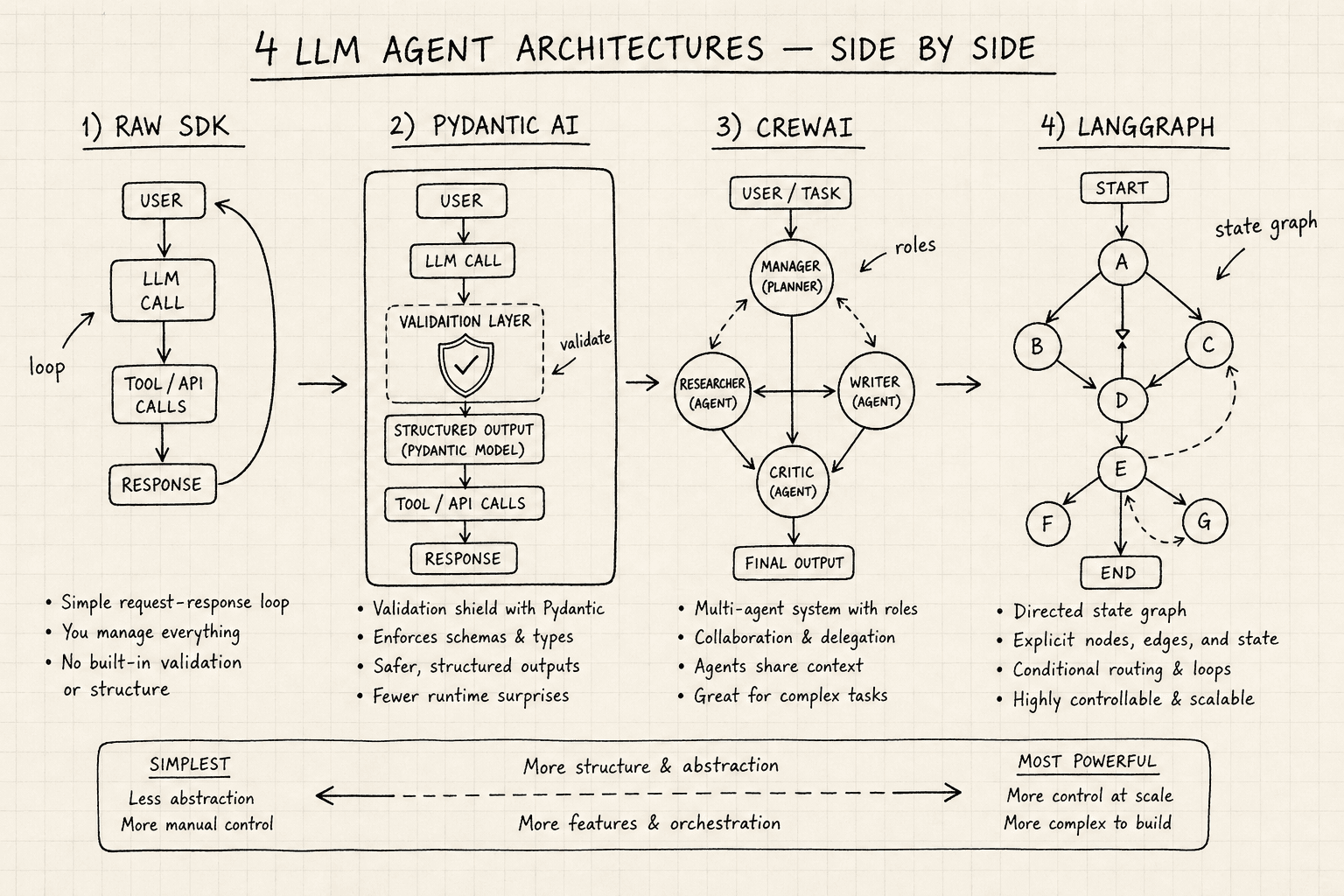
LangGraph vs CrewAI vs Pydantic AI vs Raw SDK
A technical comparison of LangGraph, CrewAI, Pydantic AI, and raw SDKs for building LLM agents, helping developers and architects choose the right framework.
Building production-grade LLM agents requires choosing the right level of abstraction. The landscape has shifted from simple prompt-chaining to complex, stateful systems. This comparison examines four distinct approaches: Raw SDKs, Pydantic AI, CrewAI, and LangGraph. The choice depends on whether you prioritize type safety, role-based orchestration, explicit state management, or minimal overhead.
The Baseline: Raw SDKs
Raw SDKs (e.g., openai, anthropic, google-genai) provide direct access to model endpoints without abstraction. The mechanism here is straightforward: construct a request payload, send it over HTTP, and parse the response.
Mechanism: The developer manually implements the "Agent Loop":
- Define tools/functions.
- Call the LLM with a system prompt and tool definitions.
- Parse the LLM’s response.
- If the response contains a tool call, execute the function locally.
- Append the result to the conversation history.
- Repeat until the LLM produces a final answer.
# Simplified Raw SDK Loop
from openai import OpenAI

client = OpenAI()
tools = [
    {
        "type": "function",
        "function": {
            "name": "get_weather",
            "description": "Get the current weather in a location",
            "parameters": {
                "type": "object",
                "properties": {
                    "location": {"type": "string"},
                    "unit": {"type": "string", "enum": ["celsius", "fahrenheit"]}
                },
                "required": ["location"]
            }
        }
    }
]

def execute_tool(name, arguments):
    # Placeholder for actual tool execution logic
    return f"Result for {name}({arguments})"

messages = [{"role": "system", "content": "You are a helpful assistant."}]
while True:
    response = client.chat.completions.create(
        model="gpt-4",
        messages=messages,
        tools=tools
    )
    message = response.choices[0].message
    messages.append(message)

    if message.tool_calls:
        for tool_call in message.tool_calls:
            # Developer must manually implement execution logic
            result = execute_tool(tool_call.function.name, tool_call.function.arguments)
            messages.append({"role": "tool", "tool_call_id": tool_call.id, "content": result})
    else:
breakTrade-offs:
- Pros: Zero framework overhead, full control over serialization, no hidden dependencies.
- Cons: No built-in error handling, retry logic, or state persistence. Debugging complex multi-turn interactions requires manual logging. Tool execution errors are not automatically retried or handled by the framework.
When evaluating a raw sdk vs agent framework approach, the primary decision hinges on whether the complexity of the agent loop justifies the abstraction layer. Raw SDKs offer maximum flexibility but demand significant boilerplate code for robustness.
Best for: Simple, stateless tasks, or when integrating LLMs into existing strict pipelines where framework overhead is undesirable.
Pydantic AI: Verification-First Agents
Pydantic AI shifts the focus from orchestration to verification. It leverages Pydantic’s validation engine to ensure that both tool inputs and model outputs conform to strict schemas at runtime. This makes pydantic ai validation a cornerstone for ensuring data integrity in automated workflows.
Mechanism: Pydantic AI uses type hints to define tool parameters and response models. When the LLM generates a tool call, Pydantic AI validates the arguments against the defined Pydantic model before execution. If validation fails, the error is fed back to the LLM, allowing it to correct its own mistakes. This process simplifies llm tool integration by guaranteeing that tools receive correctly formatted inputs, reducing hallucination-induced errors.
from pydantic_ai import Agent

agent = Agent("openai:gpt-4o")

# Define a tool with strict validation
@agent.tool
def get_weather(location: str, unit: str) -> str:
    """Get the current weather."""
    if unit not in ("celsius", "fahrenheit"):
        raise ValueError("Unit must be celsius or fahrenheit")
    return f"The weather in {location} is 20{unit}"

result = agent.run_sync("What's the weather in London in fahrenheit?")Trade-offs:
- Pros: Drastically reduces hallucination in tool usage by enforcing schema compliance. Excellent for structured data extraction and API integration.
- Cons: Limited support for complex, multi-agent workflows. The focus is on single-agent correctness rather than orchestration.
When considering pydantic ai vs langgraph, the distinction lies in scope: Pydantic excels at verifying individual interactions and data structures, whereas LangGraph manages the broader flow between multiple nodes.
Best for: Applications where data integrity is critical, such as financial calculations, database queries, or any scenario where incorrect tool parameters lead to downstream failures.
CrewAI: Role-Based Multi-Agent Orchestration
CrewAI abstracts agent interaction into Roles, Tasks, and Processes. It is designed for human-readable, multi-agent collaboration. In a typical crewai multi-agent setup, agents are assigned specific personas, allowing for modular development of complex tasks.
Mechanism: CrewAI defines agents with specific roles (e.g., "Researcher," "Writer") and tasks. A "Process" (sequential or hierarchical) dictates how these agents interact. In a sequential process, Agent A completes its task, passes the output to Agent B, and so on. The framework handles the message passing and context management between agents. For example, a Researcher agent might gather data and pass it to a Writer agent, who then drafts content based on that research.
from crewai import Agent, Task, Crew

researcher = Agent(role="Researcher", goal="Find latest AI news", backstory="You are an expert...")
writer = Agent(role="Writer", goal="Write articles", backstory="You are a tech journalist...")

task = Task(description="Write an article about the latest AI trends", agent=researcher)
crew = Crew(agents=[researcher, writer], tasks=[task], process="sequential")
result = crew.kickoff()Trade-offs:
- Pros: Highly intuitive for building multi-agent teams. Minimal code required to set up complex workflows. Great for prototyping and research-oriented tasks.
- Cons: Black-box orchestration. Hard to debug individual agent steps or implement custom routing logic. Limited control over the internal state of each agent.
When comparing langgraph vs crewai, CrewAI offers higher-level abstraction for role-based tasks, while LangGraph provides granular control over state and execution flow.
Best for: Multi-agent workflows where agents have distinct roles and the interaction pattern is predictable (e.g., research -> write -> edit).
LangGraph: Explicit State and Graph Control
Building llm agents that require complex, long-running interactions often demands the explicit control offered by LangGraph. LangGraph models agent logic as a directed graph where nodes are agents or tools, and edges are conditional transitions based on state. It is the most flexible and powerful framework for complex, long-running agents.
Mechanism: LangGraph uses a StateGraph to define the flow. Developers explicitly define:
- State: A typed dictionary that holds the conversation history, tool results, and any custom variables. This enables precise langgraph state management, allowing state to be passed and modified between nodes.
- Nodes: Functions that process the state and return updates.
- Edges: Conditional routes that determine the next node based on the current state.
This enables features like checkpointing (saving state at each step), human-in-the-loop (pausing for user input), and time travel (rewinding to a previous state). LangGraph supports various ai architecture patterns by enabling complex routing, subgraphs, and precise state management.
from langgraph.graph import StateGraph, END
from typing import TypedDict, Annotated
from langgraph.graph.message import add_messages

# Define state
class AgentState(TypedDict):
    messages: Annotated[list, add_messages]
    score: int

# Define nodes
def chatbot(state: AgentState):
    # ... logic ...
    return {"messages": [response]}

def score(state: AgentState):
    # ... logic ...
    return {"score": 0.9}

# Build graph
workflow = StateGraph(AgentState)
workflow.add_node("chatbot", chatbot)
workflow.add_node("score", score)
workflow.set_entry_point("chatbot")
workflow.add_edge("chatbot", "score")
workflow.add_conditional_edges("score", lambda x: END if x['score'] > 0.8 else "chatbot")
app = workflow.compile()Trade-offs:
- Pros: Maximum control. Enables complex routing, subgraphs, and precise state management. Ideal for production systems requiring auditability and resilience.
- Cons: Steep learning curve. Requires explicit definition of state and flow. More boilerplate code.
Best for: Production-grade agents with complex logic, long-running conversations, or requirements for human intervention and state persistence.
Conclusion
| Framework | Primary Mechanism | Best For |
|---|---|---|
| Raw SDK | Direct HTTP calls | Simple, stateless tasks; minimal overhead |
| Pydantic AI | Type validation | Structured outputs; tool correctness |
| CrewAI | Role-based orchestration | Multi-agent teams; rapid prototyping |
| LangGraph | Directed graphs | Complex workflows; production reliability |
Choose Raw SDKs for simplicity and control. Choose Pydantic AI for data integrity. Choose CrewAI for multi-agent collaboration. Choose LangGraph for complex, production-grade systems.
Related posts
State Machines and Graphs for Agent Control Flow
Explore how state machines and graph structures manage agent control flow, checkpointing, and reliability in LangGraph applications.
Context Engineering Is the New Prompt Engineering
Explore how context engineering optimizes token budgets and context windows, evolving beyond basic prompt engineering for better LLM outcomes.
Prompt Assembly, Citations, and Grounding
Explore prompt assembly, citations, and grounding techniques for RAG systems. Learn how context ordering and attribution improve accuracy and trust.
