Designing Tools an LLM Can Actually Use
A guide for backend developers and API designers on creating effective tool schemas, descriptions, and error handling for LLM agents.
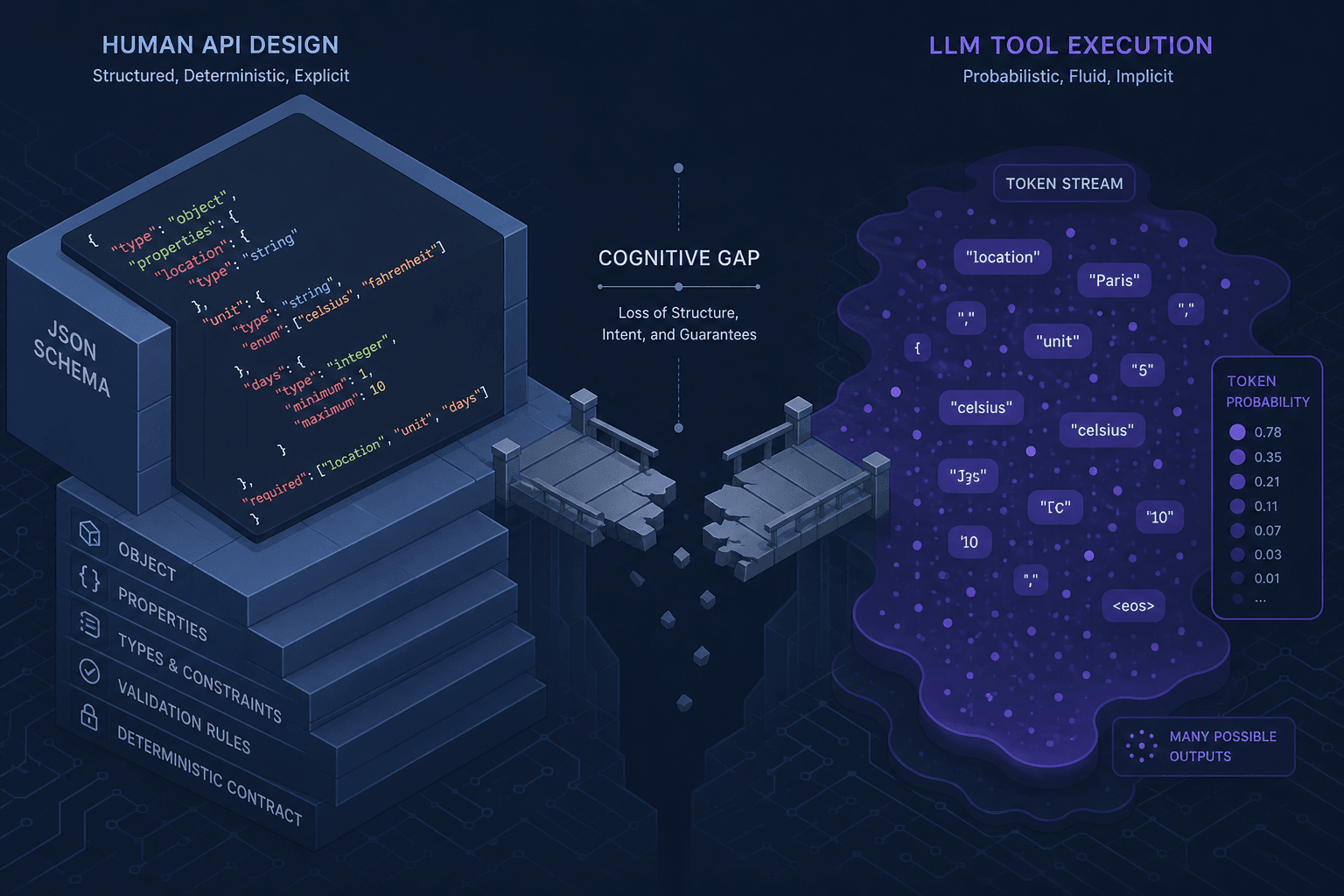
When you build an API, you design it for humans who understand context, versioning, and optional parameters. When you expose that same API to an LLM agent, you are designing it for a probabilistic text predictor that has no persistent memory, no understanding of HTTP semantics, and a tendency to hallucinate missing fields. The gap between a REST API designed for developers and effective tool design is not just syntactic; it is cognitive.
This guide explains the mechanism-level differences in designing tool interfaces for LLM agents. We will move beyond surface-level advice like "write good descriptions" to understand how the LLM’s attention mechanism interacts with JSON schemas and how error handling must be rethought as a state-recovery loop rather than a crash handler.
The Schema Mechanism: Constraints as Signals
An LLM does not "execute" a tool. It generates a JSON object that matches a specific structure, which your backend then validates and executes. The schema is the boundary condition. If the schema is ambiguous, the generated JSON will be malformed, causing your validation layer to reject it before execution ever begins.
Most frameworks rely on JSON Schema (or OpenAPI) to define tools, specifically the function schema definition. The critical components are type, properties, and required.
Consider a tool to create a user. A naive schema might look like this:
{
  "name": "create_user",
  "description": "Creates a new user in the system.",
  "parameters": {
    "type": "object",
    "properties": {
      "email": {
        "type": "string",
        "description": "The user's email address."
      },
      "name": {
        "type": "string",
        "description": "The user's full name."
      }
    },
    "required": ["email", "name"]
  }
}
This seems sufficient. However, the LLM sees this as a probability distribution over tokens. If the description for email is vague, the LLM might generate email: "john" instead of email: "john@example.com". The schema says type: string, which accepts both. The failure mode here is not a syntax error; it is a semantic error that only your backend can detect.
To mitigate this, you must embed validation logic into the schema itself. Use format: email if your framework supports it, or more robustly, use pattern to enforce regex constraints directly in the schema. This shifts the burden of validation from your code (which rejects the call) to the LLM (which generates the correct token).
{
  "email": {
    "type": "string",
    "format": "email",
    "description": "A valid RFC 5322 email address."
  }
}
By constraining the output space, you reduce the entropy of the LLM’s prediction, making successful execution more likely.
Description Engineering: The Primary Signal
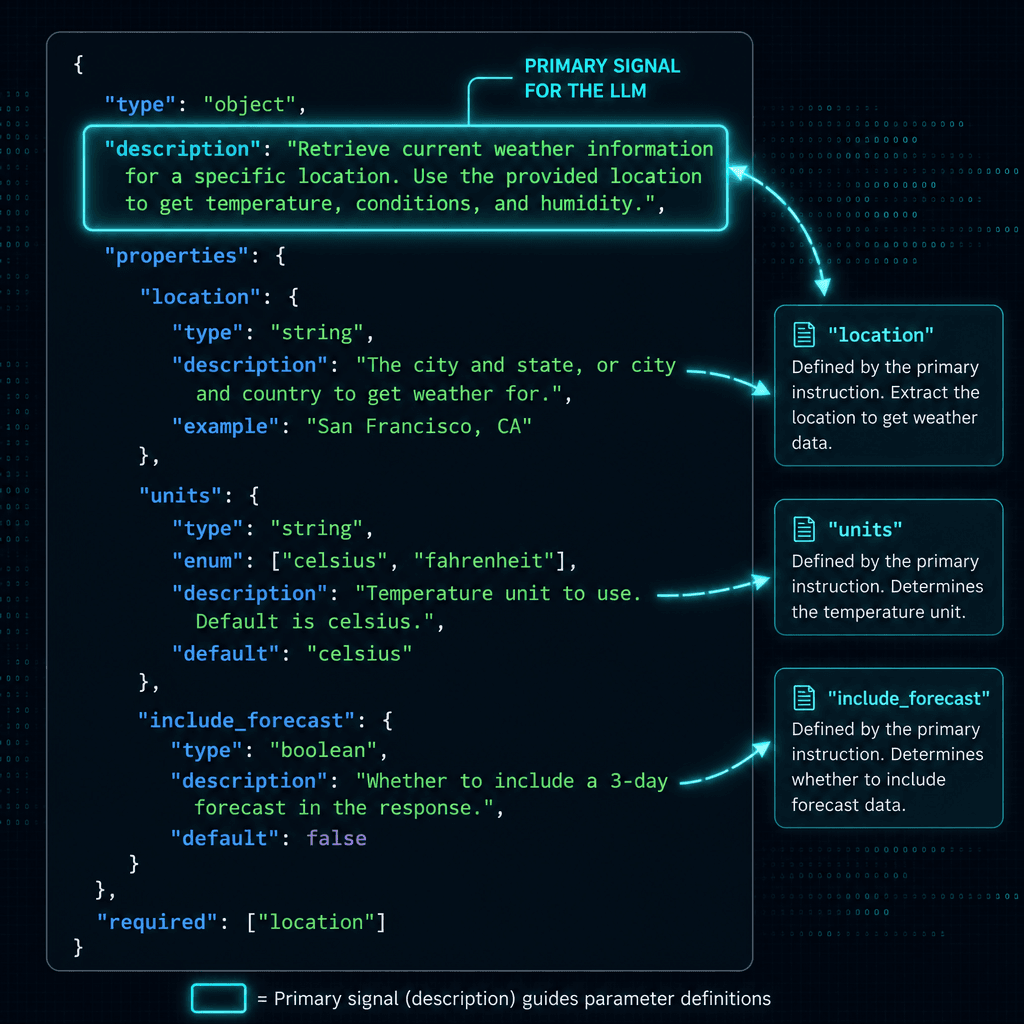
In the absence of semantic understanding, the description field is the strongest signal the LLM uses to determine when to call the tool and what values to provide. This is not documentation; it is a prompt. The tool description serves as the primary instruction set for the model.
Bad descriptions are abstract. They describe the what but not the how or why.
Bad:
"description": "Search for products."
The tool description fails because it doesn’t specify the input variable. The LLM doesn’t know if it should generate a query, keyword, or search_term parameter. It also doesn’t know what constitutes a successful search.
Good:
"description": "Search the product catalog for items matching a specific query string. Use this when the user asks about product availability, price, or specifications. The 'query' parameter must be a short phrase extracted from the user's request."
This description provides:
- Trigger Condition: "Use this when the user asks about..."
- Parameter Context: "The 'query' parameter must be a short phrase..."
- Domain Boundary: "Search the product catalog..."
The LLM’s attention mechanism weighs these tokens heavily when deciding whether to invoke the tool. If the user says "I want a red shirt," the LLM compares this input against the description. If the description mentions "product availability" and "price," the LLM recognizes the match and populates the query field with "red shirt."
You must treat every description as a micro-prompt. Be explicit about edge cases. If the tool fails when the query is empty, state that. If it returns only the first 10 results, mention that. This reduces the need for follow-up clarification calls, which increase latency and token cost.
Error Handling as State Recovery
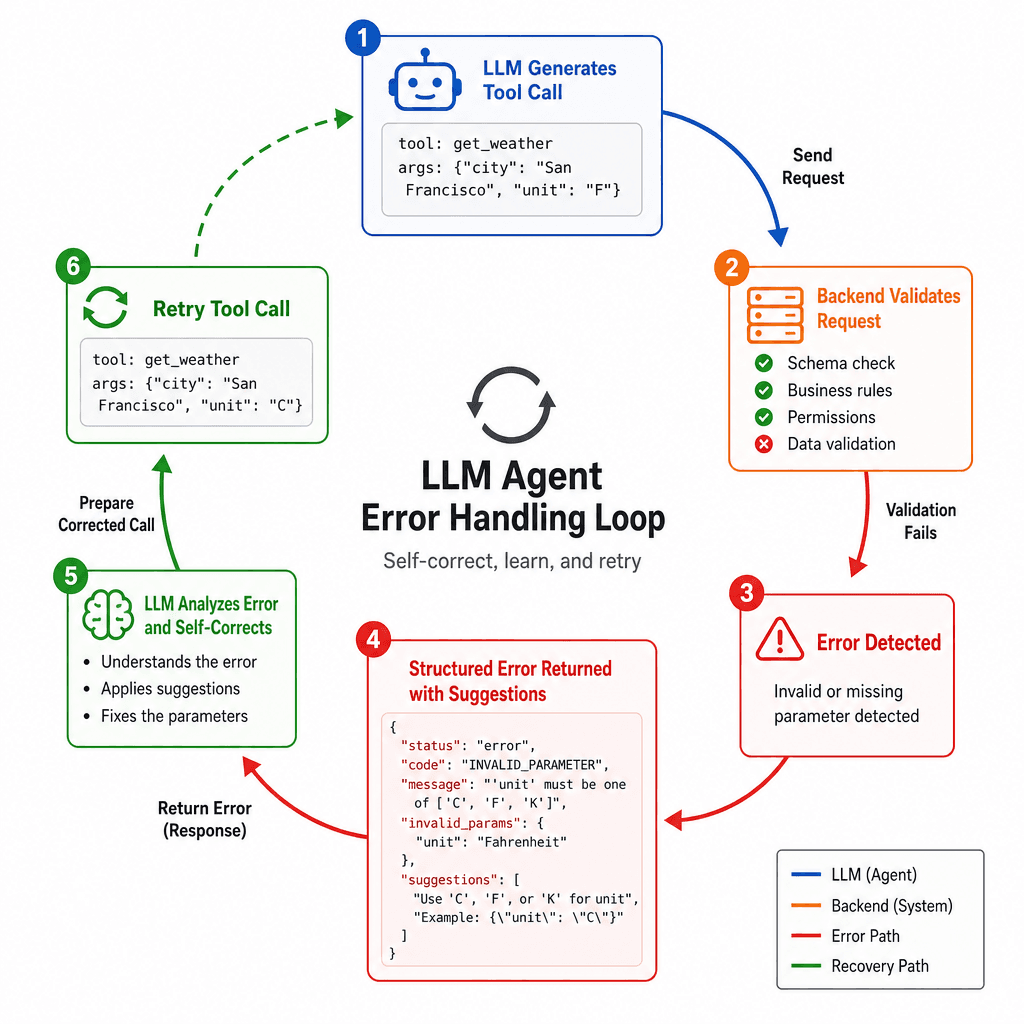
Effective error handling for agents differs from traditional API error handling because the LLM cannot read a stack trace or fix a 500 Internal Server Error by debugging code. It can only react to structured error messages.
When a tool execution fails, the error must be returned to the LLM in a format that allows it to correct its input. This turns the tool call into a multi-turn conversation.
Scenario: The LLM calls create_user with an invalid email format. Your backend rejects it.
Bad Response:
{
  "error": "Invalid email format"
}
This response is ambiguous. Did the LLM generate the wrong field? Did it use the wrong tool? Is the email field required?
Good Response:
{
  "error": {
    "type": "validation_error",
    "message": "The 'email' field must be a valid email address. Current value: 'john'.",
    "suggestion": "Please provide a complete email address including domain."
  }
}
By providing the specific field, the current value, and a suggestion, you enable the LLM to self-correct in the next iteration. The LLM will regenerate the JSON, replacing 'john' with 'john@example.com', and retry.
This mechanism relies on the LLM’s ability to follow instructions and correct mistakes. It is not guaranteed. If the LLM repeatedly fails, you must have a fallback mechanism (e.g., escalating to a human or returning a default response) to prevent infinite loops. This is known as "tool use loops" and is a common failure mode in agent architectures.
Minimal Viable Tool Surface
For agent tools, complexity is the enemy of reliability. Each additional parameter, nested object, or optional field increases the token count of the tool definition and the probability of hallucination.
Avoid deeply nested schemas. If you have a user object with address, billing, and shipping sub-objects, flatten them into top-level fields if possible, or create separate tools for each sub-domain.
Bad:
{
  "name": "update_user",
  "parameters": {
    "type": "object",
    "properties": {
      "user_id": { "type": "string" },
      "profile": {
        "type": "object",
        "properties": {
          "name": { "type": "string" },
          "address": {
            "type": "object",
            "properties": {
              "street": { "type": "string" },
              "city": { "type": "string" }
            }
          }
        }
      }
    }
  }
}
This schema is hard for the LLM to parse correctly. It may omit the address object or misplace the city field.
Better:
{
  "name": "update_user_profile",
  "parameters": {
    "type": "object",
    "properties": {
      "user_id": { "type": "string" },
      "name": { "type": "string" },
      "street": { "type": "string" },
      "city": { "type": "string" }
    }
  }
}
Flattening reduces the cognitive load on the LLM’s attention mechanism. It also simplifies validation. If you need strict nesting for business logic, consider using a dedicated DTO (Data Transfer Object) on the backend, but keep the tool schema flat for the LLM.
Conclusion
Designing tools for LLMs is not about building better APIs; it’s about building better prompts. The schema, description, and error response are all parts of the prompt that guide the LLM’s token prediction. By constraining outputs, clarifying triggers, and enabling self-correction, you can build agent systems that are reliable, efficient, and easy to debug. Remember: the LLM is not executing your code. It is guessing your intent. Make your intent impossible to miss.
Related posts
Building a Deep Research Agent: Multi-Agent Guide
A technical walkthrough for ML engineers on constructing a multi-agent research system that handles synthesis and citations.
Building an LLM Load Test That Reflects Real Traffic
A guide to building LLM load tests that reflect real traffic patterns using capacity planning, arrival rates, and saturation metrics.
OWASP Top 10 for LLM Applications, Applied
A practical examination of the OWASP Top 10 for LLM Applications, covering security checklists, mitigations, and appsec review processes for developers.
