Computer-Use Agents: Architecture and Limits
An examination of computer-use agent architecture, focusing on GUI agents, screenshot processing, accessibility trees, and browser automation limits.
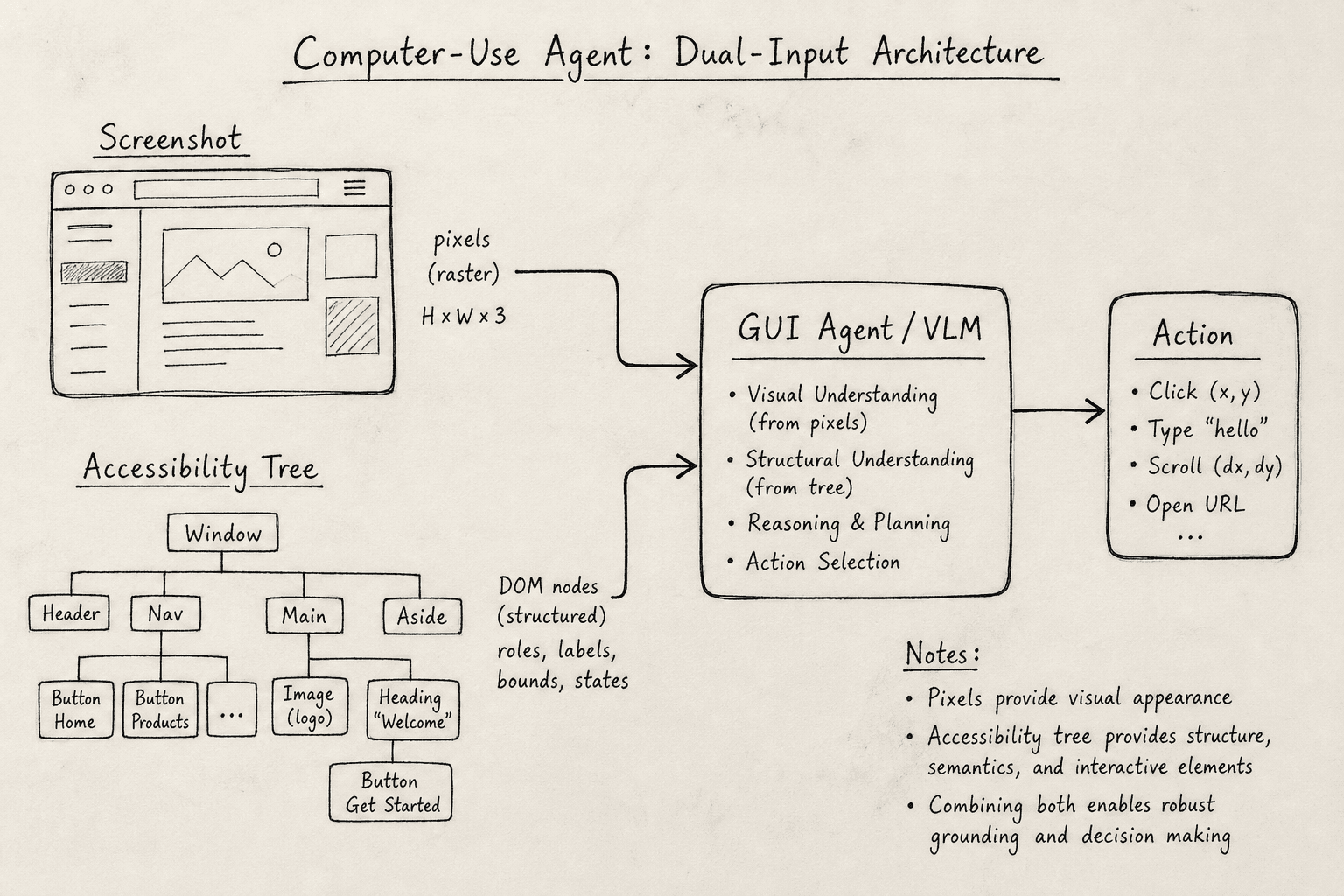
computer-use agents represent a paradigm shift from text-in/text-out interfaces to screen-in/action-out systems. For machine learning and automation engineers, the critical insight is that these agents do not "see" like humans; they process rasterized data streams and map them to structured control signals. The architecture is fundamentally a hybrid system combining computer vision for contextual understanding and accessibility APIs for precise element identification. Understanding this duality is essential for debugging why an agent might correctly identify a button’s location but fail to click it, or vice versa.
The Dual-Input Mechanism
GUI agents do not rely solely on pixels. Pure-vision approaches, where a model interprets raw screenshots to determine actions, suffer from high latency and lack of semantic grounding. A pixel at coordinate (x, y) is just color data; it does not inherently tell the model that this pixel belongs to a "Submit" button or a "Cancel" link.
Modern architectures solve this by ingesting two parallel data streams:
- Raster Input (Screenshot): A bitmap of the current screen state. This provides layout, visual hierarchy, and unstructured context (e.g., error messages, images, charts).
- Structured Input (Accessibility Tree): A hierarchical representation of the UI elements exposed by the operating system or browser. This provides semantic identity (e.g.,
role="button",label="Submit").
This dual-input approach leverages the strengths of both modalities. The accessibility tree offers deterministic, low-latency access to element properties, while the screenshot provides the visual confirmation needed to handle overlapping elements, dynamic styling, or non-standard UI components that may not be fully exposed in the DOM.
Screenshot Processing & Tokenization
The first step in processing is converting the screen state into a format the model can consume. Historically, this involved cropping regions of interest (ROIs) based on detected bounding boxes. However, with the rise of Vision-Language Models (VLMs), the trend has shifted toward processing full-screen or tiled screenshots.
Tiling Strategies
Processing a high-resolution screenshot (e.g., 1920x1080) directly can exceed the context window of many VLMs or result in lossy compression artifacts. A common technique is tiling: dividing the screenshot into smaller, overlapping patches. Overlap is critical to prevent cutting UI elements in half, ensuring that boundaries between interactive components remain intact within a single tile. Typical overlap percentages range from 10% to 20% of the tile size, balancing context retention against computational overhead.
# Conceptual tiling logic
def process_screenshot(screenshot, tile_size=512, overlap=0.1):
    tiles = []
    width, height = screenshot.size
    stride_x = int(tile_size * (1 - overlap))
    stride_y = int(tile_size * (1 - overlap))

    for y in range(0, height, stride_y):
        for x in range(0, width, stride_x):
            right = min(x + tile_size, width)
            bottom = min(y + tile_size, height)
            tile = screenshot.crop((x, y, right, bottom))
            tiles.append(tile)
    return tiles
Each tile is then encoded by a vision encoder (often a CLIP-style model) and passed to the language model. The model outputs a sequence of actions, such as CLICK(x, y) or TYPE(text). The challenge here is coordinate consistency. If the model outputs a coordinate based on a tile-local frame, the agent must map it back to the global screen coordinates before executing the action.
Latency Constraints
Screenshot processing is computationally expensive, introducing significant latency into the agent's loop. The round-trip time typically ranges from 2 to 10 seconds per step, depending on several factors. Key influencers include the model size (larger models provide better accuracy but take longer to infer), image resolution (higher resolutions require more processing power and bandwidth), and network round-trip time if the vision encoder is hosted remotely. This latency makes computer-use agents unsuitable for real-time interactions (e.g., gaming or live trading) but acceptable for batch automation (e.g., filling out forms or scraping data).
Accessibility Tree Integration
The Accessibility Tree is the backbone of reliable GUI automation. It is a structured representation of the UI, exposed via OS-level APIs (e.g., MSAA/UIA on Windows, AXAPI on macOS, AT-SPI on Linux).
Why Use It?
The accessibility tree is preferred over pure vision for specific tasks due to its inherent reliability and speed. Unlike pixel-based recognition, which requires heavy computation to interpret visual patterns, the tree provides direct, programmatic access to element properties. This structural clarity allows agents to identify elements with near-zero latency and high precision, avoiding the hallucination risks associated with interpreting raw visual data. Furthermore, it enables robust state awareness, such as detecting disabled or hidden states, which are often ambiguous in static screenshots.
- Element Identification: Instead of guessing which button is "Submit" based on pixel patterns, the agent queries the tree for
role="button"andname="Submit". - State Awareness: The tree provides real-time state information (e.g.,
checked,disabled,selected) without needing to visually inspect the element. - Action Execution: Many automation frameworks (Selenium, Puppeteer, Playwright) interact directly with the DOM or accessibility layer, bypassing the need for precise mouse movements.
Cross-Referencing
The agent’s reasoning layer cross-references the accessibility tree with the screenshot. For example:
- Query: Find all elements with
role="input"andplaceholder="Email". - Verify: Check the screenshot to ensure the input field is visible and not obscured by a modal.
- Act: If visible, send keys to the element. If not, the agent may need to scroll or close the modal first.
This mechanism reduces hallucination. A pure-vision model might misinterpret a static image of a button as clickable. An accessibility-aware agent knows the element is not interactive because the tree marks it as disabled or hidden.
Browser Automation Limits
Despite these advances, computer-use agents face hard limits imposed by the architecture of web browsers and the internet.
1. Non-Rendered Content
Agents cannot interact with content that is not rendered in the DOM or exposed via accessibility APIs. This includes:
- Canvas-based UIs: Games, complex data visualizations (D3.js, Three.js), and drawing apps render pixels directly to a
<canvas>element. There are no DOM nodes to query, so the agent must rely entirely on vision, leading to high error rates. - Shadow DOM: While modern browsers expose shadow DOM elements to accessibility APIs, some implementations obscure them, making it difficult for the agent to locate elements.
2. Authentication Walls
Agents struggle with multi-factor authentication (MFA), CAPTCHAs, and biometric prompts. These are designed specifically to block automated scripts. While some agents can solve simple CAPTCHAs using OCR, sophisticated ones (reCAPTCHA v3, hCaptcha) use behavioral analysis that agents often fail to mimic.
3. Dynamic State and Race Conditions
Web applications are often asynchronous. An agent might click a button, but the resulting page load or API call might take several seconds. If the agent proceeds too quickly, it may act on stale data. Conversely, if it waits too long, it may timeout. Managing this "state synchronization" requires complex heuristics or explicit waits, which are fragile across different network conditions.
4. Rate Limiting and Detection
Browser automation tools (Puppeteer, Selenium) are detectable. Websites can identify automation through:
- WebDriver Flags: The
navigator.webdriverproperty. - Behavioral Analysis: Unnatural mouse movements (instant jumps vs. human-like curves).
- Fingerprinting: Unique browser configurations.
Agents that trigger these detections are blocked, rendering the architecture useless for that target.
Conclusion
Computer-use agents are effective tools for automating repetitive, structured tasks. Their architecture relies on a symbiotic relationship between visual perception (screenshots) and semantic structure (accessibility trees). However, they are not universal solvers. They fail when the UI lacks semantic structure (canvas), when security measures are active (MFA/CAPTCHA), or when the network state is unpredictable. For ML engineers, the key is to design systems that leverage the accessibility tree for precision and the screenshot for context, while explicitly handling the limitations of browser automation.
Related posts
Durable Execution for Agents with Temporal
Explore how Temporal enables durable execution for AI agents, ensuring resilience through checkpointing and replay mechanisms.
Building a Deep Research Agent: Multi-Agent Guide
A technical walkthrough for ML engineers on constructing a multi-agent research system that handles synthesis and citations.
Why Your Agent Loops Forever (and Five Fixes)
Understand why AI agents enter infinite loops and learn five practical fixes for tool failures and debugging.
