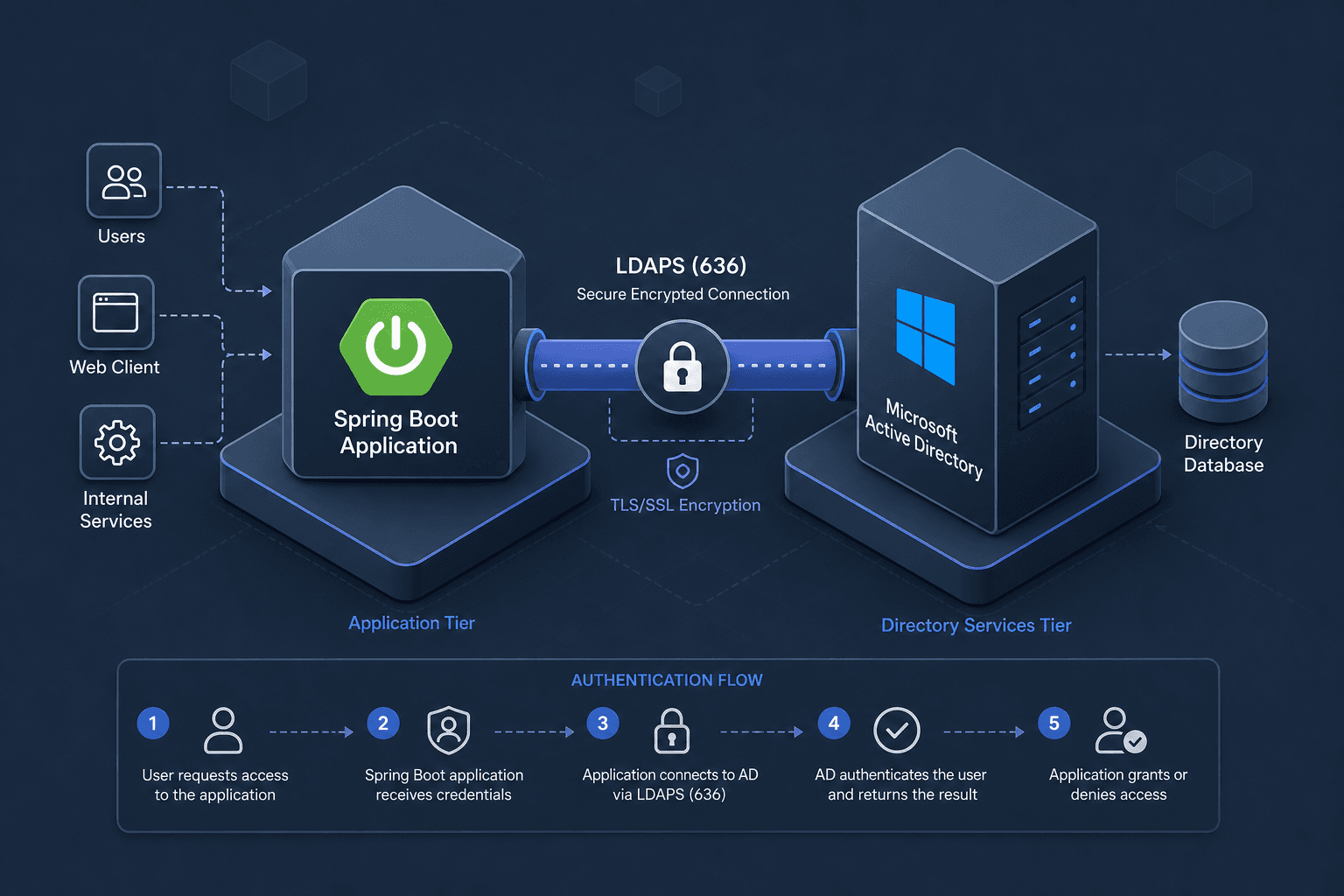
ActiveDirectoryLdapAuthenticationProvider in Spring Boot
A technical guide on configuring ActiveDirectoryLdapAuthenticationProvider in Spring Boot for LDAP authentication, UPN support, and group mapping.
Spring Security’s ActiveDirectoryLdapAuthenticationProvider is a domain-specific adapter designed to handle the idiosyncrasies of Microsoft Active Directory (AD). While a standard LdapAuthenticationProvider treats LDAP as a flat directory, AD requires specific handling for Distinguished Names (DN), User Principal Names (UPN), and group membership. This guide explains the mechanism behind ActiveDirectoryLdapAuthenticationProvider, how to configure it for secure LDAPS connections, and how to handle UPN formats and group mapping effectively.
The Mechanism: How AD Bind Differs from Generic LDAP
When a user attempts to authenticate, Spring Security must verify their identity against the directory. In generic LDAP, this often involves searching for the user’s DN first, then performing a bind. Active Directory simplifies this by supporting two primary bind strategies:
- DN Bind: The client provides the full DN (e.g.,
CN=John Doe,OU=Users,DC=example,DC=com) and password. - UPN/Principal Bind: The client provides a UPN (e.g.,
john.doe@example.com) or sAMAccountName, and the server resolves it internally.
ActiveDirectoryLdapAuthenticationProvider automates the UPN/Principal bind strategy. It takes the username provided by the user, appends the configured domain suffix if necessary, and attempts a simple bind against the LDAP URL. If the bind succeeds, the provider then queries for the user’s group memberships to assign roles.
This mechanism is distinct because it assumes the LDAP URL points directly to the domain controller’s LDAP service, not a generic directory server. It also assumes that the domain name provided matches the AD domain’s DNS suffix.

Configuration: Secure LDAPS and Domain Binding
The most critical aspect of configuring this provider is ensuring secure communication. While Active Directory supports plaintext LDAP by default, modern security policies and Group Policies often disable or block it in favor of encrypted channels. You should configure LDAPS (port 636) to ensure credentials are transmitted securely.
The provider’s constructor requires two primary arguments: the AD domain name and the LDAP URL. The domain name is used to append the suffix to usernames that are provided in short form (e.g., johndoe becomes johndoe@example.com). The URL must be an LDAPS URL.
import org.springframework.beans.factory.annotation.Autowired;
import org.springframework.context.annotation.Bean;
import org.springframework.context.annotation.Configuration;
import org.springframework.ldap.core.support.LdapContextSource;
import org.springframework.security.authentication.AuthenticationManager;
import org.springframework.security.config.annotation.authentication.builders.AuthenticationManagerBuilder;
import org.springframework.security.config.annotation.authentication.configuration.AuthenticationConfiguration;
import org.springframework.security.config.annotation.web.builders.HttpSecurity;
import org.springframework.security.config.annotation.web.configuration.EnableWebSecurity;
import org.springframework.security.ldap.authentication.ad.ActiveDirectoryLdapAuthenticationProvider;

@Configuration
@EnableWebSecurity
public class SecurityConfig {

    private static final String LDAP_URL = "ldaps://ad.example.com:636";
    private static final String DOMAIN = "example.com";

    @Bean
    public LdapContextSource ldapContextSource() {
        LdapContextSource contextSource = new LdapContextSource();
        contextSource.setUrl(LDAP_URL);
        // Truststore configuration is required for self-signed certs,
        // e.g. via the javax.net.ssl.trustStore system property or a custom SSLSocketFactory.
        contextSource.setBase("DC=example,DC=com");
        return contextSource;
    }

    @Bean
    public ActiveDirectoryLdapAuthenticationProvider activeDirectoryLdapAuthenticationProvider() {
        // Using the two-argument constructor omits a preliminary search base for user lookup,
        // relying instead on the UPN bind mechanism.
        ActiveDirectoryLdapAuthenticationProvider provider = new ActiveDirectoryLdapAuthenticationProvider(DOMAIN, LDAP_URL);

        return provider;
    }

    @Bean
    public AuthenticationManager authenticationManager(AuthenticationConfiguration authConfig) throws Exception {
        return authConfig.getAuthenticationManager();
    }

    @Autowired
    public void configure(AuthenticationManagerBuilder auth, ActiveDirectoryLdapAuthenticationProvider provider) throws Exception {
        auth.authenticationProvider(provider);
    }

    // ... HttpSecurity configuration
}
Key Configuration Details
- URL Scheme: The URL must start with
ldaps://. If you useldap://, the connection will likely fail or fall back to plain text, which AD may reject depending on policy. - Domain Parameter: The
DOMAINargument is used to format usernames. If a user logs in asjohndoe, the provider attempts to bind asjohndoe@example.com. If the user logs in asjohndoe@example.com, it uses that directly. - Search Base: Using the two-argument constructor (domain and URL only) means no root DN is supplied for a preliminary search to find the user’s DN. Instead, the provider relies on the AD server’s ability to resolve the UPN during the bind. This is the standard and recommended approach for UPN-based authentication.
UPN Support and Group Mapping
Active Directory users often log in with their UPN (e.g., user@company.com). ActiveDirectoryLdapAuthenticationProvider handles this natively. However, group mapping is where many developers encounter issues in spring boot ldap configuration.
How Group Mapping Works
By default, ActiveDirectoryLdapAuthenticationProvider automatically extracts group memberships from the user's memberOf attribute, exposing each group's Common Name (CN) as a granted authority — without a ROLE_ prefix or any case conversion. To customize this behavior, you provide a GrantedAuthoritiesMapper via setAuthoritiesMapper().
The provider uses the memberOf attribute to determine group membership by default. The memberOf attribute is easier to query but may not include nested groups. The tokenGroups attribute includes all nested groups but requires a different query mechanism and is not queried by the provider out of the box.
Implementing Group Mapping
To customize how AD groups are mapped to Spring Security roles, you inject a custom GrantedAuthoritiesMapper. This mapper transforms the authorities the provider has already extracted from the memberOf attribute, and runs before the authentication object is created.
import org.springframework.security.core.GrantedAuthority;
import org.springframework.security.core.authority.SimpleGrantedAuthority;
import org.springframework.security.core.authority.mapping.GrantedAuthoritiesMapper;
import org.springframework.stereotype.Component;

import java.util.ArrayList;
import java.util.Collection;
import java.util.List;

@Component
public class AdGroupMapper implements GrantedAuthoritiesMapper {

    @Override
    public Collection<? extends GrantedAuthority> mapAuthorities(Collection<? extends GrantedAuthority> authorities) {
        List<GrantedAuthority> mapped = new ArrayList<>();

        // The provider has already extracted each group's CN (e.g., "Admins")
        // from the memberOf attribute; here we add a ROLE_ prefix and uppercase it.
        for (GrantedAuthority authority : authorities) {
            mapped.add(new SimpleGrantedAuthority("ROLE_" + authority.getAuthority().toUpperCase()));
        }

        return mapped;
    }
}
Then, inject this mapper into the provider:
@Bean
public ActiveDirectoryLdapAuthenticationProvider activeDirectoryLdapAuthenticationProvider(AdGroupMapper groupMapper) {
    ActiveDirectoryLdapAuthenticationProvider provider = new ActiveDirectoryLdapAuthenticationProvider(DOMAIN, LDAP_URL);
    provider.setAuthoritiesMapper(groupMapper);
    return provider;
}
Limitations and Caveats
- Nested Groups: The
memberOfattribute only lists direct group memberships. If you need nested group resolution, you must use thetokenGroupsattribute, which requires a different query approach (often involving a SID-to-name lookup). This is more complex and may require additional permissions in AD. - Performance: Querying group memberships for every authentication can be slow if the user is a member of many groups. Consider caching group memberships if performance becomes an issue.
- Security: Always use LDAPS. Plaintext LDAP exposes credentials in transit. Ensure your LDAP server’s certificate is trusted by the JVM running your Spring Boot application.
Common Pitfalls
- Truststore Configuration: When using LDAPS with self-signed certificates, the JVM will reject the connection by default. You must configure the
LdapContextSourceto trust the specific certificate or CA, typically viasetTrustedManagersor by importing the cert into the JVM's truststore. - Nested vs. Direct Membership: Relying solely on the
memberOfattribute will miss users who are members of nested groups. If your security model relies on nested group inheritance, you must implement a solution usingtokenGroupsor a custom recursive lookup, which adds complexity. - Performance Implications: Group lookups add latency to the authentication process. For high-traffic applications, fetching group attributes for every login can become a bottleneck. Implementing a cache for group memberships or using a less frequent refresh strategy is recommended.
Practical Takeaways
- Always Use LDAPS: Never rely on plaintext LDAP in production. Configure your Spring Boot application and Active Directory to enforce LDAPS to protect credentials in transit.
- Use UPN Binds for User-Friendly Logins: Leverage the provider's native UPN support to allow users to log in with their email-style usernames (
user@domain.com) rather than complex DNs or sAMAccountNames. - Cache Group Memberships: To maintain high performance, avoid querying Active Directory for group memberships on every single authentication request. Implement caching strategies to store role mappings for a reasonable duration.
Conclusion
ActiveDirectoryLdapAuthenticationProvider simplifies AD authentication by handling UPN resolution and bind operations automatically. However, it requires careful configuration of the LDAPS URL and a custom GrantedAuthoritiesPopulator for group mapping. By understanding the underlying mechanism—UPN bind followed by attribute-based group extraction—you can build a secure and efficient authentication flow for Active Directory-integrated Spring Boot applications.
Related posts
Spring Security SAML: A Working Integration
A practical guide to integrating Spring Security SAML with Spring Boot, covering SAML2 relying party configuration, service provider setup, and metadata handling.
Spring Boot Keycloak: The Current Way
A guide to securing Spring Boot applications with Keycloak using the current OAuth2 Resource Server and JWT Decoder standards, replacing deprecated adapters.
Spring Security SSO With Group and Role Mapping
Implement Spring Security SSO with group and role mapping using GrantedAuthoritiesMapper and OIDC claims for secure access control.
